How do you buy a used robot vacuum with a working complete kit?
Quick answer
Match the exact robot, dock and power parts, then observe an ordinary clean-and-return task. Check each paid-for dock or mop function separately. Agree on seller-led data removal and new-owner setup before payment, and budget for compatible consumables. One successful route does not establish whole-home coverage or remaining battery life.
Decide which job the robot must do
Begin with your floors, not the flagship model in the listing. Note hard floors, rugs, ordinary transitions, low furniture, pets and the place a dock could remain. Decide whether you need basic vacuuming, room selection, mopping, automatic emptying or water handling. Each extra function brings another component and another demonstration requirement.
Measure the space under the furniture that matters. Record the dock’s available floor area and access for opening bags or tanks. A tall service station may fit against a wall but be inconvenient under a shelf. Use the exact manual’s clearance requirements; do not copy a universal docking distance from another model.
A robot that suits the seller’s uncluttered demonstration room may still struggle with your chosen task. Buying suitability means comparing the documented capabilities with your home, then treating the viewing as a bounded check of that particular used machine.
Identify the complete robot-and-dock combination
Request separate photographs of the robot label, dock label, mains cord or adapter, underside, dustbin and included mop equipment. A “plus” bundle name in the listing is not proof that the original dock remains included. Replacement docks can look similar across generations while supporting different functions.
iRobot’s compatibility reference distinguishes robot families, docks, network bands and accessories. Use an equivalent exact-model reference for another manufacturer. Verify the pairing before making a trip; physical contact with a dock is not sufficient proof of supported charging, emptying or water service.
| Function | Parts to identify | Evidence to request |
|---|---|---|
| Vacuuming | Robot, bin, filter, brushes and rollers | Ordinary pickup on a suitable surface |
| Charging | Correct dock/adapter and undamaged contacts | Charging indication after return |
| Automatic emptying | Supported robot/bin and emptying dock with bag | Normal emptying cycle, where applicable |
| Mopping | Correct tank, plate, pad and approved supplies | Intended floor mode, with carpet limitations understood |
| Water or pad servicing | Exact supported dock, tanks and removable parts | Each promised service function demonstrated |
| App controls | Supported app, phone/network requirements and ownership state | Seller can remove association; buyer setup path established |
Do not assign full retail accessory value to a bag of unidentified parts. Mark each item as matched, unnecessary or unresolved. Consumables left loose in a box may be wrong for the robot or already used.
Inspect the parts that carry dirt and water
With the robot stopped and handled according to its manual, look at the underside, wheel areas, rollers, side brush, accessible sensors, bin, seals and charging contacts. Ask the seller to show normal user-removable parts. Do not open battery enclosures or pry into a sealed sensor assembly.
Check for cracked housings, missing brush guards, wrapped hair, damaged roller ends, rust-like residue, persistent odour and evidence of liquid where it does not belong. A dirty filter is a specific consumable; a machine contaminated by something you cannot identify may not be a sensible cleaning project.
For a wet-cleaning bundle, inspect both clean- and dirty-water tanks, lids, seals, pad holders and accessible trays. Ask what liquid has been used and how the equipment was dried between uses. Match any cleaning product to the manufacturer’s permission. A machine being capable of mopping does not make every liquid or floor finish appropriate.
Ask directly about repairs, battery replacements, water incidents and persistent errors. Save a service record if available. An aftermarket battery claim is not automatically a benefit: identify the approved replacement and who installed it before attributing value.
Observe a simple route and a return to the dock
 Enlarge diagram
Agree on a short ordinary cleaning task in a suitable room. Use everyday conditions and manufacturer-approved operation. Do not stage a cliff test at stairs, scatter hazardous debris or deliberately trap the robot. Keep pets, loose cables and fragile objects out of the demonstration path.
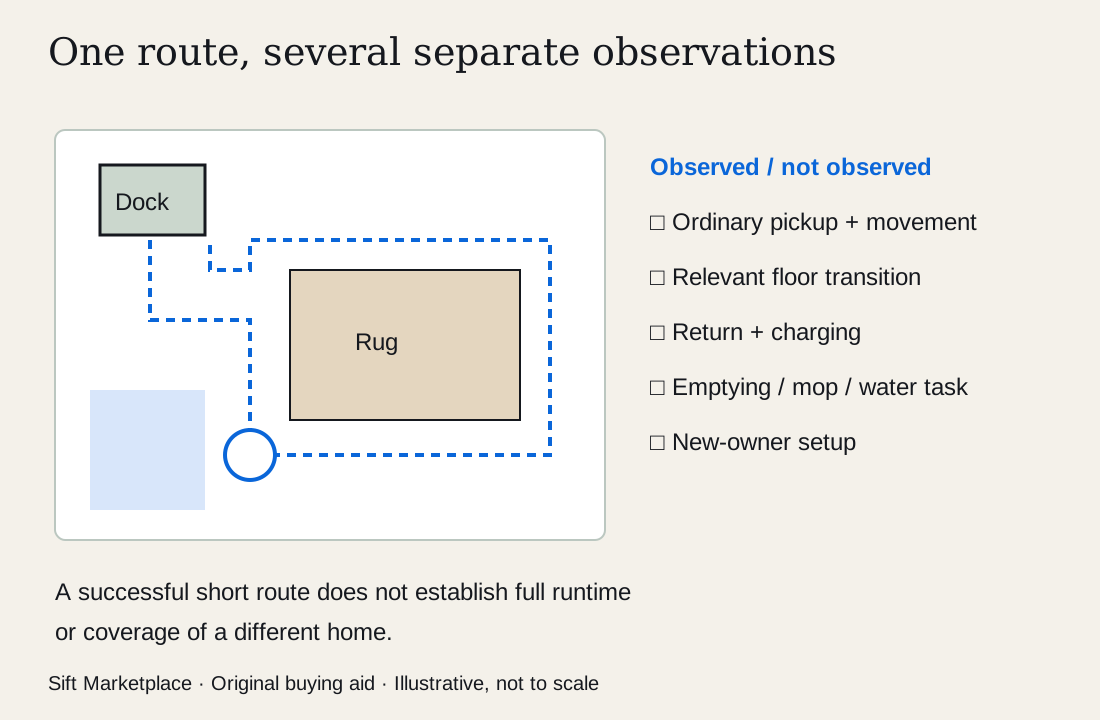
Observe the start, movement around ordinary obstacles, pickup, a relevant normal transition and return to its correctly placed dock. After return, verify the intended charging indication. If automatic emptying or mopping is part of the price, observe those functions separately where the manual and setting allow.
Write down where it failed as well as where it succeeded. “Returned from one room and charged” is useful evidence. “Maps perfectly” is an unsupported conclusion from that observation. An awkward route may involve the environment or setup, but it still needs resolution if the task matters to you. Ask the seller to correct only ordinary setup issues described in the manual and repeat the relevant task; persistent problems remain open.
A short run cannot establish full runtime or battery capacity. Ask for recent ordinary-use history, such as the area it normally completes and whether behavior has changed. Treat that as seller-reported information, separate from what you saw. If replacing the battery is part of your budget, obtain exact compatibility and service information first.
Keep private maps private and arrange ownership transfer
The demonstration can use the seller’s existing setup without giving you access to their home map, account password or network details. You need to see the relevant function, not browse private data. Arrange the reset and removal sequence before the meeting so neither person discovers a required account step at the point of payment.
iRobot describes app-based factory reset as removing the robot from the app and disassociating saved cloud data. Follow the current procedure for the exact brand and model. A physical button reset and account removal are not universally equivalent. Let the seller perform their account actions.
Check that your phone, region, app and network can support the model. iRobot’s update guidance also makes clear that connectivity and docking matter for updates. Do not promise immediate setup at a meeting with no suitable network. If new-owner setup cannot be completed there, make the unresolved step and your decision about it explicit before payment.
Value the hardware and features you can use under your own account. Do not pay for the seller’s subscription, saved map or promised future software support unless the manufacturer specifically establishes what transfers. Check current support before buying an older connected product.
Be exact about rugs and mop behavior
Different robots manage carpets differently. For example, iRobot’s Combo Essential guidance tells users to remove or avoid rugs when mopping with the relevant pad and water setup. That limitation should not be applied to every robot, but it demonstrates why “vacuum and mop” is not a complete compatibility answer.
For your candidate, record whether the intended mopping mode can be used around your rugs, what must be removed and what setup is required. Decide whether that routine is realistic. A feature you will rarely use should not justify paying for an expensive, unverified water-service dock.
Price the useful bundle
Consider a hypothetical comparison. A complete basic bundle is $160, with $30 in confirmed filters/brushes and $10 collection: $200. A robot-only listing is $90, but the verified compatible charging dock costs $85, the same consumables $30 and collection $15: $220. These are invented figures, not current prices.
The robot-only offer is not cheaper after completion. A third listing with an elaborate dock may still be worth less to you if its mop function is untested or irrelevant. Use the listing comparison tool to keep asking price, known completion costs and unresolved functions together; the arithmetic does not diagnose faults.
| Finding | Purchase response |
|---|---|
| Correct kit; ordinary tasks and ownership handover succeed | Consider buying if home fit and total cost work |
| Replaceable worn roller with a confirmed part | Negotiate using the actual replacement cost |
| Wrong dock or unavailable proprietary part | Compare a complete compatible bundle instead |
| Persistent navigation/error behavior after suitable normal setup | Seek manufacturer assessment or pass |
| Seller cannot remove an account association | Pause before payment; resolve ownership through the maker |
| Only a short battery run was observed | Keep runtime uncertainty in your decision |
A useful seller message asks for the two model labels, included modules, recent errors or repairs, a clean-and-return demonstration, and agreement to remove personal data. The broader used-appliance guide covers household purchase planning; this robot-specific decision rests on the whole kit and the new owner’s usable functions.