Build a compatible secondhand photography kit
Quick answer
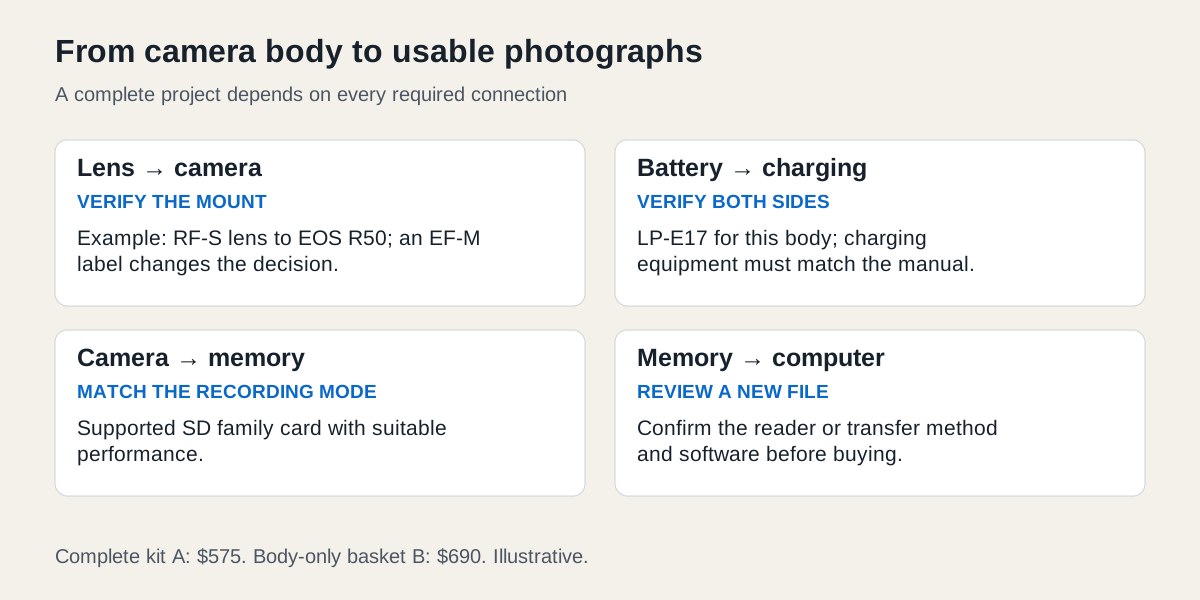
Choose the photographs first, then verify every connection from lens to camera to battery, card and computer. Compare the full ready-to-use basket before deciding whether a body-only offer is cheaper.
 Enlarge diagram
Define the photographs before choosing the body
Start with an activity you can describe: daylight family outings, still photographs of small objects or a beginner class with specified equipment. List what you already have and the photographs your present equipment cannot make. A body-only price is not the price of a usable camera system.
This worked example is a hypothetical daylight still-photography kit. The buyer wants one small zoom, a way to charge the battery, a memory card and a way to transfer and review files on an existing computer. The first purchase does not need an external flash, a telephoto lens, a microphone or a video rig. Those additions wait for an identified need.
Draw every connection in the kit
For a concrete compatibility example, consider a Canon EOS R50 with an RF-S 18–45mm lens. Canon’s R50 specifications list the RF mount, RF/RF-S lenses, LP-E17 battery and SD/SDHC/SDXC cards with UHS-I support. EF/EF-S lenses require the specified EF-EOS R mount adapter; EF-M lenses are excluded from that stated compatibility. Similar names and a seller’s “fits Canon” description are insufficient.
The manufacturer’s compatibility statement is a first check, not proof that a particular used body, lens or accessory works. Confirm the exact markings and use the body inspection guide and lens guide for condition checks.
| Connection | Evidence to collect | What an unresolved answer means |
|---|---|---|
| Body to lens | Exact body and lens names; correct mount or explicitly supported adapter | Do not buy an adapter on a guess |
| Battery to body | Battery identifier and condition; successful operation | A charged screen at collection does not establish endurance |
| Battery to charging method | Exact charger or supported charging arrangement in the camera manual | Budget a verified replacement before calling the kit complete |
| Camera to card | Card type and performance appropriate to the intended recording mode | A card that fits physically may not meet a demanding video mode |
| Card to computer | Compatible reader or supported transfer method, plus successful file opening | Include a reader if the computer cannot use the card directly |
| Carrying and protection | Strap, caps and suitable bag already owned or included | Count replacements that are necessary for your use |
Check the actual R50 manual for preparation and charging. A USB-shaped socket does not promise that every phone charger will charge every camera. The example uses a seller-supplied charging setup verified against the manual; no generic charger compatibility is assumed.
Compare complete baskets
These figures are fictional arithmetic inputs, not quotations or recommended market values. Both candidates are assumed to pass the same condition checks and satisfy the same photography brief.
| Cost | Complete kit A | Body-only offer B |
|---|---|---|
| Advertised body or bundle | 520 | 390 |
| Suitable lens | Included | 130 |
| Verified battery | Included | 55 |
| Verified charger | Included | 45 |
| Suitable card | 20 | 20 |
| Reader for the buyer’s computer | 15 | 15 |
| Collection travel | 20 | 35 |
| Total to start | 575 | 690 |
B’s attractive $390 headline becomes $690 before any optional upgrade. The $115 difference is useful only after establishing that A’s included battery, charger and lens are the correct working pieces. If A’s battery needs a $55 replacement, its total becomes $630. If the lens is unsuitable, remove its assumed usefulness and calculate a replacement; do not preserve the bargain by treating an unwanted lens as essential.
Enter the candidates in listing comparison, using the repairs/missing-parts field for the required additions and notes for exact model, condition and included pieces. Keep a separate itemised kit list so two accessories are not accidentally counted twice. If several desirable items are genuinely included, the bundle calculator can compare their separate-purchase value. Assign zero resale proceeds to unwanted extras in the conservative version.
Buy in an order that leaves a usable system
First confirm the mount, budget and intended output. Then find a body-and-lens combination that can be demonstrated together. A complete kit from one seller may simplify testing; it still needs the same identity and condition checks. Buying a body on Monday and hoping to find a compatible bargain lens later leaves both cost and timing open.
Before collection, ask for the exact inventory: “Does the price include the marked lens, one LP-E17 battery, the identified charging equipment, caps and strap? Can we demonstrate capture to a suitable card and review a new image?” Agree on testing without asking for the seller’s personal photographs or account credentials.
At the meeting, distinguish a successful camera demonstration from your own file workflow. With permission, use an appropriate card and make ordinary test photographs. Review the new files through the agreed transfer method. A working rear screen does not tell you whether your existing computer software opens the file format you intend to use. Choose a supported format or resolve the software requirement before spending the whole budget.
If the seller offers a different lens at handover, pause the comparison. Photograph or note the new model with permission, check compatibility and recalculate. Do not let a promised “upgrade” substitute for your agreed requirement.
Make the first outing the upgrade test
Keep the first kit small enough to carry. Use it on the activity in the brief, then record the actual limitation: not enough reach, unsuitable low-light performance, inconvenient file transfer or missing support for a particular shot. That observation is a better reason to add equipment than a bundle of unfamiliar accessories.
If the system cannot be fully demonstrated, consider an appropriate independent inspection or a seller with clear return terms. Buying several untested parts at once makes it harder to identify which one caused a failure. A complete modest system with an understood limitation is easier to evaluate than a cheaper pile whose essential connections remain unresolved.