Kijiji search not working: a buyer’s checklist
Quick answer
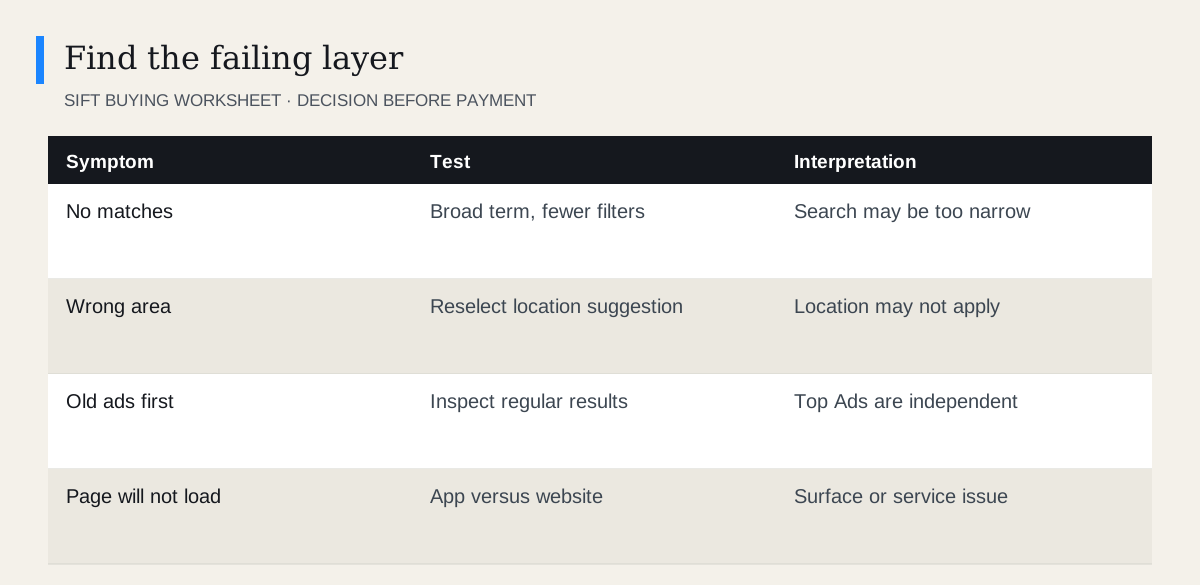
First determine whether Kijiji returns no matches, ignores a filter or fails to load. Try a broad ordinary search, confirm the selected location and category, and remove constraints one at a time. Compare the website and app using the same search. Top Ads are outside regular sorting. Report a reproducible platform problem rather than repeatedly changing unrelated settings.
 Enlarge diagram
What exactly is failing?
Write down the query, selected location, category and symptom. “No results” is different from a page that never finishes loading. “Wrong sort” is different from a promoted section remaining above regular results.
Start with a broad item type in a practical area. If that works, the service is at least returning results, and your next task is to find the constraint that excludes useful ads.
Do not clear every setting at once. A sequence of small tests gives you an explanation you can use next time.
How do you check a search that returns nothing?
- Remove detailed wording. Try the product type without colour, condition or model suffix.
- Check the category. Try the relevant parent category if sellers may classify inconsistently.
- Review the location. Confirm the intended place and a sensible radius.
- Relax price and attribute limits. Remove the most restrictive one first.
- Try a synonym. Use everyday wording and a separate language variant where useful.
Kijiji’s search documentation explains category-dependent filters and selecting a suggested location. A place typed into a field is not always an applied selection.
Use the bilingual search guide when sellers may describe the same item in English or French.
What if location seems wrong?
Reselect the intended location, apply it and inspect the search summary. Distinguish a radial search from a broader region selection. Then open a few ads to inspect the location information rather than judging from one card.
A radius is not a driving-time boundary. Water, bridges and road networks can make a geographically close item impractical. Use travel planning before committing to a pickup.
If the location control itself will not save, compare the app and website. Record what each shows so a support report can describe the difference.
What if sorting appears broken?
Look past Top Ads and check the regular results. Kijiji’s Top Ad description explains that promoted placement is separate.
Also check whether the items being compared are equivalent. Price sorting can place accessories and complete products together; that is a relevance problem, not necessarily a sorting failure.
| Observation | Check before reporting |
|---|---|
| Old promoted ad first | Regular result order |
| Very cheap accessory first | Product wording and category |
| Distant item | Applied location and actual ad location |
| Missing known item | Active status and selected constraints |
| Results differ between devices | Same query, account and filters |
What if the page will not load?
Check whether other websites work, then refresh Kijiji and try the other supported surface. Update the app through the official store if appropriate.
In a browser, temporarily testing without optional extensions can help isolate a display issue. Keep the test narrow and restore your usual setup afterwards. A cleaner browser session cannot repair a Kijiji account restriction.
Avoid installing unfamiliar “repair” software or following support links from unsolicited messages. Use Kijiji’s genuine support route.
What should a support report include?
Include the query, category, approximate location, device or browser, time, exact error and the smallest sequence that reproduces it. Note whether the same search works on another supported surface with the same account. “Changing the radius leaves the displayed location unchanged” gives support more to investigate than “search is broken.” A cropped screenshot may help, but remove irrelevant private messages and account details. Do not include passwords or payment information.
You can adapt this short report:
Search: [words]. Category: [selected category]. Location: [city or approximate area]. Device: [app/browser and version]. At [time and time zone], I selected [setting] and expected [result], but saw [exact message or behaviour]. It happens after these steps: [brief sequence]. The same search [works/does not work/not tested] on [other surface].
If the problem is only messaging, follow the message troubleshooting guide. If one saved ad is gone, use listing unavailable.
While waiting, keep a record of the working search variants and your current favourites. Once the platform works, rebuild only the filters that improve relevance. That prevents a technical reset from turning into another evening of browsing unsuitable ads.
On a computer, switch on Kijiji in Sift and it hides Top Ads, reposts and the words you block on every search. Press Watch and Sift lets you know when a new listing passes your filters, on your desktop or, with Sift Pro, on your phone.
Questions people ask
Why are my Kijiji results empty?
The query, location or category filters may be too narrow. Try a broad term and remove one constraint at a time before assuming an outage.
Why are older ads above recent ones?
Check whether they are Top Ads, which Kijiji says rotate separately from normal sorting.
Can Sift repair Kijiji search or login failures?
Kijiji runs its own search and accounts. Once Kijiji loads, switch on Kijiji in Sift and it keeps the search focused: Top Ads and the words you block go, and every listing shows its price history.
Sources
- 01Kijiji Radial Search: How Search Works on Kijiji
- 02Kijiji Promoting listings through Top Ads
- 03Kijiji Sending and receiving messages