Use Kijiji search filters without losing useful candidates
Quick answer
Set the essential requirement first, then change one query or filter at a time. Keep exact compatibility or collection limits fixed until evidence supports changing them, and verify details that native controls cannot establish.
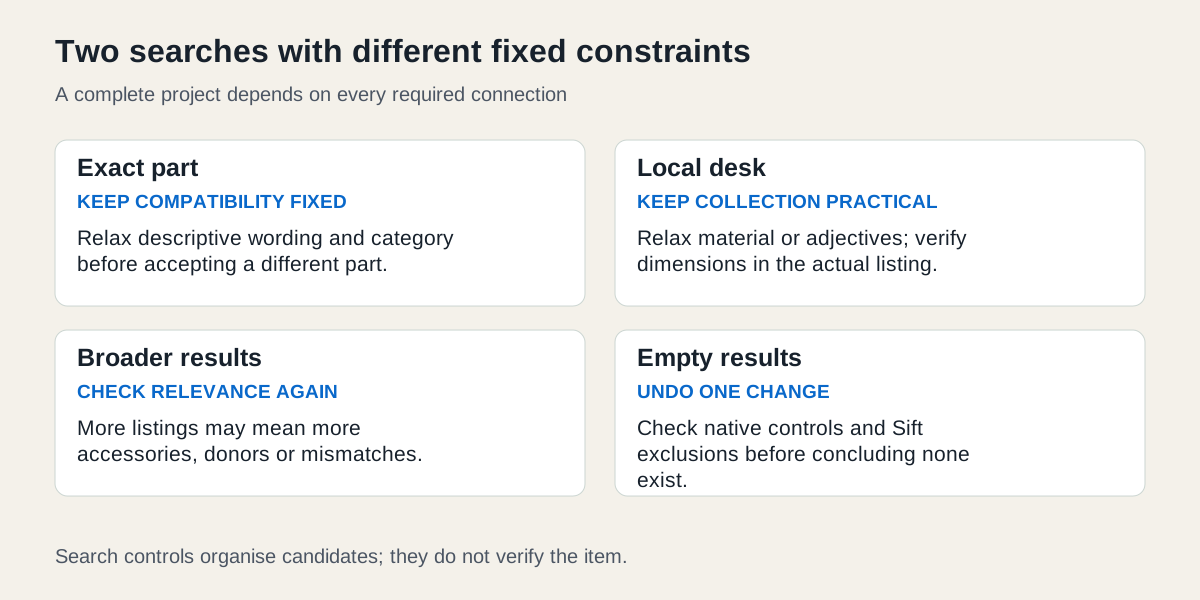 Enlarge diagram
Start with the constraint you cannot change
Write down the actual requirement before selecting filters. An exact replacement part must match the verified identifier. A large desk may have a firm collection area because transport beyond it is impractical. Other preferences, like colour, wording or seller category, may be negotiable.
Kijiji’s official search guidance describes location, distance, sorting and filters. On the web, select a suggested location before applying the distance control. A region-wide search and a distance-based search are different choices. Neither is a driving-time guarantee; confirm the actual collection area and route with the seller.
Search one: an exact replacement model
A hypothetical buyer needs a verified component code, written here as PART-42 to avoid inventing a manufacturer compatibility claim. The essential constraint is the confirmed part; colour of packaging and the seller’s descriptive wording are not essential.
| Step | Search change | What remains fixed |
|---|---|---|
| Start | Search the exact code in the relevant category and practical area | Verified compatibility |
| Too few candidates | Remove descriptive words such as “excellent” or “boxed” | The code and required usable condition |
| Still sparse | Check a broader relevant category for misclassified ads | Confirm the actual part before accepting a candidate |
| More travel is feasible | Deliberately expand the search area and recost collection | Full-cost ceiling and verified compatibility |
| Code absent from results | Try the ordinary component name, then ask for identifiers | No purchase based on appearance alone |
The stopping point is an unverified match, not merely an empty search. A broad query may uncover a seller who omitted the code, but the item must still pass the parts-matching process. Do not relax the technical requirement to make the result count look healthier.
Search two: furniture inside a firm collection area
A second fictional buyer wants a desk that fits their measured space and can be collected within an agreed transport budget. They begin with small oak desk, a relevant furniture subcategory and a practical location/distance setting. The complete-purchase cash limit is $160, with $40 reserved for collection, leaving an illustrative $120 item allowance.
If results are sparse, remove oak first when material is only a preference. Next try desk without small, because sellers may provide dimensions in the description instead. Keep the collection constraint until a real alternative transport quote justifies changing it. Ask for dimensions; the word “small” is not a measurement.
Select the relevant subcategory and inspect the filters actually displayed. Kijiji changes available attributes with category; a vehicle make/model or mileage filter should not be expected on furniture results. Do not assume there is a native width filter just because width is essential to your purchase. When a required property has no suitable control, verify it in the listing and conversation.
A $110 desk with $70 collection exceeds this buyer’s $160 limit even if it appears within the native price filter. A $125 nearby desk with confirmed $20 collection totals $145 and may warrant consideration if the buyer deliberately adjusts the item-price limit. Keep the total budget fixed while revising the search control.
Which sort order helps the next decision?
Use relevance while learning useful wording, recent order while checking new candidates and price order when the items are sufficiently comparable. Low price can place an accessory or incomplete product before a complete item; it is not a quality ranking. Kijiji states that Top Ads rotate separately from ordinary sorting, so do not use one promoted placement as proof that price order has failed.
Review the Top Ads guide for that distinction. Save useful candidates in Favourites, then compare exact contents and collection cost rather than relying on their position in the results.
What if the result set becomes empty?
Undo the last change and test one adjustment at a time. Confirm the selected location, category and price range; shorten the query or try the other language where relevant. Kijiji’s discovery troubleshooting guidance identifies unnecessary filters and mismatched search criteria as possible causes. It does not guarantee that a particular item is available.
If broad ordinary searches fail or controls do not apply, use search troubleshooting. If a broader query restores only irrelevant items, it has increased the set without solving the buying task. Return to the requirement and identify which missing evidence a seller could supply.
Add Sift after the native search makes sense
Switch on Kijiji in Sift first. On supported Kijiji pages on a computer, Sift can reduce Top Ads, repeated seen listings and unwanted wording. Review hidden items and their reasons when a search suddenly becomes too quiet. A ready-to-use search excluding “parts” should not be reused unchanged for a repair donor.
For bilingual searches, keep separate useful variants with the French and English guide. Filtering gives you a manageable candidate set; exact-model checks, dimensions, condition and total-cost comparison decide which candidate meets the brief. Once a search works, press Watch in Sift and it tells you when a new listing passes your filters, on your computer or, with Sift Pro, on your phone.
Sources
- 01Kijiji radial search sorting and filters
- 02Kijiji troubleshooting listing discovery