Kijiji Favourites: save and compare listings
Quick answer
Use the heart on a Kijiji ad to add it to Favourites. On the website, open the header heart or My Favourites; in the app, use the Favourites tab. Sign into the same account across devices. Saving helps you return to an ad, but does not reserve it or preserve an ad the seller removes. Keep important comparison details separately.
 Enlarge diagram
How do you save and find an ad?
Kijiji’s Favourites instructions document the heart control on listings. A filled heart indicates a saved item. The website offers access through the header heart or account menu, while the app has a Favourites tab.
Use the same account on each device. If you browse signed out or switch accounts, the saved list you expect may not be the one you are viewing.
Try saving one known ad and reopening Favourites before building a large shortlist. That gives you a simple reference if the list later looks wrong.
What should a useful shortlist contain?
Keep only items that plausibly meet your requirements. A long list of attractive but unsuitable ads makes it harder to act on the few that are worth pursuing.
- Record the model or dimensions.
- Add the observed asking price and date.
- Estimate the complete collection and setup cost.
- Write the main unresolved question.
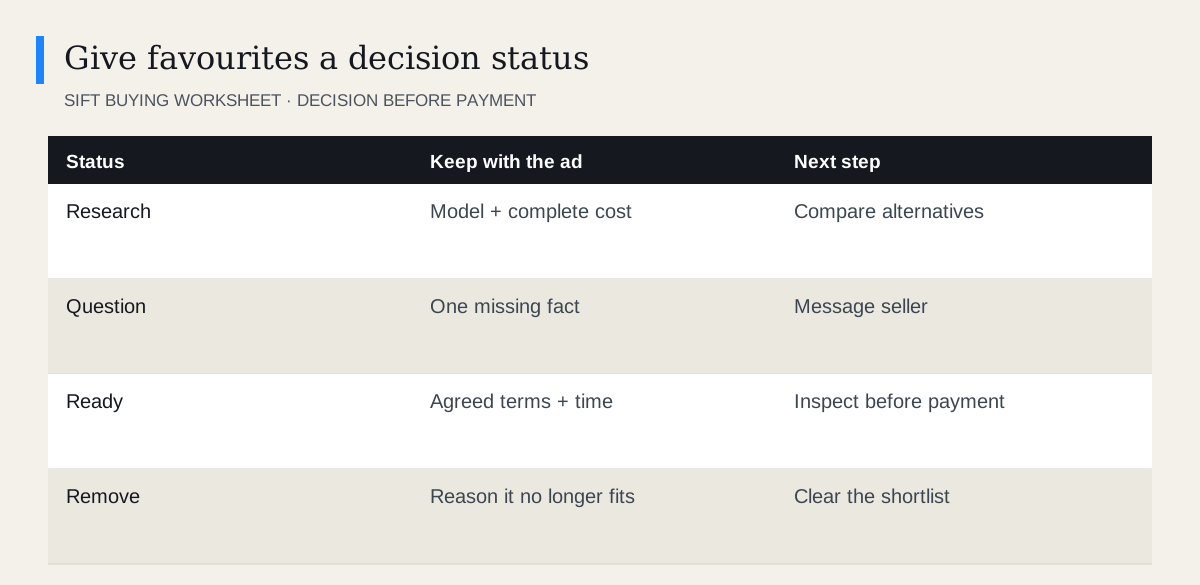
- Choose whether to compare, contact or remove.
Use the listing comparison worksheet when more than one candidate remains. A favourite tells you where the ad is; a comparison tells you why you might buy it.
How should you compare favourites?
Match the same product version and condition. A cheaper item missing its stand or charger may not be the lower-cost choice. Ask for current photographs if the ad leaves an important detail unclear.
| Ad | Known | Missing | Action |
|---|---|---|---|
| Monitor A | Exact model, includes stand | Input test | Ask for demonstration |
| Monitor B | Lower asking price | Stand and cable | Price replacements |
| Monitor C | Suitable size | Wrong connection | Remove |
Do not let the order in the Favourites page become a ranking. Give the candidates your own order based on usefulness and evidence.
For a dining table, a useful note might read: “Seats four; width confirmed; ask whether legs remove; collection quote pending.” That is more actionable than saving it because the photograph looks good. When the missing answers arrive, update the note and either advance the item or remove it. If two candidates remain, compare their complete costs and collection constraints side by side. A Favourite should help you make a decision, not become a growing archive of decisions postponed.
How do you remove an ad cleanly?
Use the filled heart to remove an item you no longer want. If you have already agreed to inspect it, message the seller before abandoning the arrangement. Removing a favourite does not notify the seller that your pickup is cancelled.
You may wish to retain a brief private note about why a candidate failed, especially when similar models recur. Keep product information rather than unnecessary personal seller details.
If you are comparing prices over time, save the dated observation before removing the ad. The price-history guide explains why a saved item is not a complete price archive.
What if favourites are missing?
First check the account, then refresh or sign out and back in through the genuine Kijiji site or app. Kijiji’s guidance recommends those checks when saved listings are not appearing.
Distinguish an empty list from one unavailable ad. If only one ad is gone, the issue may be the listing rather than the favourites feature. Use the unavailable-ad guide and any existing seller conversation.
Do not clear or delete conversations as a way to repair Favourites. They may contain the terms you need.
When should you message a seller?
Message when the item meets your essential requirements and you can ask a specific question or propose a practical inspection. Saving dozens of ads does not oblige you to contact every seller.
Kijiji’s messaging guide explains how to start a conversation from the ad. Keep the message tied to a real decision: model, condition, completeness or collection timing.
Before travelling, reopen the ad and reconfirm availability. Favourites is a shortlist tool, not a reservation system. Keep one alternative until the chosen purchase is inspected and completed, then tidy the list so it is ready for the next search.
Questions people ask
How do I remove a Kijiji favourite?
Open the saved ad or Favourites list and select its filled heart again. Available bulk controls may vary.
Are favourites shared across devices?
Kijiji says they are linked to your account. Use the same signed-in account on supported devices.
Does favouriting an ad hold the item?
No. Contact the seller and agree the actual pickup arrangement.
Sources
- 01Kijiji Favourite Kijiji listings
- 02Kijiji Sending and receiving messages