Used processors: identity, board support and a working demonstration
Quick answer
Confirm the exact processor model and physical condition, then match it to your motherboard revision, supported firmware and cooling setup. Ask for an ordinary demonstration in a compatible system and record unresolved errors without guessing their cause. A matching socket or a picture of a benchmark is not enough to establish the complete upgrade.
Identify the exact chip before comparing performance
Ask for a clear view of the processor markings and the full model reported by a working system. A broad label such as “i7” or “Ryzen 7” is not a purchase specification. Record the complete model, including suffixes, and distinguish a retail boxed processor from a loose part removed from another computer. Do not assign value to an included cooler until you identify it too.
Compare the intended upgrade with the task you need to improve. A processor change may not solve a system limited by memory, storage or a graphics card. If the new chip requires another motherboard, memory generation and cooler, compare the complete platform cost with a tested used computer. The smallest asking price is often attached to only one part of the job.
Check the complete upgrade path
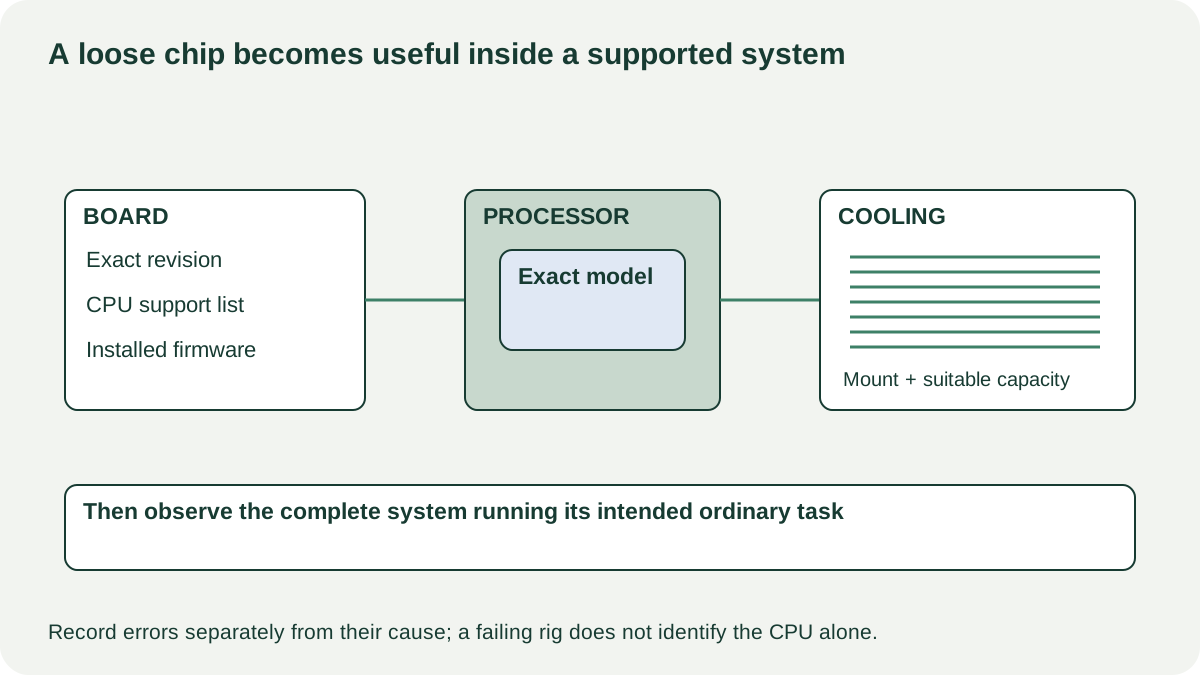
Intel’s package guide explains that the socket must match and motherboard BIOS support is also required. Its upgrade guidance directs buyers to the system or board manufacturer and highlights cooling considerations. For another processor maker, use its exact product data and the receiving board’s support list.
| Gate | Record before buying | If unresolved |
|---|---|---|
| Processor identity | Full model and supported product specification | Ask seller to identify the actual part |
| Board support | Exact board/revision and CPU support entry | Do not infer from socket alone |
| Installed firmware | Current version and required version | Arrange a supported update path before changing CPUs |
| Cooling and power | Compatible mounting, suitable cooler and system provision | Include necessary changes in platform cost |
| Display path | Whether your intended graphics arrangement is supported | Do not assume a motherboard video socket will provide a picture |
If a firmware update is required, establish whether the existing system can perform it and whether the seller or a competent shop will complete it before your upgrade. Do not casually flash firmware at a meetup or buy on an unsupported promise that “any board with that socket works.”
 Enlarge diagram
Inspect without damaging the contact side
The owner should remove and handle the processor only if they know the correct procedure. Watch for bent or missing visible pins where the package has them, damaged contact areas, chipped edges, corrosion or unexplained residue. Keep fingers and tools away from the electrical contacts. Do not scrape markings, remove the heat spreader or attempt a pin repair to make a purchase work.
Ask whether the processor has been modified, repaired or used with non-standard settings. Disclosed changes are information to evaluate, not automatic proof of failure. An expensive or unusual modified part may justify assessment by someone experienced with that platform. A seller calling a modification an upgrade does not establish its quality or remaining reliability.
A photo of the contact side can reveal obvious damage but cannot certify the entire chip. Likewise, a clean appearance cannot establish stable operation. Keep visual condition and demonstrated function as separate entries.
Prefer a live compatible-system demonstration
Have the seller show the processor identity and the test system’s board, memory and cooling configuration. Observe ordinary startup and a representative normal task. If a diagnostic or workload test is part of the offer, record the program, settings, duration and result, rather than a cropped score alone.
Do not impose a universal temperature or score threshold across processors and coolers. Use the exact model’s documentation and account for the workload, ambient conditions and system configuration. A brief successful task is useful evidence, but it cannot prove a history of perfect stability or guarantee years of service.
Repeated crashes, computational errors, shutdowns or a system that works only with unexplained restrictions require resolution. The CPU may not be the cause; memory, firmware, power and cooling are also part of the demonstration. The buying decision is still straightforward: an unresolved failing setup is not verified-working evidence for the part.
A loose CPU with no demonstration belongs in a different evidence category. If you knowingly buy it for testing, establish that uncertainty in the price and any written return terms. If you need a dependable replacement for work, consider a seller who can show the compatible system running or arrange a shop test.
Compare the complete upgrade and agree the exact handover
Suppose a hypothetical processor costs $100, but its compatible cooler and mounting kit cost $55 and a required shop-assisted firmware update costs $25. The upgrade is $180 before collection. A $150 tested board-and-CPU offer may be better or worse depending on memory compatibility and the remaining parts you must replace. Put every required platform change into the same comparison; do not compare a bare CPU price with a complete working system.
Known missing mounting hardware can support negotiation when the correct part is available. Physical damage, unclear identity or instability should trigger a different decision, not a nominal small repair allowance. Keep the exact processor and included cooler in the purchase record and confirm that the part removed after demonstration is the one you receive.
Pack it in a suitable protective carrier that keeps pressure away from contacts or pins. Follow the receiving system’s installation instructions when fitting it, or use a competent service provider. Your useful result is a supported, cooled and working upgrade, not simply ownership of a faster-sounding model name.
Sources
- 01Intel desktop processor upgrade information
- 02Intel package and socket types