Used motherboards: socket, firmware and missing hardware
Quick answer
Identify the exact motherboard revision and installed firmware, then confirm support for your processor, memory and storage. Inspect the socket and connectors without touching contacts, and ask for a demonstration in a compatible build. A power light or a claimed easy BIOS update does not establish that a loose board will work with your parts.
Match your parts to the board
A motherboard is the meeting point of several compatibility decisions. Start with the processor you will install, the exact memory kit, storage devices, graphics card, case and power supply. Add the connections you need at the rear and inside the case: network, display where supported, front USB, audio and any expansion card. The cheapest board can be costly if it requires replacing several parts you already own.
Get the full model and revision printed on the board, not just the box. Similar names may identify different memory generations, wireless options or revisions. Ask the seller to show the installed firmware version in a working system. Compare that version with the manufacturer’s support entry for your exact processor.
ASUS’s CPU and memory lookup guidance illustrates the relevant model-specific support lists. Its new-processor compatibility guidance also distinguishes listed CPU support from having firmware that can actually boot it. An update method that works without a supported CPU is a feature to verify for that particular board, not a universal rescue plan.
| Your component | Detail to match | Evidence |
|---|---|---|
| Processor | Exact model, board revision, required firmware | Manufacturer support entry plus installed version |
| Memory | Generation, kit number, module count and capacity | Manual and supported configuration |
| Storage | Interface, physical format and chosen socket | Manual, including shared-resource restrictions |
| Case | Board size, mounting and front connections | Dimensions and connector arrangement |
| Cooling | Socket mounting and clearance | Cooler and board documentation |
| Power | Required supported connections | PSU and board manuals |
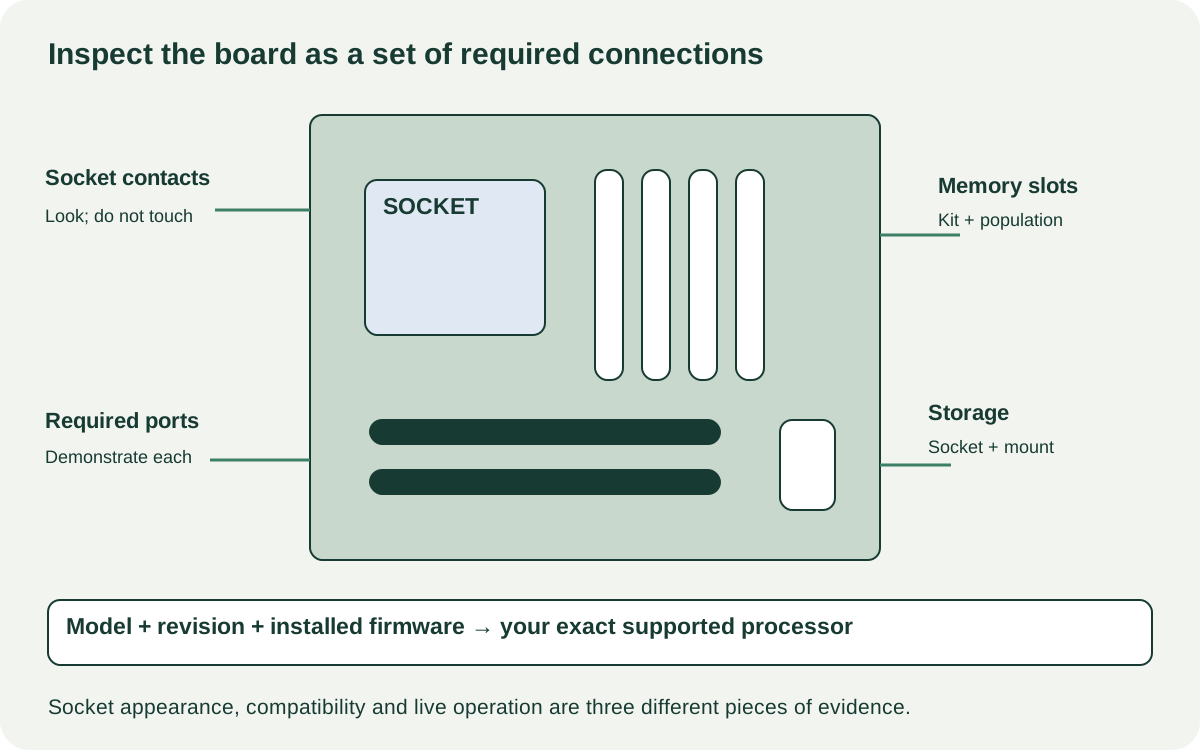 Enlarge diagram
Inspect a loose board without becoming its repair technician
Have the owner handle it by its edges on a suitable surface. Look at the socket area in good light, including any visible contacts or pins, without touching or probing them. Check for obvious displaced contacts, contamination, corrosion, cracked sockets, missing latches and damaged connectors. Do not attempt to straighten pins during a sale inspection. A photograph cannot reliably clear every contact, but visible damage is material evidence.
Look around mounting holes, slot latches, power connectors and the rear ports for cracks, scorching or signs of force. Ask about liquid exposure, repair work and why the board was removed. Dried residue or an unfamiliar repair is a reason for a qualified assessment, not proof of a particular failure or permission to scrape the surface.
A heavy heatsink can hide details, and removing it may introduce risk. Do not dismantle shielding or the socket mechanism merely to extend a casual inspection. If the value depends on expert examination, arrange that with the seller before paying.
Demonstrate the functions your build will need
The strongest ordinary evidence is the board operating in a compatible system with its identity and firmware visible. Have the seller show the detected processor and memory, then a normal task. Confirm the storage socket, network connection, audio and USB ports you actually require. For wireless models, include the correct antennas in the test.
A motherboard’s display socket only helps if the complete processor/board configuration supports that display path. Likewise, one working expansion slot does not clear every slot or every storage combination. Consult the manual for shared connections before declaring a disabled port faulty. You want a supported complete arrangement, not a series of individually plausible components.
Record each demonstrated path and leave the others untested in your notes. Reboots, failure to recognise a required module or intermittent connections need resolution. A quick successful boot after repeated failed attempts is not the same evidence as reliable ordinary startup. Do not assign blame to the board alone when the test system contains other uncertain parts, but do not pay a verified-working price for the unresolved combination either.
For a loose board with no compatible test rig, decide whether you are deliberately buying untested hardware. If the project requires a ready-to-use replacement, another seller or a shop that can test it may be a better route. A low price does not create the missing evidence.
Count the small parts that stop a build
Check the inventory against the exact manual: rear shield if separate, Wi-Fi antennas, storage screws or latches, cooler backplate where required, proprietary daughterboards or adapters and any supplied cables that your setup needs. The retail package may include optional extras you do not need; distinguish them from an essential missing item.
Ask a parts supplier about exact replacements before agreeing a repair-based price. A generic screw that appears to fit is not a substitute for a specified storage mount. A missing cooler bracket may be harmless if your cooler supplies its own correct hardware, or decisive if it relies on that original part. Resolve the actual mounting system.
A hypothetical board costs $90, with $35 for verified missing hardware and $25 for a shop to perform the required supported firmware update: $150 before collection. A complete board with the required firmware demonstrated costs $145 nearby. The first is not cheaper merely because its listing starts lower. These are example inputs, not service prices.
Choose the evidence path you can live with
Buy when the exact compatibility arrangement is supported, required functions are demonstrated and essential hardware is present or priced. Negotiate a known missing antenna or accessory only after confirming the correct replacement. Pause for unresolved socket damage, unexplained instability or a firmware-dependent boot promise that nobody has verified.
Keep the tested board identity and included parts together in your purchase record. For transport, follow the manufacturer’s socket protection and packaging guidance, using appropriate antistatic protection and support for heavy assemblies. If purchasing the CPU or memory too, compare the complete tested bundle with the processor and RAM guides. A working combination can be more useful than three unrelated bargains.