How do you test a used racing wheel and pedals?
Quick answer
Match the wheel’s exact platform version and every accessory before testing. On a supported system, check calibration, steering, each pedal, buttons and force feedback using the correct power supply and a secure mount. A wheel that appears in a USB menu may still have missing feedback power, faulty pedals or incompatible console accessories.
Read the underside label before comparing prices
Ask for the wheel or base model, console logo, pedal model and power-supply label. A listing titled “G923” or “racing wheel” may omit the version that determines whether it works on your console.
Logitech’s wheel guide distinguishes G29 and G920 console families and identifies separate G923 versions. Apply the same exact-model approach to other manufacturers. Similar-looking rims do not establish platform compatibility.
For modular systems, identify the base, rim, quick release, pedals, shifter and adapters individually. Check supported combinations and your intended game. A bundle assembled for a PC can contain parts that will not work together on a console.
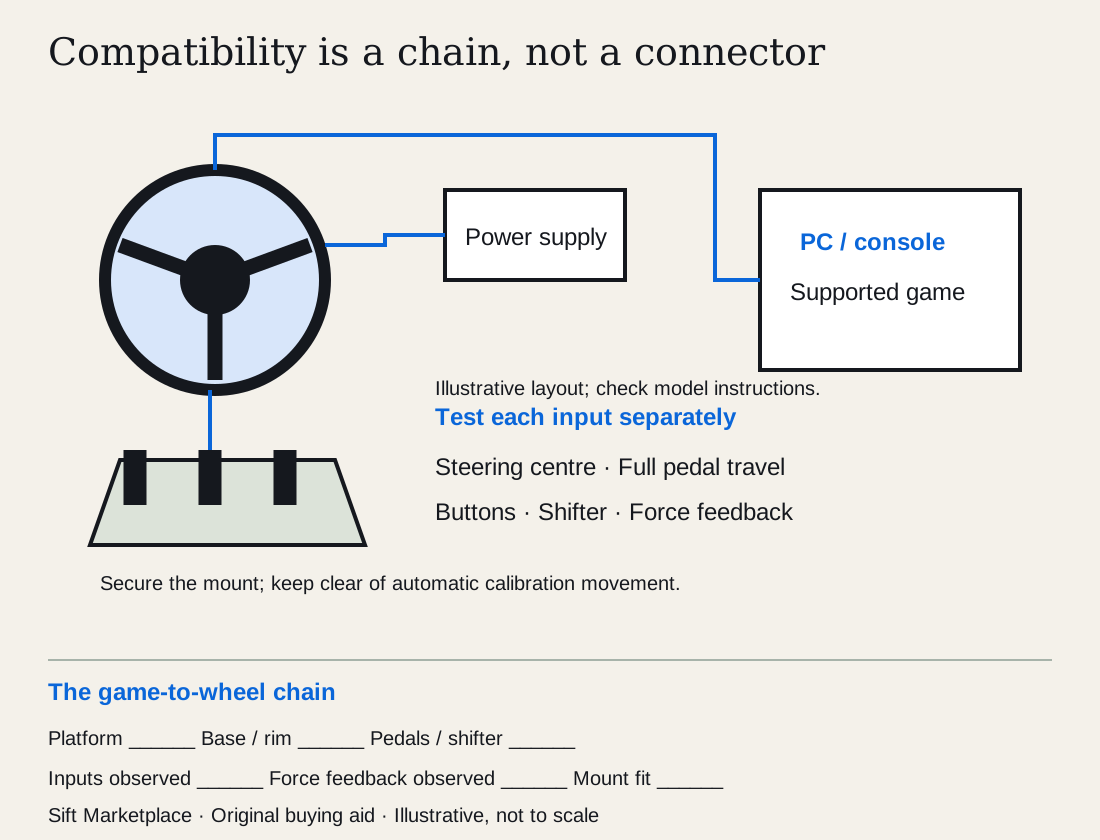 Enlarge diagram
Check the mount and included parts
A wheel needs a secure desk clamp or compatible rig mounting, and pedals need a stable position. Ask whether the clamp, fasteners and pedal mounting hardware are included. Check the desk thickness or rig hole pattern against the model’s instructions.
Inspect cables for crushed areas, exposed conductors and bent connectors. Check the base housing, wheel attachment, pedal hinges and mounting points. Look for a clamp repaired with glue or a cable trapped under the rig.
Confirm the correct power supply, including its model and ratings. Do not substitute an adapter because the plug fits. Missing power can leave a wheel partly functional and make an inadequate demonstration look convincing.
Test inputs before driving a lap
Use a supported computer, console or manufacturer utility. Follow the setup instructions, secure the base and keep hands clear of automatic calibration movement. Direct-drive equipment can generate substantial force; start with appropriate conservative settings and the manufacturer’s safety procedure.
- Watch startup and calibration. It should complete the normal sequence for that model without a repeated error.
- Check steering position. Move smoothly through its supported range and return to centre. Look for jumps or a centre that wanders.
- Test pedals individually. Press and release each slowly. Check that the input rises and returns consistently without spikes or a permanent partial input.
- Try buttons and paddles. Confirm each maps to an input. Test every shifter position if a shifter is included.
- Test force feedback. Use a supported game with known settings and correct power. Steering recognition alone is not enough.
- Run a short ordinary session. Notice disconnections, unexpected resets or a loss of feedback as the unit warms.
Pedal feel varies by design. A stiff brake may be intentional, while a noisy or jumping input is a different concern. Check the product specification before calling normal resistance a fault.
| Demonstration | What remains to check |
|---|---|
| Wheel appears in a USB menu | Feedback, pedals and game support |
| A successful lap on the seller’s PC | Your console version and accessory compatibility |
| Smooth steering | Button, pedal and shifter inputs |
| Correct pedal travel | Stability under normal foot pressure |
| Feedback works briefly | Longer-session behaviour remains uncertain |
| Third-party adapter functions today | Official support and your intended game combination |
Distinguish adjustment from an unresolved fault
A bad calibration or unsuitable setting can affect feel. Ask the seller to return to a documented normal configuration and demonstrate again. Do not let repeated changes turn the meeting into a repair session without a clear result.
A slipping quick release, damaged clamp or feedback that drops out needs more than “probably firmware.” Unless a straightforward supported setup change resolves it, price the condition as unresolved or choose another kit.
Ask about modifications, replacement pedals, added brake springs and aftermarket rims. Modifications may suit the previous owner but affect warranty, support, fit and your preferences. Value the configuration you want, not the cost of every part the seller added.
Compare the complete station
Build a chain from your platform and game to the base, rim, pedals, shifter and mount. For every link, record the exact model, required connection and observed result. Logitech’s G29/G920 page distinguishes console families; a wheel that works on the seller’s PC may still be the wrong console version for you.
Consider a buyer who needs a console wheel with a clutch and shifter. The seller demonstrates steering and two pedal inputs in a PC menu. That establishes neither console support, the third pedal input, shifter behavior nor force feedback in the intended game. Arrange those checks under supported normal use, or keep each unobserved function marked as unknown. Do not let one successful lap become a check mark for the entire bundle.
| Function | Record |
|---|---|
| Platform/game support | Exact version and primary support reference |
| Steering and each pedal | Input behavior in supported software |
| Force feedback | Observed in intended supported use, separately from steering input |
| Shifter/buttons | Required modes and each included control |
| Mount and power | Correct supply, secure compatible fixing and needed hardware |
Measure the intended desk or stand, including clamp clearance underneath, chair movement and where cables run. A mounting clamp that fits the seller’s thin tabletop may not fit a thick desk edge. A wheel stand that folds must still fit your storage space with the actual components attached as permitted.
In a hypothetical example, a $150 wheel needing $90 confirmed compatible pedals and $70 mounting totals $310. A complete $240 kit needing the same $70 mount totals $310. If the first unit’s force feedback remains unassessed, equal totals do not make the two equally evidenced. Add any correct power supply, cable, service or collection cost using the cost calculator.
Ask: “Can we check this exact platform version, each pedal and my required shifter/feedback functions with the correct power supply? Please send underside labels and clamp dimensions.” Sift can help narrow model and platform terms while you browse; the compatibility and function record determines which price changes matter.
Questions people ask
Will a PC racing wheel work on my console?
Not necessarily. Console compatibility depends on the exact wheel or base version and sometimes the attached rim. Logitech’s G29 and G920 target different console families, and G923 has console-specific versions. Verify the model, platform and game together.
Does normal steering input prove force feedback works?
No. Steering detection and feedback can be separate functions. Test in a supported game or manufacturer tool with the correct power supply and settings. A wheel that turns on screen may still have a feedback fault.
Can I mix pedals from another brand?
Sometimes on PC through a supported connection, but console combinations can require specific adapters or may not work. Confirm the complete chain in current manufacturer documentation. A physically fitting connector is not proof of electrical or software compatibility.
Sources
- 01Logitech G Sim racing wheel guide
- 02Logitech G Driving Force racing wheels