How do you test a used VR headset before buying it?
Quick answer
Identify the exact headset and required accessories, then test both displays, lenses, tracking, controllers and charging in a suitable indoor space. Confirm compatibility with your computer or console if needed. For an account-based headset, agree on a factory reset and complete setup with your own account before finalising the purchase; installed games are not proof of transferable ownership.
Identify the system you are buying into
Record the full headset model, storage version if applicable and all included accessories. Distinguish standalone headsets from PC-connected and console-dependent systems. A headset may look complete while lacking a required cable, adapter, tracking station or compatible controller.
Check the manufacturer’s current setup and system requirements for your hardware. Do not infer compatibility from a USB connector alone. Confirm the operating system, graphics requirements and ports for PC use, or the exact console and adapters for console use.
For older products, check current software availability and support before travelling. An attractive hardware price is less useful if the experience you want is no longer supported.
 Enlarge diagram
Inspect the lenses before wearing it
View both lenses in ordinary indoor light. Look for scratches, coating damage and marks that remain after manufacturer-approved cleaning. Ask whether prescription inserts were used and whether any third-party lenses or modifications are fitted.
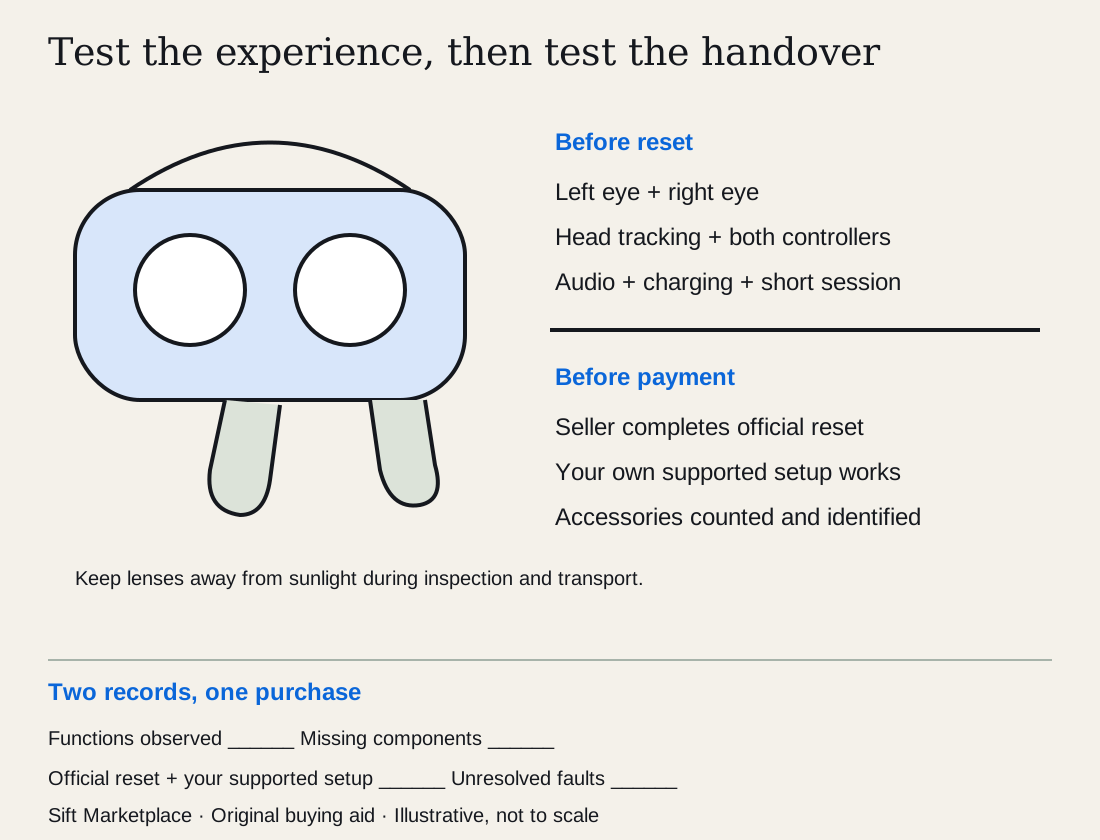
HTC VIVE’s care guidance warns that sunlight entering the lenses can damage the display. Keep the headset shaded during inspection and transport. Do not take it into direct sunlight for a brighter look.
Follow the model’s care instructions for any cleaning. VIVE’s lens instructions specifically caution against scratches and disassembly. A seller’s claim that polishing will remove damage should not become your repair budget without an approved solution.
Check the face interface, strap, charging port and controller battery compartments. Look for corrosion, distorted connectors, cracks and excessive wear. Budget a suitable replacement face interface if you want one.
Agree on a practical indoor demonstration
Choose an uncluttered area with appropriate lighting and follow the headset’s boundary and safety instructions. You do not need an energetic game to test basic functions.
- Check each eye. View a simple bright scene and a darker one. Notice persistent marks, flicker, missing areas or an obvious difference between eyes.
- Adjust fit and optics. Test the adjustments the model provides. Check whether you can obtain a comfortable clear view.
- Move your head slowly. Look for tracking loss or a scene that jumps unexpectedly in an otherwise suitable space.
- Test both controllers. Use every stick, trigger and button in a menu or supported input test. Release sticks and check for unintended motion.
- Check audio and microphones. Use a normal supported function, avoiding unnecessary access to the seller’s personal content.
- Watch charging and battery behaviour. Use the correct charger and cable. A short demonstration can reveal a fault, but cannot establish full battery capacity.
If tracking misbehaves, check obvious environmental causes with the seller. Do not accept “it always does that” as proof it will work in your home.
| Observation | Useful conclusion |
|---|---|
| Controller drifts in a neutral menu | Needs further diagnosis or repair allowance |
| Persistent display mark | Compare as damaged unless assessed otherwise |
| Charges briefly | Charging connection works; full capacity is still unknown |
| Works on seller’s powerful PC | Does not establish compatibility with yours |
| Missing proprietary cable | Obtain an exact replacement quote |
| No setup after reset | Handover is not complete |
Complete the handover through your own account
Agree beforehand that the seller will remove personal data using the platform’s official process. For Quest, use Meta’s factory-reset guidance for the relevant model rather than an improvised sequence.
Test hardware first, because resetting can remove the applications used for the demonstration. Then allow time for your own supported setup and network connection. If the device requires organisational credentials or otherwise cannot be set up normally, leave the purchase unresolved.
Do not ask the seller to transfer passwords or hand over an account to preserve installed games. Identify any genuinely transferable physical accessories separately from account-bound software.
Price the complete usable kit
Keep a function-and-handover record for the exact headset. Use separate rows for display/lenses, head tracking, each controller, audio, charging, required PC/console connection and your own account setup. Mark each as observed, not observed or unresolved, with the demonstration conditions. A working menu is not evidence that the intended PC game or both controllers operate correctly.
Where possible, use the same supported application and connection you intend to use. Follow the model’s play-space requirements; do not conduct a demonstration near stairs or obstacles.
Check current support and replacement availability for the exact generation before giving missing parts a price. Controllers, proprietary display cables and tracking stations can be the parts that make a cheap headset unusable. A third-party cable listing is not proof that it supports all required signals and functions.
In a hypothetical comparison, Headset A costs $160, with $70 for a confirmed compatible controller, $35 face interface and $25 cable: $290. A complete compatible kit at $260 plus $25 interface totals $285. If A’s battery service or tracking fault is unassessed, its total is incomplete. Account-bound games do not supply a transferable asset value merely because they are installed.
Use the listing comparison tool for the evidence record and the cost calculator for known costs.
Ask: “Can we demonstrate both controllers, tracking and my required connection, then follow the official reset and setup process before completing the handover? Please send the exact models of every included component.” Search complete supported kits and keep missing functions visible when comparing price changes.
Questions people ask
Should I pay extra for games already installed?
Do not assume they transfer with the headset. Establish what licences you can own under the platform’s rules. Budget software through your own account and treat seller-account access as separate from the hardware purchase.
Can I polish scratches out of VR lenses?
Do not assume polishing is safe. Lens materials and coatings differ, and an abrasive treatment can make them worse. Follow the manufacturer’s care instructions; treat visible damage as a condition issue unless an approved repair is available.
Does a factory reset prove a used headset works?
No. Test displays, tracking, controllers and charging before reset, then confirm setup afterwards. A reset clears local data according to the platform’s procedure; it is not a battery-health test or a guarantee that every accessory is compatible.
Sources
- 01Meta How to factory reset your Meta Quest
- 02HTC VIVE Caring for your VIVE
- 03HTC VIVE Cleaning the headset lenses