How to check a used standing desk before moving it
Quick answer
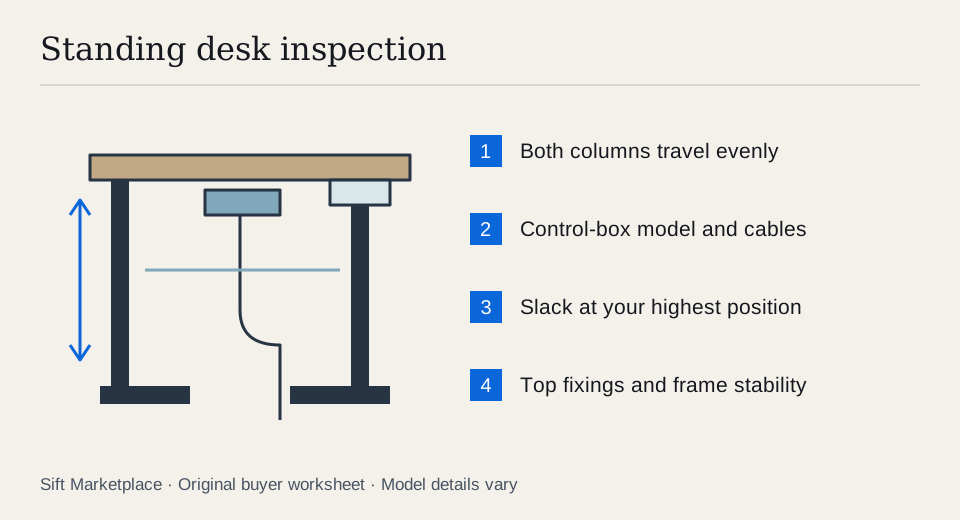
Test a used standing desk assembled and connected to power. Run it through the heights you need, check both legs move together and inspect the top, frame and cables. Record the frame, controller and keypad models before pricing replacement parts. An error message that might clear with a reset is still an unresolved fault until the seller demonstrates normal operation.
Measure your working heights before looking at desks
A tall maximum height is not enough. The lowest usable height must also suit your seated setup, including the thickness of the desktop. Measure the work surface you find comfortable, the available width, and the space needed for feet, drawers and chair arms. Include the path the desktop will travel beside window ledges, shelves and wall sockets.
Ask the seller for the desktop dimensions, the frame label, the control-box label and a photograph underneath. “Dual motor” describes one feature; it does not identify the parts or tell you whether the two columns work properly. A new top on an older frame can be a good combination, provided its size, weight and fixing arrangement suit that frame.
Make a fit record rather than relying on “adjustable”. Fill in the actual numbers for the complete desk:
| Measurement | Your requirement | Seller’s assembled desk |
|---|---|---|
| Lowest top surface | Comfortable seated working height | Measure with the included top |
| Required standing surface | Your normal working position | Demonstrate at this height |
| Top width and depth | Room, monitor and keyboard space | Include overhang beyond the frame |
| Under-desk space | Chair arms, knees and any drawers | Check crossbar and control-box position |
| Moving clearance | Shelves, sill, cables and nearby furniture | Check the whole travel path |
For example, a frame advertised to lower to 24 inches may have a 1-inch top fitted. If 24 inches is the bare frame measurement, the work surface is 25 inches before any other specified allowance. That arithmetic is illustrative: ask exactly where the seller measured. Likewise, do not equate a frame’s advertised capacity with permission to fit any oversized top. Confirm the complete top, equipment and mounting arrangement against the model’s instructions.
 Enlarge diagram
Arrange a powered demonstration while it is assembled
An unpowered frame on a driveway leaves the largest questions unanswered. Ask for enough room around the desk to run it safely, and have the seller remove loose valuables. Keep hands, pets and cables out of the moving path. Do not test collision protection with a body part or a valuable object.
- Inspect before switching on. Look for cut insulation, improvised connectors, damaged plugs and bent columns. Stop if the wiring appears unsafe.
- Start at the seated height. Check that the top sits level and both feet contact the floor. Confirm the keypad operates without requiring pressure on a loose cable.
- Raise it to your standing height. Watch both columns throughout the movement. Listen for grinding and note pauses, uneven travel or an error display.
- Check stability where you will use it. Type and rest your hands normally. A desk that is acceptable while low may move more at standing height; judge the complete setup, not a bare frame.
- Lower it and repeat the useful range. Observe any stored height presets and height limits. Respect the manual’s duty cycle; repeated operation without a rest is not a better test.
- Check cable reach. At the highest required position, the power lead and any attached accessory cables should not pull tight or catch on the frame.
If the desk reports an error, photograph or write down the code and identify its controller. UPLIFT’s troubleshooting guide explains that a reset can resolve some problems, and separates troubleshooting by control-box type. That supports trying the correct procedure; it does not establish that a different desk’s error is harmless. The seller should clear the area, follow the matching instructions and then repeat the demonstration.
Check the top and frame as separate purchases
Run your hand carefully along the edges of the desktop for swelling, separating laminate and rough repairs. Look underneath at old screw holes. A heavy monitor arm can put a concentrated load near the edge, so inspect that location rather than judging the top only by its centre.
Check the crossbar, feet and column joints for missing bolts or distorted mounting points. Loose assembly may cause movement, but stripped threads or a cracked fixing will not be solved by optimism. Ask the seller to tighten only the fasteners permitted by the assembly instructions and retest.
| Missing or questionable item | Check before making an offer |
|---|---|
| Keypad | Exact compatible part for the controller revision |
| Motor cable | Required connector, length and manufacturer part |
| Desktop | Suitable size, mounting positions and replacement weight |
| Fasteners | Correct assembly kit; no assumed universal bolt set |
| One lifting column | Repair availability and whether matched components are required |
| Cable tray or monitor arm | Whether it is included and actually useful to you |
Use the maker’s assembly instructions for the relevant model. Do not mix controls simply because the plug fits. If a seller cannot identify a no-name frame and no parts source can confirm a controller, price it as an uncertain repair project or leave it.
Turn the listing price into a collected, working price
Compare assembled working desks with assembled working desks. A frame-only listing needs a suitable top, hardware and time. An illustrative example is a $130 frame with a $100 top and $40 transport, totalling $270 before assembly. A complete $260 desk that passes the same tests may cost less overall. These are invented comparison inputs, not typical selling prices.
Use the cost calculator to record your actual quotes. If the listing includes a monitor arm, check its compatibility in the used-monitor guide, rather than crediting the bundle with an accessory you cannot use.
Use the powered test to decide which kind of purchase remains. Buy as a working desk when the complete assembly fits, travels normally and is stable at your heights. Negotiate an identified omission when the replacement top, cable or keypad is confirmed compatible and priced. Pass or deliberately choose a repair project when a column stalls, a controller is unidentified or a reset has not restored ordinary operation. An error that disappears once but returns on the next movement is still unresolved.
Before travelling, send one precise request: “Please leave it assembled and powered so we can measure the top’s low and high positions, check travel and photograph the frame/control labels. Which top, keypad, cables and fixings are included?” This often prevents a useless visit to a dismantled bundle.
Plan collection before removing the first bolt
Photograph the connections and assembly layout with the seller’s permission, keeping people and unrelated information out of frame. Unplug the desk before disassembly. Label disconnected components, bag the original hardware and protect the keypad. Lift with enough help for the top and frame; do not drag the assembly by a motor lead.
Measure the vehicle opening as well as the cargo area. Some tops fit inside but cannot turn through the hatch. Reassemble using the correct instructions, check cable clearance and perform any required reset before putting your equipment on it.
Sift, a free Facebook Marketplace filter and scam checker that also works on Kijiji, can help narrow the search on Chrome on a computer. Require a model term and use exclusions carefully: blocking “manual” could hide a powered desk whose listing says “manual included.” Recorded price history helps you follow the shortlisted listing while you arrange the inspection.
Questions people ask
Is a standing desk stuck at its lowest height broken?
It may need a model-specific reset, but it may also have a cable, controller or motor fault. Ask the seller to follow the manufacturer’s instructions and demonstrate full operation before you buy it as a working desk.
Can I replace a missing standing desk handset with any keypad?
Do not assume so. Match the frame and control-box revision and obtain manufacturer confirmation of the compatible keypad. Similar connectors do not establish electrical or software compatibility.
How should I test wobble on a used standing desk?
Test it on a level floor at your seated and standing heights with the intended top attached. Type normally and gently check front-to-back and side-to-side movement. Inspect feet and fasteners before deciding whether the movement is acceptable.
Sources
- 01UPLIFT Desk Standing desk reset, stability and troubleshooting
- 02UPLIFT Desk Assembly and programming instructions