How to buy a used office chair that fits and stays put
Quick answer
Sit in a used office chair at your working height, try every fitted adjustment and stay seated long enough to notice sinking. Inspect the seat frame, mesh, base and casters, then identify the exact model and size before pricing parts. A famous brand is only a good buy if that particular chair fits you and its controls work.
Identify the chair before you compare prices
Ask for the model label underneath, a side view and a photograph of the actual adjustment controls. The same product name can cover different sizes, arm packages, back supports and generations. A seller’s description of “ergonomic” gives you none of those details.
Herman Miller’s adjustment library provides separate instructions for individual chairs; use the matching guide to establish which controls should exist. Its Aeron specifications distinguish sizes and configurations. The buying implication is straightforward: compare the chair in front of you with the correct configuration, rather than treating every similar silhouette as equivalent.
 Enlarge diagram
Make a fit record for your desk, not just your height
Take three measurements at home: the underside of the desk where the arms must pass, the width between its legs or storage units, and the height of the surface holding your keyboard. A chair that feels comfortable in an open warehouse can force you to reach when its arms prevent you moving close to your actual desk. If your keyboard sits on a tray, measure that working surface rather than only the desktop.
Use the following record during the seated test. The final column should describe a physical observation, not just “comfortable.” A photo of an adjustment position, with the seller’s permission and no identifying details, can help you reproduce the setup later.
| Requirement | What to try | Useful record |
|---|---|---|
| Feet supported at keyboard height | Set the seat, then simulate typing with relaxed shoulders | Feet flat, or a specific footrest needed |
| Seat supports without pressing behind knees | Sit fully back and try available depth adjustment | Fit works at this setting; fixed seat too deep; edge pressure remains |
| Arms fit under the desk | Measure their lowest usable height and overall width | Clears the measured opening, or does not |
| Back support works in your normal posture | Adjust the fitted support, then work upright and reclined | Support position holds; uncomfortable contact remains |
| Recline returns predictably | Follow the model guide for tension and limiter settings | Each fitted position demonstrated, or one control ineffective |
| Seat height stays put | Compare the same fixed reference before and after sitting | No observed drop during the visit, or visible sinking |
A missing adjustment may reflect the original configuration rather than damage. Ask the seller to demonstrate any unfamiliar control against the matching manufacturer guide, and record the options on this chair.
If two people will share the chair, both should test it where practical. Record whether returning to the other person’s settings is straightforward. If buying for someone who cannot attend, an exact previously tried model and size is more useful than guessing from their height. The buying-for-someone-else guide helps separate confirmed requirements from assumptions.
Make the seated test do useful work
Arrange a place where sitting, rolling and reclining are possible. A chair still wrapped in a delivery van is difficult to judge. Wear the shoes you normally work in, and ask permission before adjusting anything.
- Set the height and settle in. Get your feet supported and your shoulders relaxed. Note the seat’s position against the desk or another fixed reference so gradual sinking is visible.
- Check the seat edge. Sit back against the backrest. The front edge should not press uncomfortably behind your knees. Test any seat-depth adjustment without assuming every model has one.
- Try each arm independently. Move every advertised adjustment through its range. Rest your forearms gently, checking for an arm that slips down or twists after being set.
- Test recline with control. Begin with modest tension. Check that the tilt limiter or lock changes the available movement as its guide describes. A loose lever that does nothing is not a working feature.
- Return to the original height. After trying the controls, check your fixed reference again. Repeat the raise-and-lower action to see whether it operates consistently.
- Roll and swivel. On a clear surface, listen for a seized wheel or scraping base and check whether the chair rocks sideways unexpectedly.
Comfort is personal, and a short visit cannot promise an entire comfortable workday. It can rule out immediate pressure, poor reach and controls that will not hold their settings. If you already know a particular chair fits you, matching its size and configuration reduces guesswork.
Inspect the structure while it is empty
Ask the seller to help turn the chair carefully; do not lift a heavy chair alone to inspect its underside. Use a light around the seat perimeter, where fabric or mesh meets the frame. Check for cracks, split plastic, missing fasteners and repairs hidden by tape. Look at each spoke of the base and where the cylinder meets it.
| Observation | What to establish | Buying decision |
|---|---|---|
| Dirty upholstery | Cleaning method and persistent odour | Allow for cleaning only if the material is sound |
| Torn mesh at an edge | Correct assembly and replacement cost | Treat as a part replacement, not a surface clean |
| Seat slowly drops | Cylinder compatibility and installed repair quote | Compare the repaired total with a working chair |
| One loose arm | Whether a fastener or the mechanism is damaged | Have the seller resolve it or price the uncertainty |
| Cracked base or seat frame | Structural damage | Pass on it as a ready-to-use chair |
Inspect seams and crevices as well as the visible upholstery. Strong odour or signs of pests make a cheap chair a poor fit for a home office. Do not dismantle a pressurised gas cylinder during a purchase inspection; arrange replacement through someone equipped to do it.
Put replacement parts through their own acceptance check
Before making a repair-based offer, establish the exact part, the correct chair generation and size, whether the quote includes fitting, and whether the part is actually available. A universal-looking cylinder, caster or arm pad is not proof of compatibility. Photographs of the label and damaged assembly are useful to a parts supplier; a broad brand name is not enough.
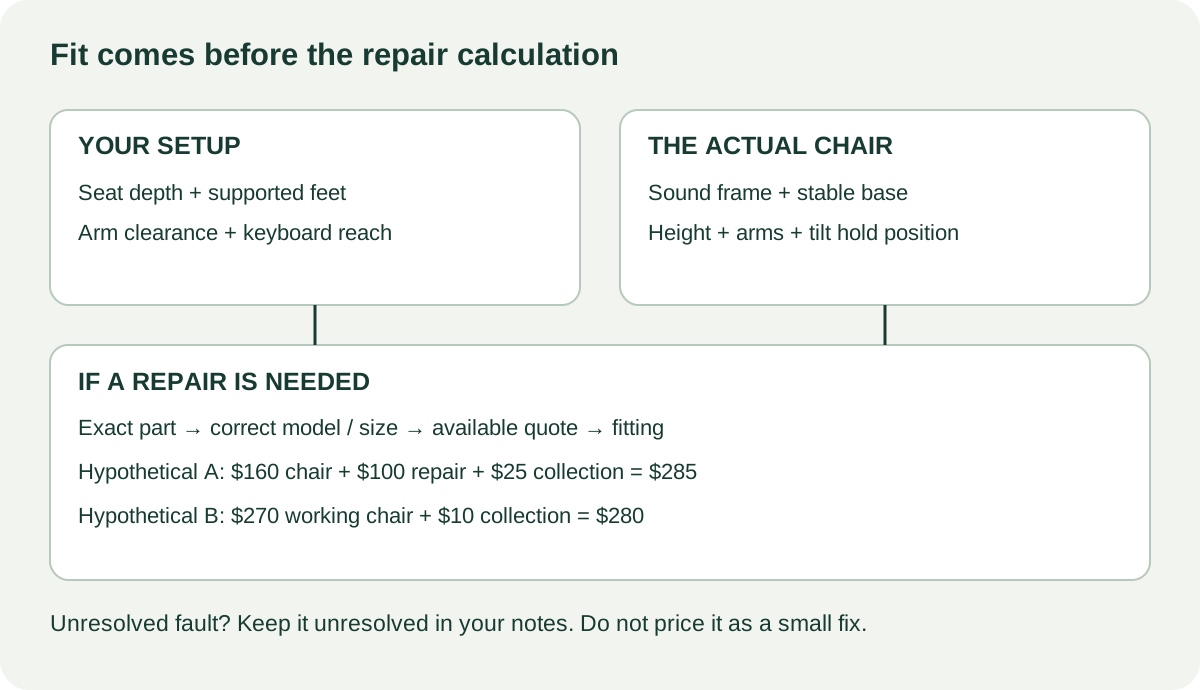
An intact chair can still be the wrong purchase if it does not fit. A damaged chair that fits can still be the wrong purchase if the repair is unpriced. Keep those questions in this order:
- Does the chair fit your body and desk in its intended working position? If no, an attractive repair quote does not make it fit.
- Is the structure sound? Cracks in the supporting frame or base are a reason to pass on a ready-to-use purchase, rather than improvise a repair at home.
- Is the failed part identified and available for this chair? If not, record it as an unresolved fault rather than a known small cost.
- Does the complete repaired cost still make sense? Include collection, parts, labour and a second trip if fitting requires one.
Here is a hypothetical comparison with different outcomes from the same asking price. Chair A costs $160, fits your desk, and has a sinking cylinder. A suitable installed replacement is quoted at $100 and collection is $25: $285. Chair B costs $270 plus $10 collection and passes the same fit and control checks: $280. Under these assumptions, A’s lower listing price offers no cash saving. Its inconvenience may also matter. These are illustrative figures, not chair valuations or repair estimates.
If A’s only issue instead were a correctly identified $25 set of compatible casters you can safely fit, its cash total would be $210. That may be a reasonable negotiation candidate. The important difference is a confirmed, bounded repair. Do not invent a low repair allowance to make an unresolved tilt mechanism look inexpensive. Enter quoted repairs and collection in the cost calculator; the tool totals your inputs but does not diagnose the chair or find a compatible part.
Ask a clearance seller which exact unit is included, whether fitted options match the demonstrated chair and what any written return terms cover. A showroom sample with smooth controls does not establish the condition of a different chair waiting in the loading area. Repeat the brief height, arms and tilt checks on the unit you collect.
Plan collection for the chair you tested
Ask whether the chair can fit through your doorway and into the vehicle without removing its cylinder. Secure it for transport so it cannot roll or strike a window. Confirm that the chair you tested is the one being loaded when a seller has several similar office-clearance units.
Narrow the search to chairs you can actually inspect
Search the maker and model together, then try its size or generation separately. In Sift on Chrome, required and excluded listing words can help keep that shortlist relevant. Be careful excluding “broken”: it may also hide a seller who wrote “nothing broken.” Word-filter examples explain that tradeoff.
Save the model, fitted controls, observed faults and collection cost in the listing comparison tool. Compare the same model, size and fitted options using the fair-price guide. Your strongest offer is tied to actual condition and a known replacement quote. A refurbished seller’s written return terms may also have value; read the specific terms.
Questions people ask
How do I test whether a used chair sinks?
Set the seat to a comfortable height, note its position against a fixed reference and remain seated while checking the other controls. A gradual drop suggests a cylinder problem. A brief pickup test cannot establish long-term reliability.
Is every Aeron chair the same size?
No. Herman Miller lists different Aeron sizes and configurations. Match the exact chair to its specifications and adjustment guide, then sit in it. Do not assume a listing calling it fully loaded identifies the size or installed options.
Should I buy an office chair with torn mesh?
Price the correct replacement seat or back assembly first. A small cosmetic mark differs from a tear near the supporting edge. If the frame is cracked or replacement parts are unavailable, choose another chair.
Sources
- 01Herman Miller Chair adjustments
- 02Herman Miller Aeron chair specifications