Used UPS battery backups: load, battery and replacement cost
Quick answer
Identify the exact UPS model, voltage, plug, outlet groups and both watt and VA ratings. Match the intended load to manufacturer guidance, review the installed battery and its history, and observe only supported ordinary checks. A unit powering on or passing a short self-test cannot promise runtime. Include compatible battery, service and disposal costs before comparing offers.
Decide what must keep running, and for how long
A UPS for a router during a short interruption is a different purchase from one supporting a gaming desktop long enough to shut down. List the equipment you actually intend to protect and the required outcome: a brief bridge, saving work and shutting down, or a longer documented runtime. Do not begin with the largest number printed on a used unit’s front panel.
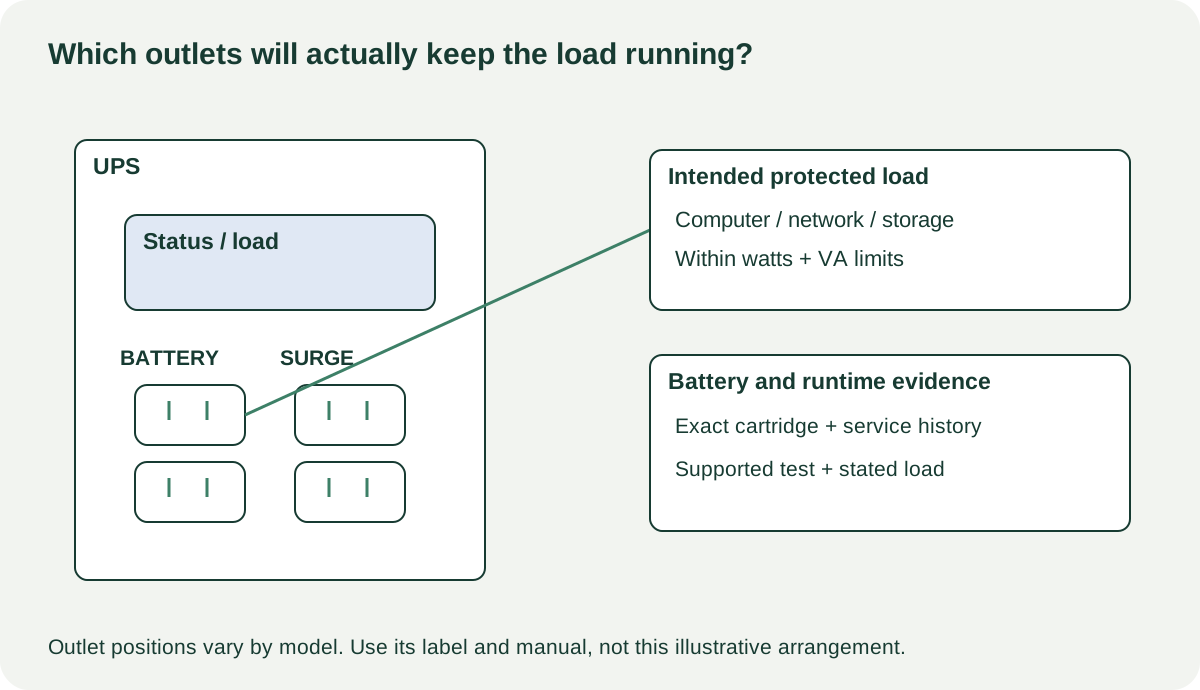
Record the exact model and regional version from the rear label. Check input voltage, plug type, output sockets, watt and VA ratings, and which outlets receive battery backup rather than surge protection alone. A rack unit also needs appropriate rails or support and a practical lifting and installation plan. A cheap imported unit with the wrong electrical requirements is not made suitable by a travel adapter.
APC’s selection guide distinguishes watts from VA, explains that neither rating should be exceeded, and relates runtime to connected load. Use the exact model’s supported load and runtime information for planning. A nominal VA rating alone does not establish how long your equipment will run, particularly with a used battery.
Build a load and outlet record
| Requirement | Record for your proposed setup |
|---|---|
| Intended equipment | Computer, display, network or storage devices that actually need backup |
| Load evidence | Supported equipment information or suitable measured operating load |
| UPS limits | Model-specific watts, VA and manufacturer sizing guidance |
| Runtime purpose | Enough time for your intended action under that load |
| Outlet allocation | Battery-backed versus surge-only sockets; suitable connector types |
| Shutdown support | Correct data cable, supported software or compatible NAS integration |
| Battery | Exact cartridge, installation evidence and replacement availability |
Leave room for the manufacturer’s recommended sizing margin and the behaviour of the connected equipment. Do not use a guessed household appliance as an improvised high-load test. If the installation requires electrical work or a specialised outlet, have a qualified electrician establish suitability before purchase.
 Enlarge diagram
Ask what battery is actually installed
Request the battery or cartridge identity, any installation date or invoice, and whether the unit has displayed replacement warnings. A seller saying “new battery” should be able to explain whether it was a correct complete replacement, who fitted it and when. A date entered in software may be useful history, but is not independent proof that a battery was replaced on that date.
Look up the exact supported replacement and its delivered cost. Check whether replacement is user-serviceable according to the manual or needs a service provider. Do not assume an arbitrary battery with similar dimensions is the specified substitute. If a seller has improvised wiring, bypassed a protective component or installed an undocumented pack, do not treat it as an ordinary ready-to-use UPS.
Inspect the external case, cord and sockets for damage, heat marks or unusual odour. A swollen or leaking battery, damaged cable or exposed electrical part should stop the demonstration. Do not open the electronics enclosure or probe terminals. A UPS can contain stored energy even when disconnected from the wall.
Observe supported checks, and record their limits
Ask the seller to show the normal status display, battery condition indication and relevant event history without exposing network credentials. Have them use the model’s documented self-test procedure under its required conditions. APC’s battery guidance illustrates that charging and a supported self-test are part of the process after a battery replacement; the exact procedure still belongs to the actual model manual.
Do not simply pull the wall plug as a universal pickup test. Follow the maker’s procedure and use an agreed suitable load with no unsaved work or critical service attached. If the seller is relying on the UPS for their live household or business equipment, arrange a separate demonstration rather than interrupting it.
Record the model, indicated charge, load, test method, result and any alarm. A self-test pass is evidence of that check, not proof that the unit will meet your full runtime target. An accurate longer runtime assessment requires suitable conditions and enough time; if that cannot be established, value the battery conservatively and price a supported replacement.
If automatic shutdown is important, demonstrate that the intended computer or NAS recognises the UPS through the supported connection and software. A USB socket existing on the case does not establish compatibility with your storage device. Likewise, network-management hardware may be an optional component with its own support and setup requirements.
Separate a bounded battery purchase from an unresolved fault
| Finding | Practical decision |
|---|---|
| Correct model, sound external condition, supported test passes | Compare complete cost and the limits of runtime evidence |
| Battery replacement due, exact supported service cost known | Evaluate as a unit needing that replacement before reliance |
| Repeated unexplained alarms or shutdown under suitable test | Obtain a qualified diagnosis; do not assume battery alone |
| Wrong voltage, plug or required installation | Choose suitable equipment or establish a compliant installation first |
| Swelling, leakage, damaged mains parts or undocumented rewiring | Stop the ordinary purchase test and seek appropriate service/disposal |
A hypothetical unit costs $45, but a correct replacement cartridge costs $95, fitting costs $30 and collection costs $15: $185. A supported complete alternative at $170 may be the better purchase if its evidence and suitability are comparable. These figures are illustrative, and disposal or recycling arrangements may add another practical requirement.
Put quoted battery service under repairs in the cost calculator. Do not enter a guessed $20 fix for an unidentified fault merely to preserve the bargain. Ask the appropriate local battery or electronics collection service how the old unit or battery should be handled; do not place it in ordinary household waste.
Make the first setup match the buying plan
Transport the UPS according to its manual, with adequate help for the weight, protected terminals where applicable and no strain on cords. After purchase, complete any required supported battery work, charging and setup before relying on it. Configure the intended shutdown behaviour and retain independent backups for important data.
A UPS can help with particular power interruptions when correctly selected and maintained. It does not make a single storage device an adequate backup or guarantee uninterrupted internet service upstream of your home. The worthwhile used purchase is a suitable, supportable system with known costs and enough evidence for the job you intend.