Used NAS enclosures: bays, drives, support and ownership
Quick answer
Value the enclosure and included drives separately. Match the exact model and software version to current drive and package support, demonstrate every bay and network port you need, and agree how the seller will remove their data and account connections. A healthy storage pool is neither proof of each drive’s future life nor a substitute for a separate backup.
Decide what storage job you are buying
An empty NAS enclosure, an enclosure with old disks and a complete working storage system are three different offers. Start with the files and workflow you intend to support: computer backups, a shared document folder, a media library or several people editing large files. Record the capacity you need now, the interfaces already in your network and the software features you actually require. A four-bay case is not automatically four drives of usable capacity.
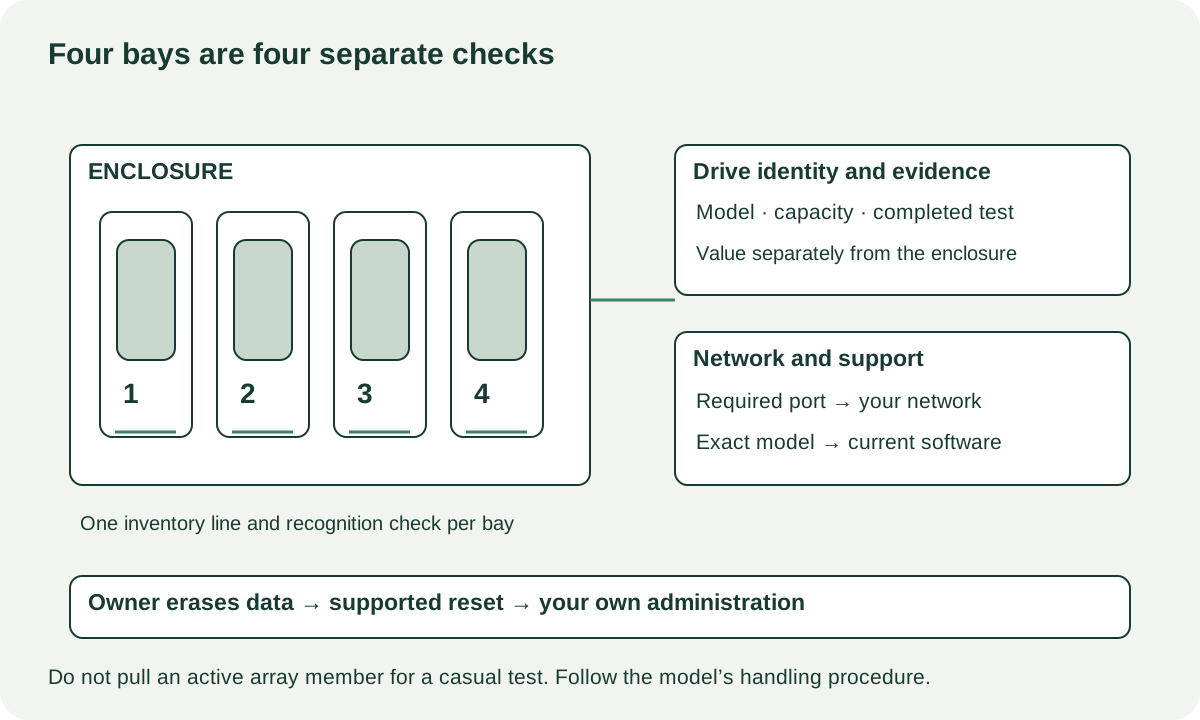
Ask for the exact chassis model, installed memory, software version, power-supply identity and a separate list of every included drive. Record each drive’s model and capacity against its bay number. Check whether trays, screws, keys, network cables and any expansion cards are included. A seller’s original receipt can identify a purchase, but it does not establish that the same drives remain inside.
For a diskless enclosure, arrange a demonstration with a compatible test drive the seller owns and has prepared. Do not insert your only backup disk into an unfamiliar NAS: setup may offer to initialise it. If the seller cannot demonstrate storage recognition, the enclosure’s bay operation remains unverified even if its power light turns on.
Check support before assigning value to the hardware
Look up the exact model in the manufacturer’s current support status and download centre. Synology’s status page distinguishes software support levels; a discontinued sales listing and ended security support are different conditions. Record the result and date. Do the same for the particular packages or features you intend to use, because hardware starting normally does not establish that your required software remains supported.
Drive support is model- and software-dependent. Synology’s current compatibility policy has different rules by product family and drive type, including distinctions for models released from 2025 onward. The useful buying step is to check the actual enclosure, OS version and proposed drive model together. Do not extend a statement about one DiskStation family to every NAS, or rely on an old forum comment as the current policy.
Copy this inventory for each candidate:
| Component | Record | Evidence still needed |
|---|---|---|
| Enclosure | Exact model, RAM, expansion card | Current support page and required packages |
| Bay 1 | Tray present; drive model/capacity or empty | Recognised with an authorised compatible test drive |
| Bay 2 and remaining bays | One line per bay | Individual recognition and accessible connector condition |
| Network | Port type and number needed | Connection at expected negotiated link rate |
| Power and cooling | Exact supply, fitted fans | Ordinary startup and continued operation |
| Included storage | Each drive identity and diagnostic result | Separate condition and erasure plan |
 Enlarge diagram
Demonstrate the enclosure without looking through seller files
Agree on a test share containing only expendable sample files. The seller can open the system’s hardware and storage information while keeping private folder names and user information out of view. You need device identity, bay recognition and test results; you do not need their family photos or business records.
Have the seller start the NAS normally. Observe whether it reaches its ready state, whether fans operate without scraping and whether repeated alarms appear. Inspect trays and accessible sockets while following the manual’s power and removal rules. Do not pull an active array member merely to see what happens. Ask about any missing tray latch, cracked carrier or repaired power connection.
Test every network port that is material to your purchase. Record the link rate shown by compatible equipment, then copy an agreed test file to and from the test share. A slow transfer is a symptom to investigate across the whole chain: host, cable, switch, network configuration, drive and workload. It does not by itself prove that the NAS processor or disk is defective. Conversely, a fast transfer through one port does not clear another untested port.
If you intend to use USB backup, an expansion enclosure or a specific network card, verify its supported relationship in the manual and demonstrate it when it forms a significant part of the offer. A port existing on the back is less useful than your intended job completing through it.
Evaluate included drives as their own purchase
Ask for current diagnostics linked to each included drive, not a single screenshot of a healthy pool. Record the test name, completion date, result and any reported warnings. Read the used-drive guide for how to keep reported counters, read tests and remaining-life uncertainty separate. A short demonstration cannot forecast how long an old disk will run.
Do not add the capacities printed on every drive and call the sum usable protected storage. Decide the supported storage arrangement you want, account for its capacity trade-off and retain a separate backup plan. Redundancy inside the same enclosure does not cover every form of accidental deletion, theft or device failure.
An old populated NAS can make sense when the enclosure itself meets your requirements and the bundled drives have a modest, evidence-based value to you. It is less attractive when the asking price depends on treating every unknown disk as equivalent to a new warranted drive. If you plan to replace them immediately, compare the offer as an enclosure plus your own drive purchases.
Agree what clean handover means
Resetting administrative settings and erasing stored files are different tasks. Synology’s reset documentation explicitly describes reset modes that leave stored data intact. Therefore, “factory reset” in a listing is not enough information to establish that the seller has erased their files.
Have the seller back up what they need, follow the exact manufacturer’s supported removal or erasure process, and release relevant account or remote-access associations. Do not request their credentials. Agree whether drives are being included erased, retained by the seller, or excluded from the sale. Any destructive operation belongs to the owner and needs explicit agreement about the drives involved. If you encounter personal data, stop inspecting it and let the owner resolve the handover.
Your acceptance step is a supported clean setup under your control, using drives you are authorised to initialise. Do not treat temporary access to the seller’s administrator account as completed ownership. If the process cannot be finished during pickup, postpone payment rather than buying an administrative problem you cannot independently resolve.
Compare the complete storage system
Consider a hypothetical pair. Enclosure A costs $190 and includes two drives you do not plan to trust for your intended job. Compatible new storage costs $240, a missing tray costs $25 and collection costs $20: $475 before any separate backup destination. Enclosure B costs $280, has every tray and uses the same $240 storage plan with $10 collection: $530. A is cheaper only if its support and demonstrated bay operation also meet your requirements. These numbers are examples, not NAS or drive prices.
Use the cost calculator for confirmed parts and collection. Put unverified bays, unsupported packages and unresolved resets in your notes, not into a guessed repair allowance. Missing ordinary hardware with a verified quote can support negotiation. An unsupported security requirement, unexplained storage errors or a seller unable to clear ownership should change the candidate.
Before transport, shut down through the supported procedure. Follow the manufacturer’s packing instructions for disks and trays, label any agreed bay positions and keep the unit dry and protected from impact. Your first useful purchase is a supportable storage system you can configure and back up, not simply the largest number of bays in the search results.
Sources
- 01Synology drive compatibility policies
- 02Synology product support status
- 03Synology NAS reset modes