How to buy a used mesh router system you can set up
Quick answer
List the exact model of every mesh node, confirm they work together and check current firmware support. Verify the included power adapters and Ethernet ports, then have the seller remove the devices from their network and demonstrate fresh setup. A three-piece bundle is useful only if those particular units can perform the gateway, satellite and wired-backhaul roles your home needs.
Inventory every unit, not just the box
Ask for the model label on each node and each power adapter. A retail box may originally have held three identical units while the current bundle contains mixed generations or a replacement satellite. Record the model, quantity, ports and adapter for every piece.
Decide which device will connect to your internet equipment. Some mesh products can act as gateways, while others are extender-only products. Check the specific roles in the manufacturer’s manual. If you want wired backhaul, confirm each relevant node has the required Ethernet connection and supports that arrangement.
Check your provider’s requirements before assuming the kit replaces every existing box. You may still need a modem or optical network terminal, and provider-specific settings can affect setup. If you intend to keep the existing router, verify the mesh system’s supported access-point or bridge arrangement and which features that changes.
Make a role map for your own home before counting nodes:
| Position | Required role | Hardware evidence |
|---|---|---|
| Beside modem or optical terminal | Gateway | Supported gateway model and working upstream port |
| Office with existing Ethernet | Wired satellite | Supported backhaul arrangement and enough ports |
| Room without Ethernet | Wireless satellite | Compatible node, power and a feasible placement |
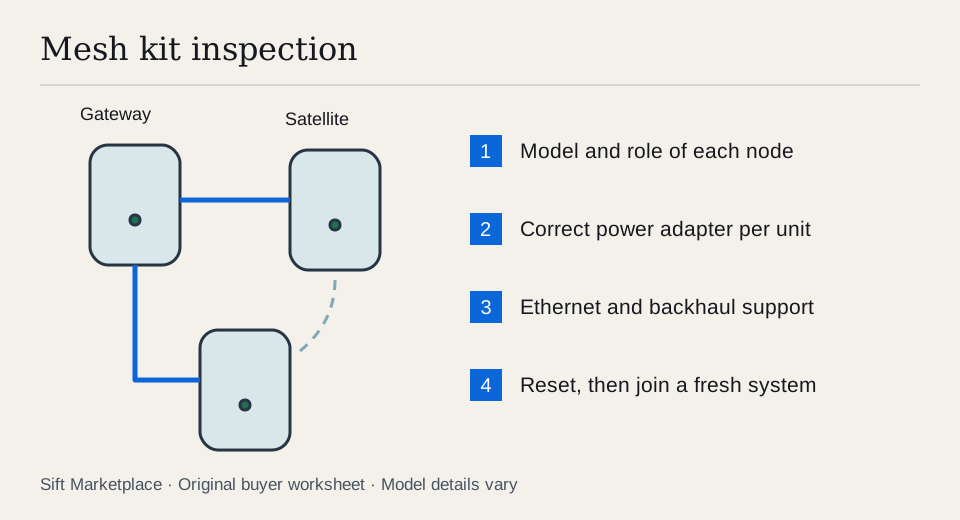
For example, suppose the office has one Ethernet cable from the gateway and you also want to plug in a desktop. A satellite with one Ethernet port cannot automatically provide both connections directly. Check whether your supported design needs a separate switch, a different satellite or another cable route. An extender without Ethernet cannot fill that wired role at all. The three-unit count stays the same while the useful kit changes.
 Enlarge diagram
Check support before paying for older hardware
Find the exact models on the manufacturer’s support and security-update pages. Confirm the setup app works on your phone and that required features do not depend on an unwanted subscription. Avoid relying on a seller’s statement that it “still works perfectly” when the maker no longer supports the device you would put at the edge of your home network.
Do not assume a faster advertised Wi-Fi generation makes every connection faster. Your client device, Ethernet port speeds, internet plan and route between nodes all matter. Write down the slowest relevant link before paying extra for a feature none of your devices can use.
You do not need a complicated network design to shop sensibly. A simple sketch of floors, difficult walls, gateway location and available Ethernet sockets is enough to expose whether the bundle has useful placements and the right number of wired ports.
Demonstrate the hardware, then the transfer
Arrange the reset sequence in advance so the seller does not accidentally disconnect their household before they are ready. Ask them to back up any settings they need. You are checking the devices, not inspecting their network clients, passwords or browsing data.
- Power each node separately. Confirm normal startup using its correct adapter. Check for cracked housings, damaged ports, overheating symptoms or an intermittent power socket.
- Identify each unit in the app. Have the seller show only the model and relevant connection status. Match the units to your inventory.
- Test Ethernet where needed. Use a known-good cable and client device. Verify link and data transfer through the ports you will use rather than inferring that all ports work from one test.
- Test a satellite connection. Verify the second and third units actually join the demonstrated network and carry traffic. Keep a record of which units were tested.
- Remove the seller’s ownership and settings. Have the seller use the maker’s transfer or reset process at the agreed time.
- Verify fresh setup. Confirm the devices can be added to a new system you control before paying. Enter credentials privately and use a temporary network arrangement if necessary.
Eero’s reset instructions explicitly distinguish rebooting, soft reset and hard reset. The hard reset clears user data and removes the device from the network, while a soft reset retains it. Eero’s handover guidance also points to removal or hard reset before giving units away. Use the matching process for your brand; a flashing light by itself is not proof of successful transfer.
If a device remains tied to an account, provider or management system, resolve that with the seller and manufacturer before purchase. Do not buy it on the assumption that an unofficial bypass will make it usable.
Interpret a speed test carefully
A live test is useful for detecting a node that drops out or cannot carry traffic. It cannot predict whole-home coverage from a tabletop demonstration. Test with the same client and route when comparing nodes, and distinguish internet throughput from a local transfer if you know how to measure both.
If a result is poor, try a known-good cable and a direct connection before blaming the mesh. If you cannot isolate the cause, record it as unresolved. A seller moving the client beside the gateway does not demonstrate that the distant satellite works properly.
Keep the test repeatable. Label the physical units A, B and C in your notes, then record which one acted as gateway, which carried satellite traffic and which Ethernet ports were used. If all three cases sit beside the gateway and the client remains connected to the gateway, an ordinary speed result may say little about B or C. Use the manufacturer’s app to confirm the relevant path, without opening the seller’s personal client information.
A bundle that joins your fresh network and fills all three roles is ready for a home placement trial. A missing verified adapter is a price adjustment. A node that cannot join, an unresolved provider association or a required unsupported feature is a reason to stop treating the bundle as complete. Do not value an untested third unit at the same amount as the two that worked.
| Question | Why it matters |
|---|---|
| Are all nodes the exact advertised models? | Mixed kits may have different ports and capabilities |
| Are power adapters correct and included? | Replacements add cost and must match specifications |
| Can every node join a new system? | Existing operation does not prove transfer |
| Is firmware support current? | Network hardware needs a supported maintenance path |
| Does wired backhaul work on these units? | Wireless coverage claims do not answer this |
| Are required features included without a plan? | Subscription assumptions can change ongoing cost |
Compare complete kits with the same role
An illustrative $100 three-node kit requiring two $25 adapters totals $150 before cables and collection. A $140 complete kit may be a better purchase, provided its actual models meet the same requirements. The example is arithmetic, not a valuation. Use the listing comparison worksheet for your actual bundle inventory.
Sift, a free Facebook Marketplace filter and scam checker that also works on Kijiji, can narrow model searches on Chrome on a computer. Required words help distinguish a complete system from a single satellite; exclusions need care because “no subscription required” contains “subscription.” Recorded prices help you follow the shortlist while you verify every node.
Questions people ask
Can different mesh router brands work together as one mesh?
Do not assume so. Check the manufacturer’s explicit compatibility guidance for the exact models and features. Sharing a Wi-Fi generation or an Ethernet connector does not establish mesh interoperability.
Is restarting an eero enough before selling it?
No. Eero distinguishes a reboot and soft reset from a hard reset or removal from the network. Its hard-reset guidance says it clears user data and removes the device from the network. Follow the instructions for the actual model.
Does a quick speed test prove the mesh will cover my house?
No. It tests one connection in one environment. Walls, node placement, interference, internet service and backhaul affect the result. First prove every unit works and then plan placement for your home.
Sources
- 01eero How to reboot or reset an eero
- 02eero Giving someone extra eeros