How to test used speakers and match them to your system
Quick answer
Identify whether the speakers are passive, powered or app-dependent, then confirm the exact models suit your system. Inspect cabinets, drivers and terminals and listen to each speaker separately at a sensible level. Test every input you need. For smart speakers, verify current app compatibility and complete the manufacturer’s ownership-reset process before paying.
Identify the type and the exact pair
Passive speakers need an external amplifier. Powered speakers include amplification, sometimes in only one speaker of a matched pair. Smart speakers add software and network requirements. These categories have different missing-part and compatibility risks, so start by identifying which one is being sold.
Ask for the model label on every speaker. Check whether the pair matches and whether replacement drivers or amplifiers have been fitted. Similar cabinets can contain different revisions or improvised repairs. A speaker sold as the passive half of a powered pair may require its specific partner and cable; do not assume it is a complete independent system.
For passive speakers, compare the published impedance and the amplifier’s supported load, channels and intended use. Klipsch’s amplifier guidance emphasises suitable amplification and impedance compatibility. Avoid choosing solely by a large wattage number printed in the listing.
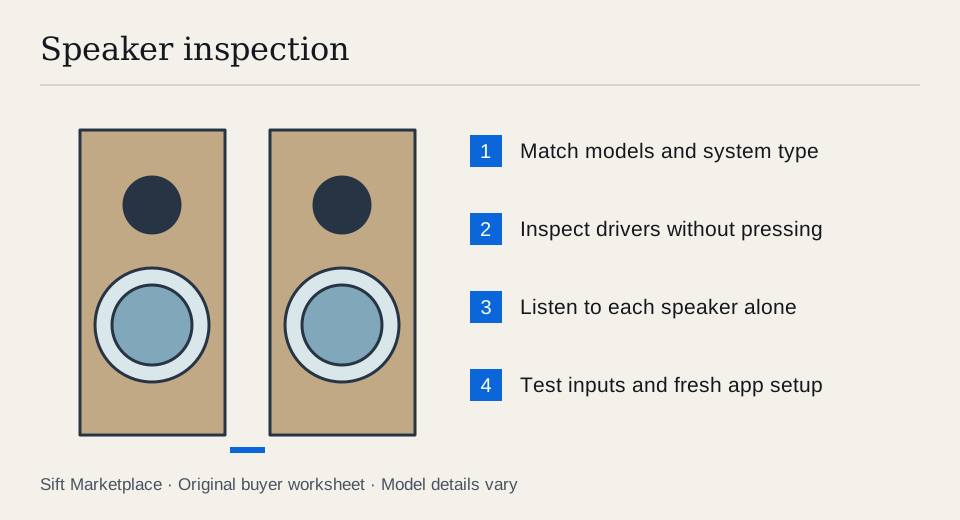
Draw the system you are actually buying: source → supported input → amplification → left and right drivers. Include power and any inter-speaker connection. For a powered pair, establish whether the second enclosure uses ordinary speaker wire, a proprietary cable or its own power. Count the matching cable and partner as essential where the design requires them.
A pair that needs its original powered partner can look like two independent bookshelf speakers in a photograph. A single smart speaker may not form the stereo pair or home-cinema position you intend. Verify the exact supported role in the manufacturer’s instructions, then demonstrate that role. Counting matching boxes is not enough.
 Enlarge diagram
Look behind the grille, with permission
Ask the seller to remove detachable grilles normally. Inspect cone surfaces, surrounds, tweeters and mounting screws. Look for tears, crumbling material, dents, obvious glue repairs and mismatched components. Do not press cones, pull domes back into shape or remove drivers.
Inspect cabinet seams, bases and ports for swelling, cracks and loose parts. Check terminals for broken posts or corrosion. If a model has multiple terminal pairs, verify any required links are present and connected as the manual describes. A missing link can affect playback but should be resolved before evaluating the sound.
On powered models, check the adapter or mains lead, controls and input sockets. Keep the enclosure closed and do not continue a demonstration if there is smoke, a burning smell or unsafe wiring. A scratched finish is negotiable; an electrical fault needs proper assessment.
Listen in a way that separates speakers from the room
Bring familiar music with voice, bass and higher-frequency detail, plus the source connection you will use. Begin at low volume. Avoid extreme bass tones, maximum-volume demonstrations or placing your ear directly against a driver.
- Play one speaker at a time. Use the same source and sensible level. Listen for missing frequency ranges, rattles, crackling and obvious imbalance.
- Compare the second speaker. Similar placement helps. A corner can change bass dramatically, so do not mistake every room difference for a driver fault.
- If one sounds wrong, isolate the route. With equipment powered off before reconnecting, swap the relevant cable or amplifier channel using the correct setup. See whether the problem follows the speaker.
- Listen to the pair together. Check ordinary stereo playback and a voice centred between them. Confirm the wiring follows the maker’s polarity guidance.
- Increase to a normal listening level. Look for faults that appear during ordinary use, not only at a whisper. Stop if sound becomes distressed.
- Test each required powered input. Analogue, optical, USB, Bluetooth and network audio are separate features. A successful Bluetooth song does not prove the optical input works.
- Leave them running briefly and recheck. Intermittent cutouts or control noise may appear after warming up.
If the seller cannot demonstrate both speakers individually, record the gap. A good pair can hide a weak tweeter or channel fault more easily than an isolated comparison.
Use a small comparison record for each speaker: source track, connection, amplifier channel, approximate placement and observed issue. Suppose the left speaker sounds dull. With the equipment safely off before changing connections, move that speaker to the known-good route. If the dull sound follows the cabinet, the cabinet or its components need assessment. If it stays with the original route, the amplifier, cable or source still needs checking. Neither result identifies a replacement part by itself.
Listen at the volume and distance you can use at home. A loud demonstration in a large showroom-like space can hide whether the controls behave well at a desk. For a subwoofer, test its intended input, level and normal integration separately; bass from the main speakers does not demonstrate the subwoofer. Accept cosmetic wear you can see, negotiate a confirmed missing cable, and obtain a repair scope before discounting a nonworking driver as a minor omission.
Check smart-speaker software before valuing the hardware
Sonos’ compatibility table distinguishes products supported by its current app, the older S1 app or both. Identify the exact generation and your intended system before buying an apparently matching speaker.
Sonos’ reset guidance says a factory reset removes registration and saved service information and is commonly used before transferring ownership. Have the seller handle their own account removal at an agreed point, after the audio test. Then demonstrate setup on a system you control. Do not browse their music accounts or accept their login as part of the purchase.
For other brands, check current support and handover instructions directly. A reset is not proof of continued service support, and an older network speaker may have limitations even while its amplifier and drivers work. Verify the functions you need through the current supported route.
Build the complete listening budget
If records will be your main source, compare the whole playback chain. The used-vinyl checklist helps separate pressing identity and groove condition from sleeve appearance, so a noisy test record does not lead you to blame a working speaker.
| Speaker type | Possible required additions |
|---|---|
| Passive pair | Suitable amplifier, speaker cable and stands |
| Powered pair | Correct power adapter and inter-speaker cable |
| Smart speaker | Compatible network and current supported setup device |
| Repaired speaker | Correct replacement component and qualified work |
| Subwoofer | Suitable signal connection and demonstrated controls |
An illustrative $150 passive pair plus a $100 amplifier and $30 cables totals $280. A $240 powered pair may cost less for a simple desk setup, although its inputs and performance still need to suit you. The figures are example inputs, not market recommendations. Use the comparison worksheet to map your complete system.
Secure speakers for transport without pressure on exposed drivers. Keep grilles and spikes protected and avoid lifting by a port, terminal or driver opening. Check the receiver guide if you are building a larger system.
Sift, a free Facebook Marketplace filter and scam checker that also works on Kijiji, helps focus model searches on Chrome on a computer. Use listing filters and recorded prices to find candidates worth hearing in person.
Questions people ask
Can passive speakers connect directly to my phone?
They need suitable amplification between the source and speakers. Powered speakers have amplification built in, but still need a compatible input. Identify the speaker type and complete signal path before buying.
Is a pushed-in dust cap always a broken speaker?
It is visible damage, but its effect depends on the driver and construction. Do not poke it or attempt a repair at pickup. Listen carefully and obtain an assessment or replacement quote rather than assuming it is either harmless or fatal.
Can an older Sonos speaker join any Sonos system?
No. Sonos publishes app-version compatibility by product and generation. Check the exact model against the system you use, then verify setup. A factory reset does not make incompatible generations universally compatible.
Sources
- 01Klipsch Choosing an amplifier or receiver
- 02Sonos App version compatibility
- 03Sonos Factory reset before transfer