How to buy a used AV receiver for your TV and speakers
Quick answer
Match the receiver’s exact HDMI, audio and speaker capabilities to your equipment, then demonstrate the source-to-receiver-to-TV path you will use. Test every required speaker channel and TV audio return where relevant. Check the remote, calibration microphone and network setup. A receiver playing radio in stereo does not prove its HDMI board or surround channels work.
Make a connection map before reading the listing
List your TV or projector, game console, streaming device and other sources. Record the video modes and audio formats you actually need, then draw the path between them. This prevents buying a receiver that amplifies sound perfectly but cannot pass the picture your source produces.
Get the exact model and region from its label. Find the manufacturer’s manual and specifications, including limitations by input, output and firmware. “4K,” “Atmos” or “HDMI” alone is not a complete description of bandwidth, channels, speaker layout or audio return.
The Denon AVR-X1700H manual separates TV connections, ARC/eARC, speaker layouts and video-signal behaviour. Use the corresponding manual for the model you are considering. Do not transfer specifications from a similar-looking receiver one year newer.
Make one row for each route instead of one broad “HDMI works” tick:
| Your use | Path to demonstrate |
|---|---|
| Console picture and sound | Console → named receiver input → main output → display, at your required mode |
| TV streaming app sound | TV app → supported ARC/eARC or optical route → receiver → required speakers |
| Record player | Correct phono/line stage → supported analogue input → front channels |
| Another room | Supported source → assigned zone output → that room’s amplification/speakers |
For example, the seller may show a console at an ordinary video mode while your plan depends on a higher refresh rate through a particular port. That clears only the demonstrated route. Connecting the console directly to the TV is a possible alternative design to verify, including audio return; it is not evidence that the receiver can pass the original mode.
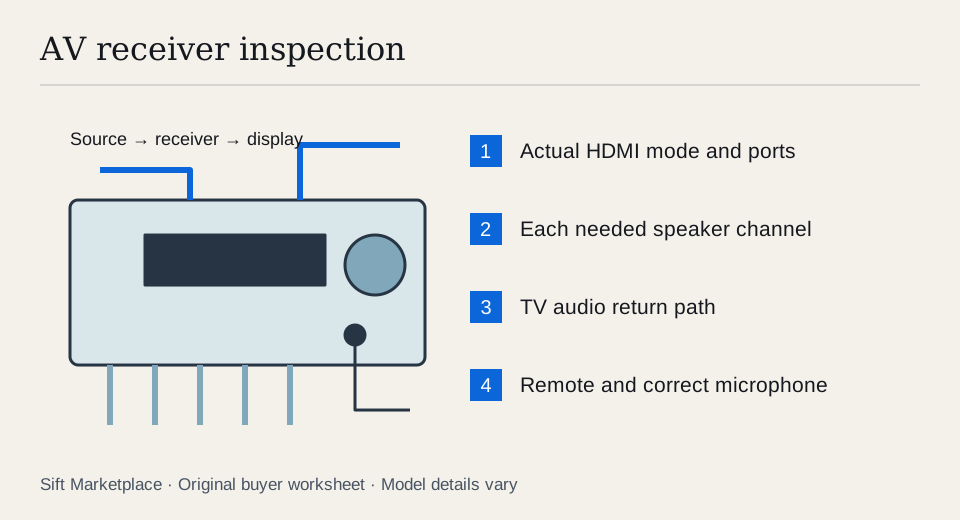 Enlarge diagram
Confirm the speaker arrangement is supported
Count powered amplifier channels separately from processing claims and preamp outputs. Decide whether you need surround speakers, height speakers, a second zone or only stereo. Check how the receiver assigns its channels; using a second zone may change the available main-room layout on some models.
Match speaker impedance to the receiver’s documented support and setup. Denon’s speaker-connection precautions require power to be disconnected before speaker wiring and warn against stray wire contact. Follow your model’s instructions rather than reconnecting speakers while the amplifier is live.
Ask which calibration microphone, remote and antennas are included. A replacement remote may handle volume but not every setup function. A generic microphone with the same plug may not suit the calibration system. Price exact replacements before deciding that a receiver is complete.
Inspect it cold and leave ventilation space
Check the power lead, speaker terminals, HDMI sockets and case for damage. Look through ventilation openings without inserting anything, and ask about overheating, shutdowns, repairs and liquid exposure. Do not open the housing; internal electrical components are not part of a casual pickup test.
Arrange a stable surface with the ventilation clearance specified in the manual. A hot receiver squeezed inside a closed cabinet makes troubleshooting harder and can be an unsuitable demonstration setup. Ask the seller to start it from cold and note error messages or unexpected protection shutdowns.
Test the signal routes you intend to use
- Check basic controls. Use the front panel and remote to select inputs, change volume and reach the setup display. Confirm the remote belongs to the unit or supports its needed functions.
- Play through each required speaker channel. Use the receiver’s normal channel-test function or a known test source at low volume. Verify the physical output, not just a diagram on screen.
- Connect your HDMI source through the receiver. Use known-good cables to the intended display. Check the source’s actual output mode and the display’s reported input.
- Try all HDMI inputs you need. A working input does not clear a second damaged port. Test the main output and any secondary output that matters.
- Verify TV audio return. Demonstrate the exact ARC or eARC connection with compatible equipment and settings. If the pickup display cannot test it, mark it untested.
- Play real content with the required sound format. Confirm the receiver recognises the incoming signal and routes it as expected. A stereo stream does not establish a surround decoder’s full operation.
- Run for an ordinary viewing interval. Watch for intermittent video loss, channel cutout and shutdown as it warms. Avoid maximum-volume stress tests.
An HDMI handshake failure can involve a cable, source setting, display or receiver. Try a known-good simpler path to isolate it. If the intended setup still fails, do not buy on the assumption that a future firmware update or special cable must solve it.
Check network and older analogue features separately
If streaming or app control matters, confirm current service support and setup with the exact model. Ask the seller to remove their personal accounts and reset network settings at the agreed point after the hardware demonstration. Enter your own credentials privately.
For a turntable, check whether the receiver has the phono input required by your cartridge or whether an external preamp is needed. For older video equipment, verify the manual’s conversion and output rules rather than assuming every analogue input appears on HDMI. The turntable guide covers the audio-stage distinction.
| Requirement | Evidence |
|---|---|
| Video | Source, input, output, resolution and refresh rate tested |
| Sound | Actual incoming format and speaker channels heard |
| TV return | ARC/eARC route demonstrated or marked unknown |
| Setup | Remote and correct calibration microphone |
| Network | Supported service and new setup possible |
| Reliability | No observed cutout during the agreed running test |
A missing channel needs an orderly recheck. Verify the selected speaker layout and source, then use the documented channel test. Change a known-good speaker or cable only with the power disconnected. A channel that remains silent in its normal test is unresolved; do not price the receiver as fully working because stereo playback is fine.
Likewise, distinguish a video limitation from a dropout. A documented unsupported mode can make a healthy receiver unsuitable for your setup. Repeated blackouts in a supported tested path require isolation and assessment. A factory reset can remove settings, but the seller should demonstrate the resulting normal setup before payment. Keep the old calibration and personal network information private, and expect to configure the receiver for your own room.
Compare the usable system cost
An illustrative $180 receiver needing a $45 microphone, $30 remote and $25 cable totals $280. A $250 complete receiver may be cheaper to set up if it supports the same requirements. These are sample costs, not current quotations. Use the cost calculator, and do not assign a small fixed repair allowance to an undiagnosed HDMI fault.
Sift, a free Facebook Marketplace filter and scam checker that also works on Kijiji, helps narrow local model searches on Chrome on a computer. Use listing-word filters and recorded prices to focus on receivers that can pass your actual connection test.
Questions people ask
Does an HDMI socket mean a receiver supports my 4K gaming setup?
No. Check the exact resolution, refresh rate, HDR and other required features for the specific inputs and output. Test your intended source and display through that path before buying.
Can I use any calibration microphone with a used receiver?
Do not assume so. Find the microphone model specified for that receiver and calibration system. A physically fitting plug does not establish the correct measurement response.
Can I send video straight to the TV and audio back to an older receiver?
Sometimes, but support depends on the TV, receiver, audio-return connection and formats. Verify the exact ARC, eARC or optical route and demonstrate the formats you need. It is not a universal workaround.