How to buy a used projector that suits your room
Quick answer
Match the projector’s exact model and throw range to your room, then watch it run on a plain surface using your own source. Check focus across the picture, uniform colours, HDMI stability and fan noise. Treat lamp hours as a resettable maintenance record, not proof of condition. Include any replacement lamp, remote, mount and screen in the cost.
Fit the image to the room before judging the deal
Measure the available image width, the lens-to-screen distance and where the projector could actually sit or mount. Account for doors, seating, ventilation clearance and the route for power and video cables. A cheap projector with the wrong throw range can force an awkward installation or a smaller picture than you wanted.
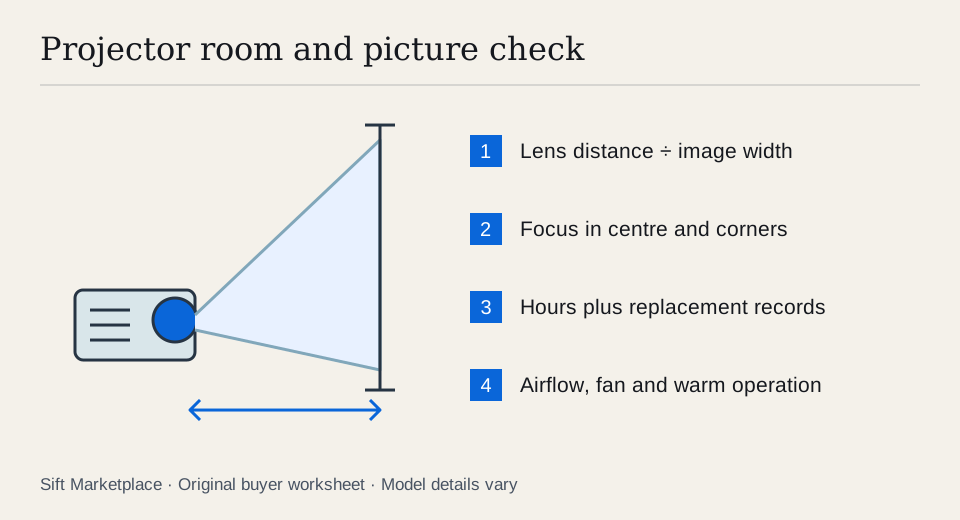
Read the exact model’s installation manual. Throw ratio relates lens distance to image width, but zoom range, lens shift and mounting offset determine where that image can go. Use the manufacturer’s calculator when available. Do not assume a short-throw unit is ultra-short-throw, or that digital keystone can compensate for any placement.
For illustration, a specified throw ratio of 1.5 requires about 3 m between the lens and screen for a 2 m wide picture. That is a simple planning example, not a specification for the projector you are considering. Check the real model’s range and measurement reference before arranging collection.
Write the room plan in four lines: desired image width; available lens position; viewing light conditions; and source/audio route. Include whether the unit must be moved after every use. A ceiling installation adds mounting and cable-routing costs; a portable setup adds setup time, suitable support and protection in transit.
Do not compare a demonstration in a dark room with your intended daytime living room as if they were identical. Arrange conditions that approximate your use, or retain the uncertainty. For a short-throw or ultra-short-throw setup, confirm the documented placement and screen requirements before assuming an existing wall or cabinet will work. A seller’s screen may be contributing to the result you like but may not be included.
 Enlarge diagram
Identify the light source and its replacement path
Ask whether the model uses a replaceable lamp, LED or laser light source, and verify that in its documentation. Find the exact replacement lamp assembly and a credible supplier if it is a lamp model. A generic bulb advertised for many projectors is not automatically equivalent to the specified assembly.
Ask when the lamp was replaced and whether there is a receipt. Epson explains that its lamp timer is reset after replacement and should not be reset without a new lamp. Consequently, low displayed hours alone cannot establish a lamp’s age. A laser model’s hour display also does not replace a condition test or establish that its light source is economical to repair.
Epson’s maintenance documentation points users to lamp-use information in the menu. Photograph only the relevant screen with permission, avoiding personal network details. Record hours, mode and visible warnings alongside the seller’s maintenance history.
Run a picture test that exposes the awkward faults
Arrange a suitably dim room, a plain wall or screen and enough time for normal warm operation. Bring a known-good HDMI cable and the source you intend to use. Do not stare into the lens or obstruct the ventilation. Ask the seller to operate the machine and keep the housing closed.
- Start from cold. Watch the startup sequence for warnings, failed ignition, flickering or unexpected shutdown. Listen before a film soundtrack masks the fan.
- Project a grid or small text. Focus the centre and inspect all corners. Align the projector normally before blaming soft corners on the optics.
- Display white and neutral grey. Look for strong colour patches, dust-like shadows, bright dots and dark areas. Then inspect red, green, blue and black images.
- Watch familiar moving footage. Check dark scenes and faces, not only a bright demonstration reel. Some viewers notice display artefacts more than others, so your own viewing matters.
- Test the intended HDMI mode. Confirm the source’s output and the projector’s reported input. If gaming matters, try the actual device; a static desktop does not test response during play.
- Let it run, then recheck. Look for focus drift, intermittent image and excessive noise as it warms. Follow its shutdown and cooling procedure before packing.
A persistent patch in the same place across sources is a reason to stop and investigate. Changing the cable can isolate one connection problem, but it cannot clear a fault that remains in the projector’s own menu or test pattern.
Keep a test record: source and cable, input mode, image width, approximate lens distance, room light, projector picture mode, displayed hours and how long it ran. That makes a second candidate easier to compare. “Bright enough” on a small image in a dark room is a different observation from “bright enough” at your intended size.
If the picture fails, ask what remains to isolate. A different source can help with an input problem; it does not prove a persistent optical patch is cheap to repair. A new lamp may be a known maintenance item, but do not assume it cures focus, colour or shutdown faults. Buy when room fit and ordinary operation are demonstrated; negotiate a verified remote or lamp requirement; pass when an essential optical or thermal issue remains unexplained.
Count what is missing from the bundle
| Item | Why it matters |
|---|---|
| Correct remote | Setup access, input selection and image adjustments |
| Mount and hardware | Fit, load suitability and safe positioning |
| Lamp or service allowance | A replacement quote can change the buying decision |
| Video cable | Required length and signal support for the route |
| Screen | Suitability for the projector type and room lighting |
| Audio path | Projector speakers may not meet your needs |
Check the receiver and speaker guides if sound will come through a separate system. A bargain projector can be the smallest part of the final setup cost.
As an illustrative comparison, a $220 projector plus a $160 verified lamp assembly and a $35 remote totals $415. A $380 candidate with a demonstrated good picture and the required accessories deserves consideration. The example does not predict lamp life or market value; replace each number with an actual quote and use the cost calculator.
Search by model and keep the inspection local
Search the exact model, including its suffix, after checking room fit. Sift, a free Facebook Marketplace filter and scam checker that also works on Kijiji, helps narrow listing words and follow recorded prices on Chrome on a computer. Keep enough candidates to compare a live picture, rather than letting a low asking price decide before you see it running.
Questions people ask
Can a used projector’s lamp hours be reset?
Some models allow the user to reset the lamp timer after replacement. Epson explicitly warns against resetting it without replacing the lamp. Ask for replacement records and judge the actual picture rather than trusting the counter alone.
Is a projector that accepts 4K necessarily a native 4K projector?
No. Check the manufacturer’s native display specifications and supported input modes separately. A supported input resolution does not by itself describe how the image is produced on screen.
Should I buy a projector without a remote?
Only after confirming you can access the needed controls and obtain a compatible replacement if required. Price that replacement before buying; a generic remote may not expose every setup function.
Sources
- 01Epson Resetting the lamp timer
- 02Epson Projector lamp maintenance