Used Windows laptops: battery, locks and a clean handover
Quick answer
Buy a used Windows laptop only after its exact configuration fits your work, the hardware demonstrates your required functions, and the seller can complete a clean handover. Check battery evidence alongside an unplugged test, verify the charger and hinges, and distinguish Windows activation from firmware passwords and organisation management. A laptop reaching the desktop is not enough.
Decide what this laptop must do before comparing prices
A thin business laptop, a large gaming laptop and an inexpensive student laptop can all advertise “16 GB RAM and an SSD.” That does not make them interchangeable. Write down your actual workload: a browser with several work tabs, video calls, the software you must install, any external displays and the time you expect to spend away from a socket. Add the heaviest task you genuinely need rather than the most impressive benchmark in the listing.
For each candidate, ask for the full model or machine-type number and the installed processor, memory, storage and display specification. A model family may have several screen panels and processor generations. The original factory specification is useful, but it does not establish which memory or drive is inside a used unit today. Ask the seller to show the installed configuration live, with personal information out of view.
Check the manufacturer’s manual for upgradeability before calling a small memory capacity an easy fix. A laptop with soldered memory is a different purchase from one with accessible supported memory slots. Likewise, a second storage bay mentioned in a family manual may require a cable, bracket or a different battery configuration. Price the exact configuration you can confirm.
Support matters to the purchase in its present year. Microsoft ended standard Windows 10 support on October 14, 2025. A listing saying “Windows 11 installed” still does not prove official hardware eligibility. Check Microsoft’s Windows 11 requirements and the manufacturer’s support page for the specific laptop; use Microsoft’s compatibility check where appropriate. Do not base a long-term work purchase on an unexplained installation workaround. The Windows 10 support notice is the starting point for any claim about continued updates, rather than an old seller screenshot.
Ask for a demonstration that answers your questions
Send a compact request before travelling:
Could you confirm the full model, processor, installed RAM and SSD, screen resolution, and the charger model or wattage? Has it had battery, screen, hinge or liquid-damage repairs? I’d like to check the ports, use it briefly on battery, see the available battery report and firmware settings, and agree a clean setup before payment. If it came from a workplace or school, has that organisation released it from management?
Ask whether the seller is able to remove any setup passwords. Do not ask for their personal password or recovery key. A seller who needs time to back up files and obtain authorised company release may be legitimate, but the appropriate next step is to wait for completion, not buy the unresolved problem.
Bring a known-good USB device containing only your test files, headphones if required, your intended display cable or dock, and a small checklist. Use documents and media you own. Avoid signing into email, banking or work accounts on the seller’s existing installation. A private demonstration account or the seller operating the device lets you inspect functions without searching their files.
 Enlarge diagram
Inspect the parts that make a laptop expensive to repair
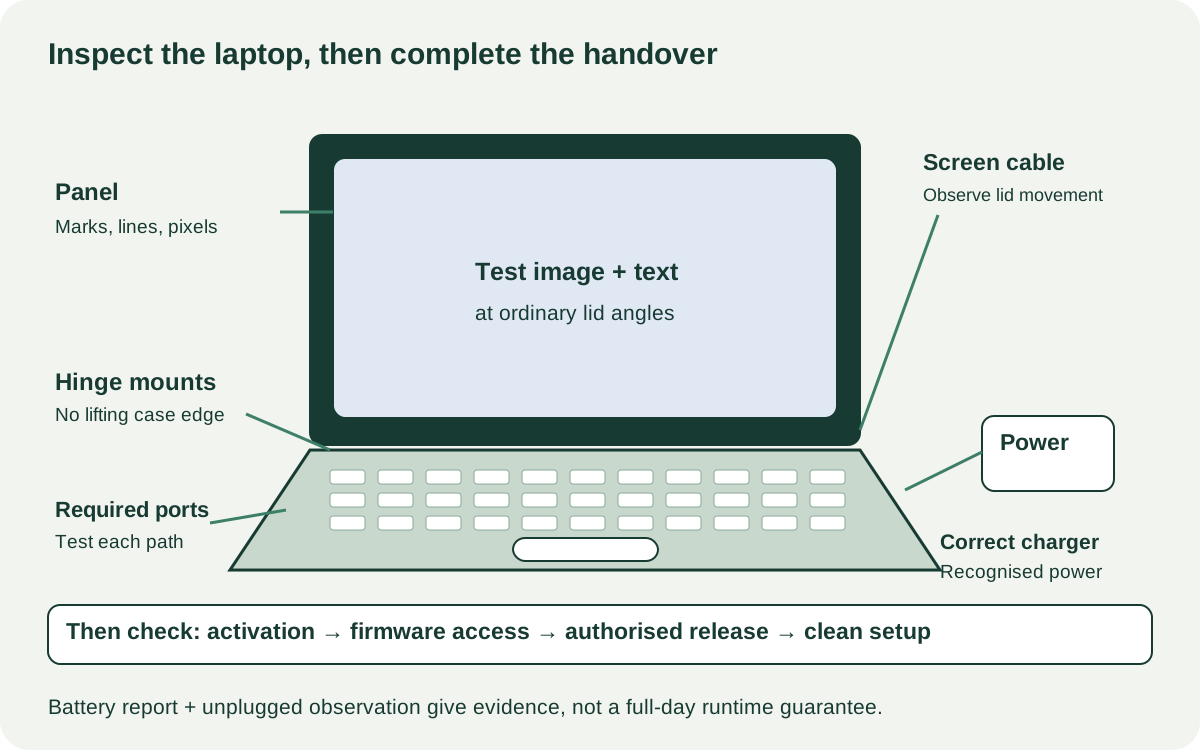
Start with the laptop shut down and disconnected. Look along the bottom seam, palm rest and trackpad for distortion or separation. If the battery appears swollen, stop the demonstration and leave handling or repair to a qualified service provider. Do not press the case flat, puncture anything or keep charging it to complete your test. Microsoft includes swelling precautions in its battery guidance.
Open and close the lid normally while watching the hinge mounts and surrounding case. Resistance should be evaluated against the model’s design, but a lifting case corner, cracking sound or hinge pulling away is a repair issue. A loose hinge screw and a broken internal mounting point can look similar from outside. Avoid accepting “just needs tightening” without a diagnosis.
Check the keyboard in a blank document, including the modifier keys, numbers and any keys essential to your work. Test the touchpad’s movement and clicks separately. On a convertible, try the supported modes according to its manual; do not force the hinge beyond its intended travel. Inspect the webcam, microphone and speakers with a short local recording and playback. Delete your test recording afterward.
Show plain light and dark images and look for pressure marks, coloured lines, uneven patches and damaged pixels. Adjust brightness, then move the lid through ordinary working angles to see whether the picture cuts out. A screen working only at one angle is not cleared by a perfect screenshot. If the touchscreen matters, demonstrate taps and dragging across the usable area.
Check vents for obstruction and listen while the laptop performs your ordinary task. Fan noise alone does not diagnose a fault. Repeated shutdowns, visual corruption or a device that cannot complete the task are enough to pause the purchase. Do not dismantle the cooling system or improvise a sustained stress test at pickup. A specialist assessment may be worthwhile for an expensive gaming or workstation laptop.
Treat battery condition as several pieces of evidence
A percentage beside the battery icon means current charge, not remaining useful capacity. Ask the seller to generate a current Windows battery report using Microsoft’s documented procedure, or show the manufacturer’s battery information where available. Compare reported full-charge and design capacity, noting whether the battery is original or replaced and whether the history belongs to the current battery. Missing or inconsistent information is uncertainty, not automatically proof of fraud.
A hypothetical example: a report shows a design capacity of 60 Wh and a reported full-charge capacity of 42 Wh. The ratio is 70%. This is a useful description of reported capacity at that moment; it does not promise 70% of a new laptop’s runtime or identify a universal pass/fail threshold. Your screen brightness, workload, wireless use and power settings affect runtime, and a short pickup cannot establish a full discharge cycle.
Unplug the charger during a normal task and record the start and end charge, elapsed time, brightness setting and what was running. Watch for an abrupt fall, unexpected shutdown or a laptop that immediately dies. Do not extrapolate five quiet minutes into an eight-hour workday. If your requirement is several hours of dependable mobile work, include a verified replacement-battery quote or choose a seller with suitable written return terms.
Reconnect the supplied charger and verify that the laptop recognises suitable external power. Check the cable and connector for damage and confirm its compatibility in the model documentation. Dell’s BIOS guidance illustrates why the recognised adapter and battery status can be worth checking; its menu instructions are model-dependent. A connector fitting, or a charging symbol appearing, does not establish that the supply is appropriate for the laptop under load.
Test your whole working setup, including sleep and wake
Use each port you expect to rely on. A USB-C socket may provide a different combination of data, display output and charging from another socket with the same shape. Check the laptop manual and the dock buying guide before assuming it will drive two monitors or replace the original charger.
Connect your intended display and peripheral together. Confirm the actual selected resolution and refresh rate, then try normal sleep and wake. Check Wi-Fi using an agreed network without viewing saved network passwords. If you need Bluetooth audio, an SD-card slot or Ethernet, test that function rather than assuming a general diagnostics pass includes it.
A manufacturer’s built-in diagnostic result can support the demonstration. Record which test ran and any error codes. “Passed diagnostics” without the test name or a matching device identity adds little. Even a valid pass does not guarantee an intermittent problem will never recur.
Keep three kinds of access separate
| Check | What it tells you | What it does not settle |
|---|---|---|
| Windows activation | The installed edition reports its activation status | Hardware ownership, organisation release or all licensing rights |
| Firmware or BIOS access | The authorised seller can access needed settings without an unresolved password | Whether cloud management will reappear during setup |
| Clean connected setup | The machine can proceed through the agreed setup without demanding the old organisation | Every hidden hardware defect or future support period |
Microsoft’s activation guidance explains the activation status and digital-licence process. Check the edition you expect to use. Do not pay extra for workplace software, an enterprise licence or a seller’s personal account without a valid transferable entitlement.
For a former work or school computer, get the release completed by the authorised organisation. Microsoft says devices permanently leaving an organisation should be deregistered from Windows Autopilot. Removing a user profile or showing a Windows desktop is not evidence that this has happened. If setup unexpectedly requests a particular organisation’s sign-in, stop and have the seller resolve it through that organisation. Avoid bypass instructions or promises to fix it after payment.
Agree the sequence before the visit: hardware demonstration, seller backup and authorised reset, connected setup check, then payment if the agreed conditions are met. A reset can take time, so arrange a second visit or another practical sequence instead of rushing a process still running. The seller should use Microsoft’s reset instructions and choose an appropriate data-removal option. Do not interrupt it or inspect residual personal files. Complete your own clean setup before putting sensitive data on the computer.
Convert the inspection into a buy, negotiate or pass decision
A price reduction can compensate for a known cosmetic mark or a priced replacement battery. It does not resolve an organisation lock, a disputed model identity or an undiagnosed shutdown. Separate faults you can cost from prerequisites that must be completed by the seller.
| Finding | Decision before payment |
|---|---|
| Exact configuration and supported OS meet your needs; required functions work; handover completes | Candidate to buy at a sensible complete cost |
| Battery works but mobile capacity is inadequate; correct replacement and fitting are quoted | Negotiate using the installed replacement cost and your inconvenience |
| Missing charger with confirmed compatible replacement | Include its delivered cost, then demonstrate the laptop using suitable power |
| Hinge mount lifts or charging is intermittent | Obtain a repair diagnosis; do not assume a cheap screw or cable fix |
| Firmware password unresolved or organisation sign-in returns | Seller must resolve it before the sale |
| No powered demonstration permitted | Treat condition as unverified; choose another candidate for ready-to-use work |
Consider two hypothetical offers. Laptop A is $360, with $95 for a quoted battery replacement, $45 for a compatible charger and $20 collection: $520. Laptop B is $490 with the right charger and acceptable observed battery behaviour, plus $10 collection: $500. Neither total predicts future repairs, but the cheap headline price has disappeared. Enter your own quotes in the used-buying cost calculator, with the battery work under repairs and the absent charger under missing parts.
If A also has unresolved management, do not add a speculative “unlocking fee.” It fails a handover requirement. If B cannot meet your mobile runtime needs, it is not automatically the better laptop either. The decision is whether a confirmed, usable configuration fits your work at a total you accept.
Record the model, included accessories, demonstrated functions and any agreed defects on the purchase record. Keep seller identity out of your comparison notes. Sift can help narrow Marketplace and Kijiji results using the model words that matter and show recorded price changes while you browse; inspection and transfer still happen with the seller. Use the listing comparison tool to keep the serious options and unresolved questions together.
Sources
- 01Microsoft Windows 11 system requirements
- 02Microsoft Windows 10 support has ended
- 03Microsoft Caring for your battery in Windows
- 04Dell Check AC adapter and battery status
- 05Microsoft Activate Windows
- 06Microsoft Learn Windows Autopilot registration overview
- 07Microsoft Reset your PC