Check account locks and subscriptions before buying a used device
Quick answer
A working demonstration or factory reset does not prove transfer. Have the authorised owner complete the official release, verify buyer setup, and check the service required for your intended function.
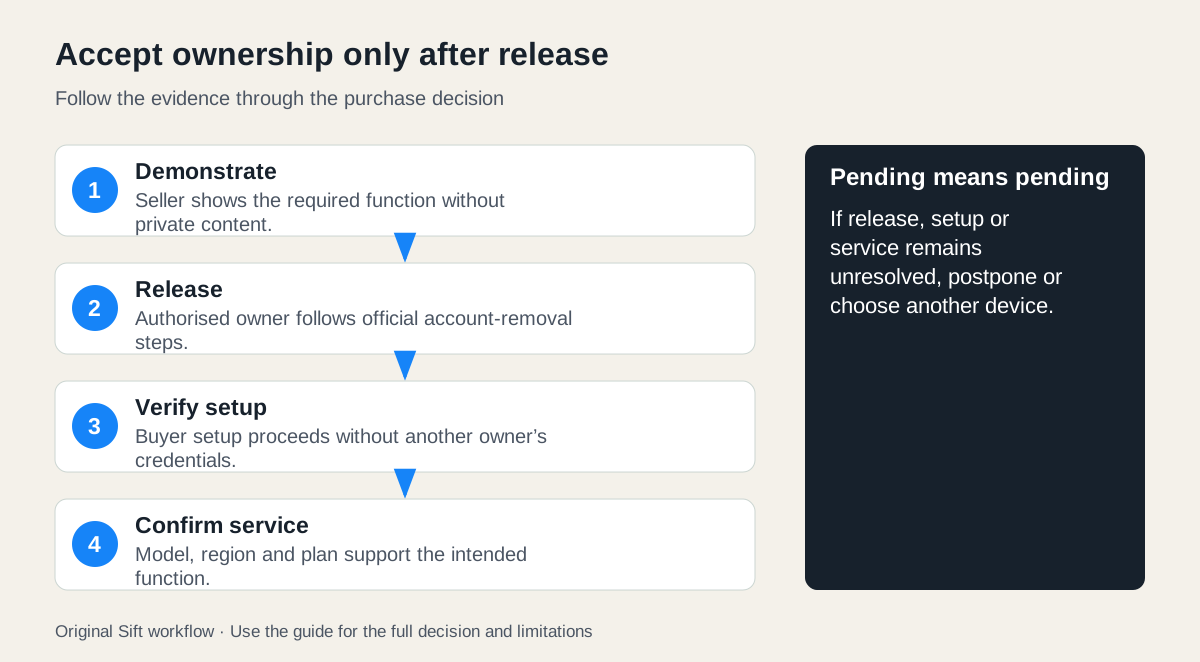 Enlarge diagram
Why is a working demonstration not enough?
A device can work in the seller’s account and still refuse setup for its next owner. A factory reset, ownership release, network restriction and subscription entitlement are different checks. Define the function you need, then confirm that the hardware can be transferred and that you can obtain the service it requires.
Before meeting, ask for the exact model and whether it belongs to a personal account, employer, school or other organisation. Ask the seller to prepare the official transfer process. Do not ask for their password or agree to keep using their login. If an organisation controls the device, its authorised administrator may need to release it; a personal account reset does not settle that separate issue.
How do ownership checks differ?
| System | What a reset does not settle | Evidence the buyer needs |
|---|---|---|
| Apple iPhone or iPad | Erasing does not by itself establish that Activation Lock is gone | Seller completes the official release; setup no longer requests the previous owner’s account |
| Android device protection | A protected reset can still require previous credentials | Owner follows the device/account removal process and normal setup can proceed |
| Ring device | Physical removal, deleting an app or cancelling a subscription does not release app ownership | Official ownership removal/transfer completes and the buyer can set up the device |
Apple says not to take ownership of a used iPhone or iPad while it remains linked to the previous owner. Google identifies account removal as the way to turn off Android device protection. Follow the actual device manufacturer’s preparation instructions too; Android models and versions differ.
Ring’s ANZ transfer guidance separates ownership release from subscription cancellation and physical possession. Some requests remain pending while the previous owner is contacted. Use the current instructions for your region and device; do not promise that every transfer will finish during a meeting or that support can accelerate it.
Agree the handover sequence
Arrange a normal demonstration first, while the seller still controls their device and can show relevant functions without exposing private content. Then the seller follows the official preparation and ownership-release instructions. Finally, verify the permitted buyer setup steps using your own account and a suitable connection.
Plan time and connectivity before the meeting. Protect your credentials while entering them and do not leave a rejected device signed into your account. If you cannot safely complete the agreed checks at that location, arrange an appropriate alternative or postpone. A screenshot stating “removed” is weaker than confirming the actual device can proceed through its required setup.
| What happens | Practical decision |
|---|---|
| Owner is present and release succeeds | Continue the remaining setup and condition checks |
| Owner can complete release later | Leave the sale pending until completion can be verified |
| Transfer request is waiting | Follow the official process; do not treat the expected wait as a completed transfer |
| Setup asks for someone else’s credentials or organisation approval | Stop and have the authorised owner resolve it |
| Required service is unavailable for the model or region | Reassess the intended function; pass if it cannot be met |
A discount does not remove an account restriction. Do not pay on the premise that an unofficial bypass will make the device usable. If the seller cannot obtain the authorised release, choose another candidate.
How should you budget subscriptions?
Describe the desired function precisely: live viewing, recorded history, remote alerts, cloud storage or operation without a subscription. Check the provider’s current model, region and plan terms. A seller’s existing plan, trial, stored recordings or promotional benefit should have no assumed transferable value unless the provider confirms that entitlement.
Here is a hypothetical connected-camera comparison, using invented amounts to illustrate the method. It is not a Ring price list or a claim about any specific plan.
| Cost for the buyer’s required function | Used option | New option |
|---|---|---|
| Hardware | $70 | $130 |
| Missing required accessory | $20 | Included |
| Collection/delivery | $10 | Included |
| Assumed annual service quote | $60 | $60 |
| One-year total | $160 | $190 |
| Three-year total, unchanged service assumption | $280 | $310 |
The used hardware saves $30 after completion costs, not $60. The service remains a recurring obligation for both. If the actual required plan is $90 a year, both one-year totals rise by $30. If the used model cannot obtain that service at all, it fails the brief regardless of its lower total.
Enter hardware, accessories and collection in the used buying cost calculator. For a multi-year comparison, use annual running cost in the used versus new calculator, with the same comparison period and no assumed inherited subscription. Keep service eligibility beside the arithmetic because the calculator cannot verify it.
What is the final acceptance test?
Accept only when the physical condition, official release, required setup and service availability all meet the agreement. Check support life separately with the device support guide; ownership transfer does not extend software support.
Record the exact device and included accessories, the observed setup result and any genuine remaining limitation in the purchase record. Do not record passwords or copies of another person’s private account information. A clear handover gives you a usable device under your own control, with its ongoing obligations understood.
Sources
- 01Apple Activation Lock guidance
- 02Google Android device protection
- 03Ring ownership transfer ANZ