Check a used device’s support life before buying
Quick answer
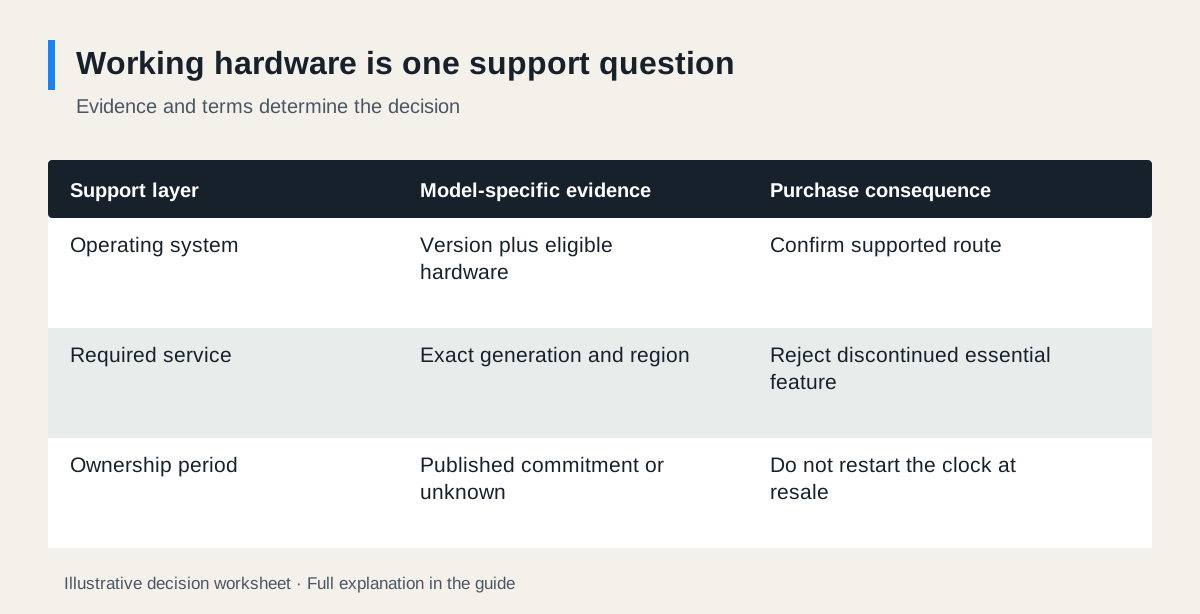
Identify the exact model, region and installed software, then check the manufacturer’s current support information for the functions you need. A device can still switch on after security updates or cloud features end. Compare your intended ownership period with documented support, and treat unknown future support as unknown.
 Enlarge diagram
Define what “supported” must mean for you
A seller saying “still works” may be telling the truth while describing a device that no longer supports your purpose. Start with the task: online work and banking, a local music source, remote heating control or a specific application.
Then separate five questions: does the hardware operate; does its operating system receive applicable security updates; do required apps support it; does its cloud service still operate; and can necessary repairs or consumables be obtained? One yes does not answer the other four.
Write an intended ownership period without treating it as a lifespan prediction. “I need a supported work computer until next October” is a requirement. “This laptop will last three years” is an unsupported forecast unless framed as a planning assumption.
Match the exact device before reading the policy
Record model, generation, regional variant and relevant hardware configuration. On a computer, the installed operating-system edition and version also matter. On a connected device, distinguish the product generation from the app name and the seller’s account.
Use the model-identification guide if the listing gives only a family name. Find the manufacturer page through its official support site and save the date checked. A reseller’s old specification page may describe launch features rather than current service availability.
If the manufacturer publishes a support end date or guaranteed period, record exactly what it covers and when its clock starts. Google’s Pixel update guidance, for example, groups named models under specific commitments. Buying a used phone does not restart its manufacturer support clock.
Computer example: a working desktop with Windows 10
In this illustrative buying case, the seller demonstrates a desktop running Windows 10. The buyer wants online work, a supported browser and a required work application for the next two years. A successful demonstration establishes that the current configuration runs; it does not establish the support plan.
Microsoft says Windows 10’s standard support ended on 14 October 2025. Its guidance distinguishes eligible Windows 11 upgrades and Extended Security Updates. Check the current eligibility, enrolment and duration for the particular device and user; do not assume an existing seller arrangement transfers or covers your entire ownership period.
| Requirement | Evidence to obtain | Buying consequence |
|---|---|---|
| Supported operating system | Exact hardware eligibility and supported installed version | No supported route: reject for this work brief |
| Required application | Publisher’s OS and hardware requirements | An OS upgrade alone may not be enough |
| Buyer control | Authorised clean setup without organisation restriction | Seller must resolve management or ownership blocks |
| Two-year plan | Published commitments where available; uncertain remainder labelled | Compare another candidate if the gap is unacceptable |
A seller saying “Windows 11 is already installed” does not by itself show supported hardware eligibility. Ask for the official compatibility evidence. If the buyer has another supported operating-system plan, verify their necessary applications and peripherals on that system instead of assuming a substitute will work.
Connected-home example: local operation survives a service change
Google’s support notice states that first- and second-generation Nest Learning Thermostats, including the specified second-generation European version, lost app connection and software/security updates from 25 October 2025. It describes retained controls on the thermostat itself. This is a concrete example of working hardware and discontinued connected features diverging.
A buyer who needs remote temperature control should therefore reject an affected model for that brief, even if the seller can turn the temperature up on the device. A factory reset or new account does not restore a retired service. Do not infer installation compatibility or suitability for a heating system from this support check; that requires the exact product guidance and appropriate assessment.
| Buyer’s brief | Evidence | Decision |
|---|---|---|
| Remote control while away | Required app function discontinued for affected generation | Pass |
| Replace an existing compatible installation with supported connected equipment | Exact installation and current support still need verification | Choose a supported candidate; obtain appropriate installer advice |
| Seller says “works locally” | Local operation does not answer remote-use requirement | Keep the requirements separate |
Price support costs without inventing longevity
Suppose two hypothetical computers cost $220 and $320. The cheaper one needs $60 of confirmed setup expenses and has an unresolved support requirement. It is not simply a $280 alternative to the $320 computer. Resolve the requirement first; a small saving cannot compensate for a machine that cannot do the necessary work under supported conditions.
If both are suitable, enter their acquisition costs in the listing comparison tool. Use condition notes for the exact support evidence and next review date. For a known paid service, record the recurring cost separately using the ownership-cost guide; do not present a subscription as an included lifetime benefit.
Make a decision you can revisit
Save the official policy link, exact device identity, date checked and unresolved items with your purchase record. Recheck when you are ready to pay if the search took weeks or a promised service change is near.
Choose a different model when the essential feature has ended, buyer setup is blocked or support cannot be established to your satisfaction. An absence of an announced end date is not a guarantee of perpetual service. The goal is a documented present decision and a realistic plan for the period you need.
Sources
- 01Microsoft Windows 10 end of support
- 02Google End of support for early Nest Learning Thermostats
- 03Google Pixel software updates