Identify the exact model of a used item
Quick answer
Use the full model identifier, including any suffix or revision, and match it to the manufacturer’s documents. Verify configuration separately and pause when an essential label or compatibility fact remains unproven.
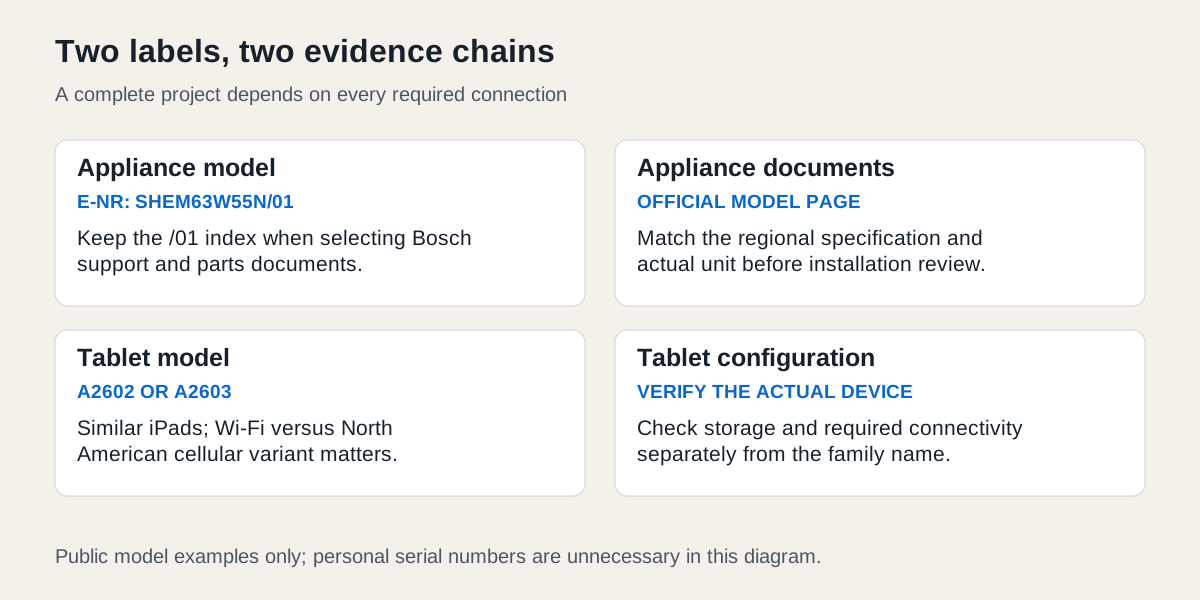 Enlarge diagram
Which identifier do you actually need?
A product family name starts the search; an exact identifier connects the item to the correct specifications, parts and checks. Write down the brand, model, any suffix or revision and where you obtained each piece of evidence. A serial number identifies an individual unit and may be needed for a recall or support enquiry, but it is not interchangeable with the model number.
Ask for an existing, safely accessible label photograph or the appropriate device information screen. Do not ask a seller to move a heavy appliance, remove a protective cover or expose a private account just to obtain it. Share a full serial only when necessary in a private conversation or directly with the manufacturer; do not request public posting of unnecessary identifiers.
Appliance example: keep the full Bosch identifier
Suppose an accessible label reads SHEM63W55N/01. Bosch calls the model identifier the E-Nr. Enter the complete identifier, including /01, in the official manual finder. The resulting SHEM63W55N/01 support page provides the model-specific route to manuals, installation documents and parts information.
The US specification sheet for SHEM63W55N gives a concrete cross-check: this is the stainless-steel model, with a third rack and a 120 V, 60 Hz specification. That does not prove the used unit is intact or ready for your installation. Compare the actual label and components, then use the correct installation documents and a qualified installer for site suitability.
Do not replace a missing /01 with a guessed suffix. Bosch lists several index versions under the same base model. A family-level specification can help identify the product while a parts order may need the full index. If the seller has a receipt for a different suffix, ask for clarification before ordering a replacement component.
Electronics example: two similar iPads, different connectivity
Apple’s identification guide lists A2602 for the ninth-generation iPad and A2603 for its North American Wi-Fi + Cellular version. The corresponding technical specifications distinguish Wi-Fi-only and cellular functions. Two tablets with similar screens and cases can therefore meet different buying briefs.
A buyer who needs mobile data away from Wi-Fi cannot confirm that requirement from “iPad 9” in the title. They must establish the actual variant, then separately check carrier, region and service suitability. A2602 does not become the cellular version because a seller includes a SIM tool.
Capacity is another field to verify on the actual device. The model-family identifier is not enough to establish which advertised storage configuration is present. Compare the readable device information with the physical identity, without inspecting the seller’s personal files. Resolve any disagreement rather than choosing whichever piece of evidence favours the purchase.
| Identifier | Example | What it tells you |
|---|---|---|
| Product family | iPad, ninth generation | Starting point for the correct generation |
| Variant/model | A2602 or A2603 | A specific version in Apple’s model guide |
| Configuration | Capacity shown on the actual device | Whether the advertised storage is present |
| Individual identifier | Serial retained privately if needed | Connects support or recall evidence to one unit |
What if you only have photographs?
Compare visible controls, dimensions, port layout and distinctive components with official documents. Image search can suggest a family, but it does not verify a model, revision or authenticity. Several generations may share an enclosure, and an item may have been repaired or modified.
For furniture, compare the actual construction and dimensions with the manufacturer’s instructions. A familiar product name may have persisted through changes to fittings. If the purpose is matching a replacement part, follow the parts-identification workflow before treating a similar-looking donor as compatible.
Missing, obscured or inconsistent labels
If a removable cover hides a normal label and the owner can safely show it through the ordinary user procedure, request that view. If accessing it requires unsafe movement or specialist work, use existing purchase/service documentation or ask the manufacturer for an alternative identification method. Do not scrape, alter or dismantle a label area to manufacture certainty.
If the label and screen disagree, stop the exact-match decision and ask the manufacturer what the discrepancy means. A receipt for the same family is corroboration, not proof that it belongs to this unit. Unreadable identity can make recall checks, accessory matching or service eligibility impossible.
An uncertain decorative object may still meet a buyer’s requirements through direct examination and measurements. An item whose safety, operation or compatibility depends on the model needs stronger evidence. If that necessary match cannot be established, pass or defer; a confident seller description cannot fill the gap.
Keep the result with the purchase
Record the verified full identifier, the official document URL and any unresolved configuration questions. Recheck the physical item at collection rather than relying solely on a pre-meeting photograph. Then continue to recall checking, support life or imported-model compatibility as the product requires. Identification makes those checks possible; it does not replace them.