Buy through Facebook buy-and-sell groups
Quick answer
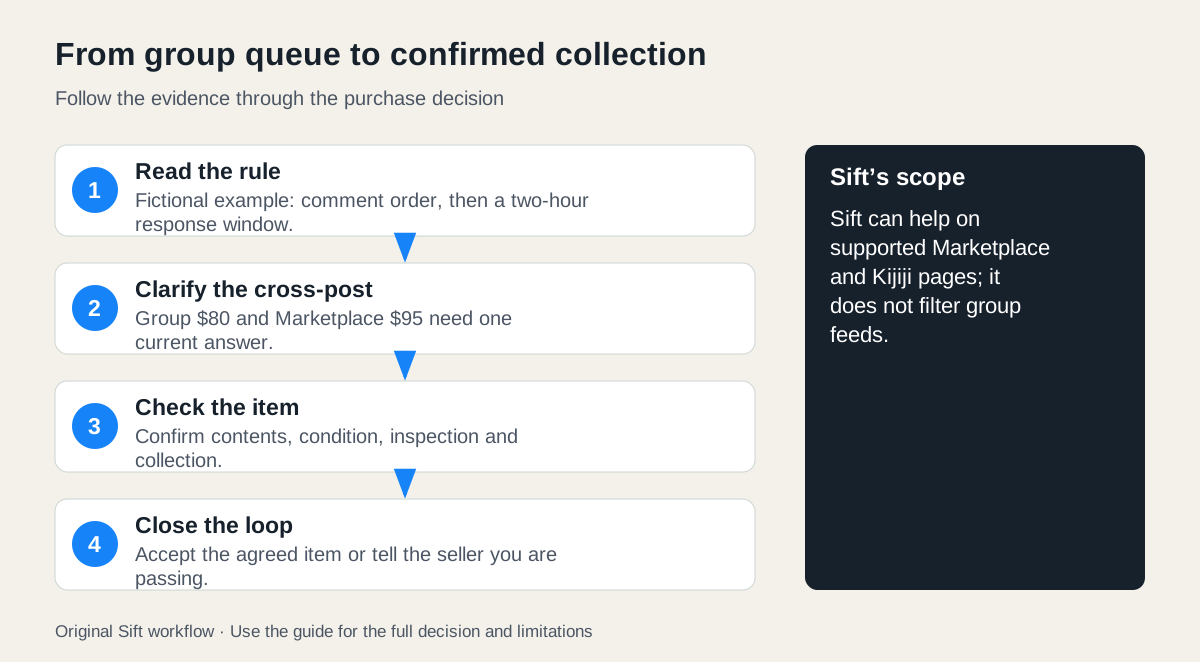
Read the group’s buying rules, establish your place in any stated queue and confirm the current item and price across cross-posts. A group response starts a conversation; condition and collection still need agreement.
 Enlarge diagram
How do you choose a useful group?
Read the group’s area, item rules and buying process before responding. Some groups use a queue, some allow first confirmed collection and others prohibit particular types of post. Those are group-specific rules, not a universal Facebook contract. Check whether the item is still available and whether the seller’s proposed arrangement follows the posted rules.
Search the group for the ordinary item term and exact model where useful. A group post may also have a Marketplace listing, but do not assume every post appears there or that all versions are kept in sync.
Follow a queue without assuming a purchase is complete
Here is a fictional group rule: buyers comment “interested” in order, then the seller gives the first person two hours to respond to a message. A buyer sees two earlier comments and adds, “Interested if the earlier buyers pass.” They do not offer a hidden premium to jump the stated queue or announce a collection before the seller has accepted.
The first person declines at 14:00. The seller contacts the second at 14:10 and then, under this fictional rule, contacts our buyer after the response period expires. The buyer still needs to establish condition, price and collection. Queue position is permission to discuss the purchase under that group’s process; it is not an inspection result or proof of ownership.
If the seller’s messages conflict with the rules, ask for clarification or seek the administrators’ guidance through the group’s normal process. An administrator can explain group rules but cannot certify the physical item merely by allowing the post.
What if the item is cross-posted?
Suppose the group post shows a $80 desk and a Marketplace listing shows $95. The buyer sends:
I’m responding to the desk in the group. That post shows $80, while the Marketplace listing shows $95. Are these the same desk and included pieces? Please confirm the current price, whether anyone is ahead of me under the group’s rule, and when inspection and collection would be possible.
If $95 is the current offer, compare it at $95. Do not assume the old price controls every conversation. If the seller has already agreed a transaction elsewhere, do not travel until availability is clarified. Keep one confirmed agreement rather than trying to reconcile several screenshots at the doorstep.
What belongs in a group comment?
Meta’s group-privacy guidance explains that new content in a public group can be visible to anyone, including people off Facebook. Private-group content has its membership audience; groups converted to public have specific protections for previously private content. Check the current status before posting.
A short product question or queue response can fit a group comment. Move necessary addresses, arrival details and personal contact arrangements to the appropriate direct conversation. A private group is still a group audience, and members can repeat what they read. Use the buyer privacy guide for a staged example.
Finish the normal purchase checks
Group familiarity, a long posting history or supportive comments do not establish condition or title. Marketplace ratings also reflect interactions under Meta’s system; do not treat informal group praise as a verified inspection. Confirm the exact item, perform the agreed checks and keep a purchase record.
Sift filters supported Facebook Marketplace and Kijiji browsing surfaces on a computer; it does not filter group feeds. If the seller supplies an actual Marketplace listing, you can compare that candidate alongside other Marketplace options while keeping the group’s communication and queue rules in mind. Close the loop if you pass so the seller can contact the next person.