Protect your privacy while buying on Facebook Marketplace
Quick answer
Review public profile information, check whether you are commenting to a group or messaging a seller, and share collection details in stages. Keep household routines and unnecessary third-party information out of the conversation.
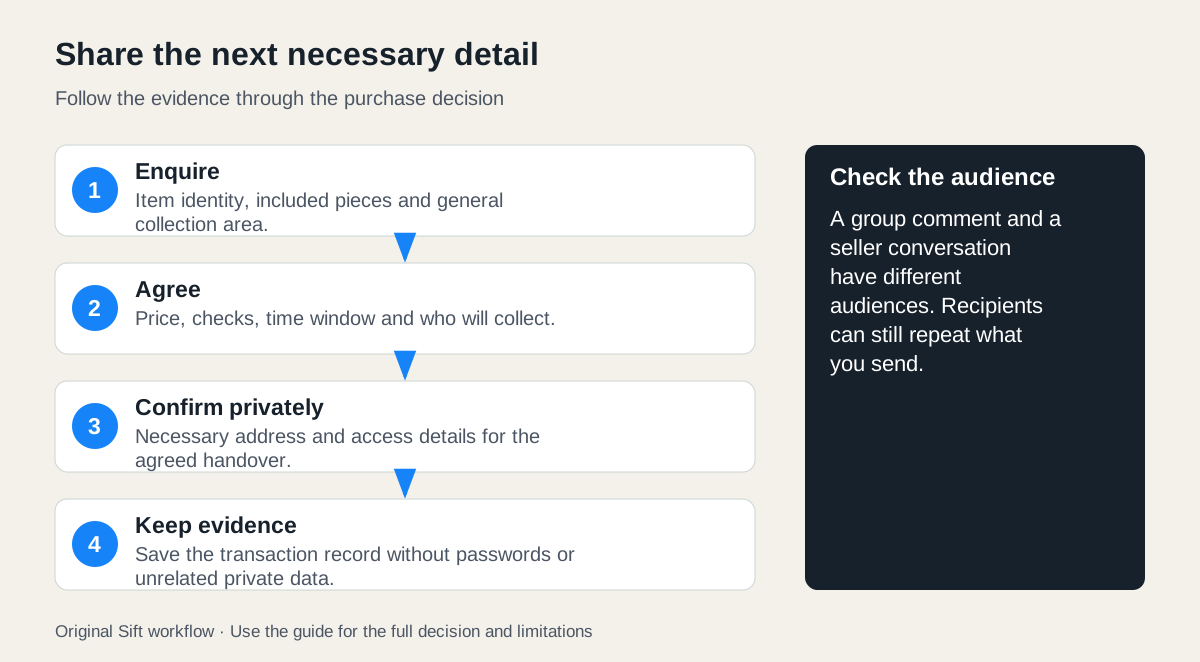 Enlarge diagram
What can a seller learn from your profile?
Before sending an enquiry, review the public information attached to your Facebook profile. Meta states that your current profile picture and cover photo are public. Other fields and posts depend on their audience settings. A private buying conversation does not make the associated public profile disappear.
Use Meta’s privacy settings guidance to review Audience and visibility, including profile details, posts, contact settings and tagging. On the computer interface described by Meta, these controls are under Settings & privacy, then Settings. Options can vary by profile type; check the actual control and audience shown. There is no need to invent a different identity to ask a product question.
Match the information to its audience
| Where you share | Audience to consider | Sensible buying detail |
|---|---|---|
| Public profile information | Anyone who can view that public information | Review whether a photograph or public field reveals more than intended |
| Marketplace conversation | The people participating in that conversation; check its participants | Product questions, agreed price and necessary handover details |
| New comment in a public group | Public audience, including people off Facebook | A brief item question or queue response, without private collection details |
| Comment in a private group | The group’s permitted membership audience | Treat it as a group discussion, not a one-to-one seller message |
Meta’s current group-privacy explanation also covers groups converted from private to public: earlier private content retains the described restricted audience, while new public content has a wider audience. Check the group’s current status and notices before commenting. A group you remember as private may have changed.
A recipient can repeat or capture what you send. The table describes the relevant sharing context, not a promise that information will never leave it. Avoid assuming that a message is anonymous or that every conversation has the same technical protections. Meta’s Marketplace messaging help covers that communication route; Sift does not change its audience or privacy settings.
Share details in stages
A fictional buyer wants a desk. Their first enquiry can establish the product and general collection area without a home address:
Is the 48 × 24-inch desk still available? Are the legs and all required fixings included? Which general area would collection be from?
Once the item appears suitable, they propose a specific window and suitable meeting or collection arrangement. For bulky furniture, home collection may be necessary; the buyer can obtain the exact address privately after the arrangement is clear. They do not need to explain their employer, household schedule or where a relative lives.
At final confirmation, communicate the details needed to avoid confusion: the agreed time, who is collecting, whether the agreed inspection can be completed and how arrival will be coordinated. If the seller is delivering to the buyer, give the necessary destination and access information privately to the person performing that job. Use the seller-delivery guide to define the scope.
A before-and-after message
Before: “I live at my home address near the school, work late every weekday and my sister is alone there until I get back. She can give you her phone number. Can you bring the desk tonight?”
After: “Would delivery on Thursday 22 October between 18:00 and 19:00 work? Please confirm the delivery charge and whether it includes the agreed carrying route. Once we confirm, I’ll send the destination and access details privately. I’ll be the receiving contact.”
The revised version keeps the scheduling and delivery questions while removing a home routine and another person’s circumstances. If someone else really is receiving the item, obtain their agreement and share only the contact details necessary for the job. Do not volunteer their account, workplace, identification or availability pattern.
What should remain out of an ordinary enquiry?
Do not send passwords, login codes, unnecessary identity documents or another person’s financial information to prove interest in an item. If a genuine platform or payment provider requires verification, reach that service through its official route and understand what it requires. A seller’s link or request is not proof that the information is necessary.
Photos can reveal details you did not intend to discuss: address labels, paperwork on a desk, a child’s name or another conversation in the background. Before sending a measurement photograph or screenshot, keep only the relevant content and remove unnecessary personal information. Preserve an original privately if it is needed as transaction evidence.
Finish with a useful record
Keep the item description, agreement, payment record and relevant handover messages. Use the purchase-record guide to separate useful evidence from unnecessary personal data. If you abandon a purchase, tell the seller plainly rather than continuing to share details to explain your life circumstances.
Privacy controls and careful messages serve different purposes. Review the controls for information already on your profile, and choose the minimum useful details for each new interaction. Sift’s listing filters can help with browsing on a computer; they do not hide your Facebook identity, alter group audiences or make a buying conversation confidential.
Sources
- 01Meta privacy settings
- 02Meta profile and cover photos
- 03Meta group privacy update November 2025
- 04Meta Marketplace messaging guidance