Kijiji wanted ads: search, filter and post clearly
Quick answer
Wanted ads describe what someone wants to buy, rather than an item they are offering. Use Kijiji’s available ad-type filter to focus on Offering when shopping. If you need a hard-to-find item, create a specific wanted ad using the relevant category and “I want to find” option. State compatibility and condition requirements without exposing private information or promising advance payment.
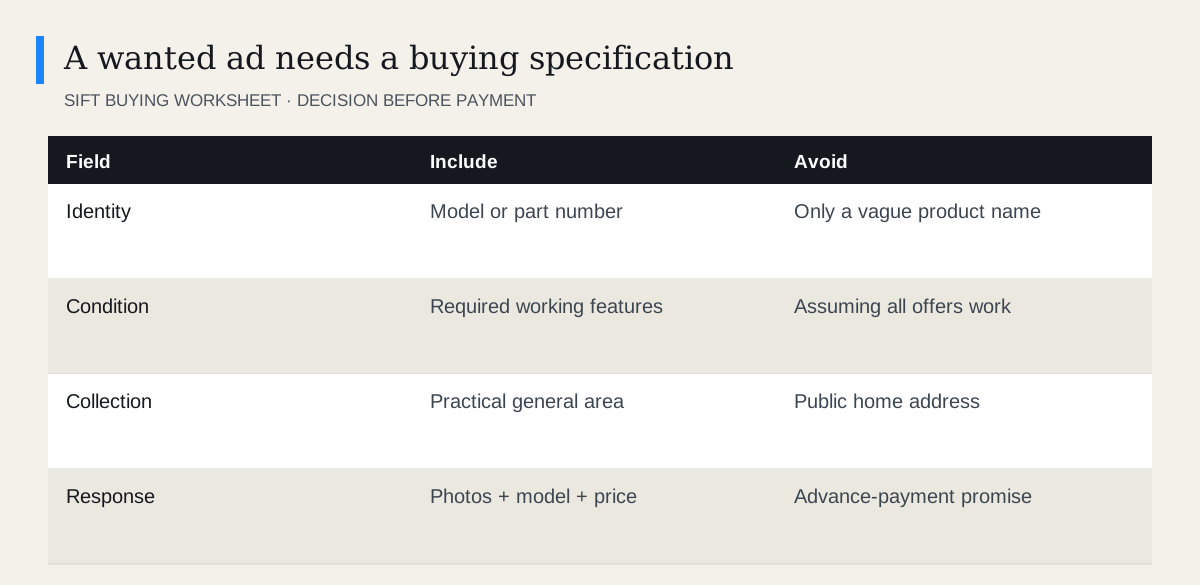 Enlarge diagram
How do Wanted and Offering differ?
An Offering ad presents something available from the poster. A Wanted ad presents a need. A photograph of an attractive product in a wanted ad may be a reference image, not an item you can buy.
Kijiji’s search guide documents ad-type filtering. Choose Offering where that filter is available when your aim is to buy an existing item.
Read the description even after filtering. Sellers and buyers may classify imperfectly, and ordinary title words such as “wanted” can appear in other contexts.
When is a wanted ad useful?
It can help for an exact replacement part, an uncommon model, a matching furniture piece or another item where browsing broad results is inefficient.
It is less useful when the request is so general that ordinary search already finds many suitable ads. “Wanted: a chair” gives potential responders little reason to know whether their chair fits.
Before posting, use the search filters guide and try relevant synonyms. A wanted ad should complement your search rather than replace basic product research.
How do you create a clear request?
Kijiji’s posting instructions describe selecting “I want to find” for a Wanted ad. Follow the current category-specific form and review the preview before publishing.
- Name the item precisely. Include brand, model or part number where necessary.
- State required condition. Say which functions must work and what wear is acceptable.
- Define compatibility. Include dimensions or revision information that matters.
- Give a practical collection area. Use a general area rather than your full address.
- Ask for relevant evidence. Request the actual item’s photos, model and proposed price.
Use the model identification guide before seeking an exact replacement. An incorrect identifier can attract confidently unsuitable offers.
What should the text look like?
A concise example is: “Wanted: the original stand for monitor model ABC123. Please send a photo of the stand and its mounting plate, the part number if visible, and your asking price. I can collect within the agreed local area.”
ABC123 is an illustrative identifier, not a real compatibility recommendation. Replace it with the verified details of your own product.
| Broad wording | More useful detail |
|---|---|
| Need a desk | Maximum width, depth and whether it must disassemble |
| Looking for parts | Exact product and required component |
| Want cheap furniture | Item type, usable condition and collection range |
| Need a matching chair | Model, dimensions and reference details |
| Buying electronics | Exact model and required working functions |
Do not include your daily routine, financial situation or urgency in unnecessary detail. A deadline can be stated without explaining when your home will be empty.
How do you assess responses?
Treat each reply as a new purchase candidate. A responder knowing what you need does not prove they possess it. Ask for current photographs and verify the model, condition and included parts.
Compare the proposed price with alternatives and your complete cost. A hard-to-find item can still be overpriced or unsuitable. Do not let the relief of receiving a response bypass your normal checks.
Use Kijiji’s safety guidance and inspect before payment where practical. Be cautious of someone who has exactly the rare item but can only proceed through an unfamiliar advance-payment arrangement.
How should you manage the ad after finding the item?
Update or remove the request when the need is filled, and tell people with active conversations that you no longer need it. This avoids unnecessary messages and duplicate commitments.
If the first response is unsuitable, refine the request with the missing specification rather than simply adding urgency. For replacement parts, the discontinued-parts guide helps distinguish a genuine match from a similar-looking substitute.
Keep the same standard on both sides of the search: precise requirements when asking, and specific evidence when someone offers to sell.
Questions people ask
What does Wanted mean on Kijiji?
It means the poster is seeking an item rather than offering that item for sale.
How do I stop seeing wanted ads?
Use the Offering ad-type filter where available. On desktop, Sift can also help reduce wanted or ISO wording in supported browsing.
Should I put my full budget in a wanted ad?
That is your choice. A realistic range can help responses, but do not publish financial details or commit to paying before verifying the item.
Sources
- 01Kijiji How to post an ad on Kijiji
- 02Kijiji Radial Search: How Search Works on Kijiji
- 03Kijiji Safety at Kijiji