Used microphones: test the recording chain
Quick answer
Identify the exact microphone and its connection and power requirements. Test it through a known compatible chain, record normal speech or the intended instrument, and listen to the saved file. Inspect the connector, grille, controls and mount without opening the capsule. Noise or low level needs isolation across the whole chain before it becomes a microphone diagnosis.
Work backwards from the recording you need
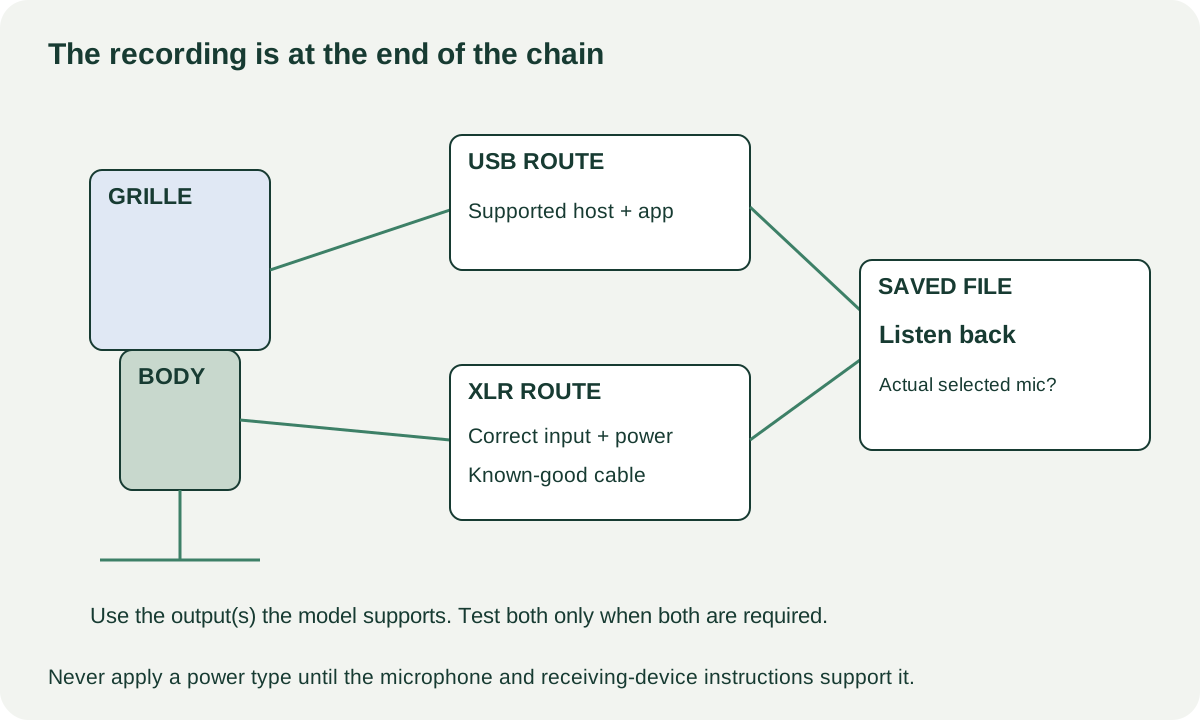
A USB microphone can connect through its supported digital route, while an XLR microphone normally depends on a compatible interface, mixer or recorder. Some models provide both, and their controls or processing may not apply equally to both outputs. Decide whether you need desktop speech, an instrument, handheld performance or a particular mounting arrangement before evaluating the listing.
Record the full model and revision. Check the manufacturer’s connection, power and host requirements, including any required software. Do not apply phantom power or another supply simply because a connector is XLR. Follow the microphone and receiving device instructions, especially for unfamiliar or vintage equipment.
Shure’s MV7 guide illustrates why this matters: the model has separate USB and XLR paths, and software settings do not affect its passive XLR audio. That is a model-specific example of a general buying question: which features will work through the connection you intend to use?
Inventory a complete usable recording setup
Ask which cable, mount, thread adapter, windscreen, shock mount, desktop stand or boom arm is included. A microphone photograph may show a studio stand that is not part of the sale. Check the microphone’s weight and fitting requirements against the stand you intend to use.
| Part of the chain | Confirm before pickup |
|---|---|
| Microphone | Exact model, connector, pickup orientation and required power |
| Input device | Correct input type and suitable supported settings |
| Cable | Known-good cable for that connection |
| Host software | Supported driver/app and a recording route you can own |
| Monitoring | Headphones or speakers at a safe volume |
| Mount | Compatible thread, support and included adapters |
If the seller advertises paid plug-ins or presets, verify the actual transfer terms separately. A working microphone does not transfer a personal software account. Value a clean hardware purchase on the software access you can legitimately obtain.
 Enlarge diagram
Inspect without touching the sensitive element
Look at the grille, body, connector pins, switches and mounting threads. Ask about drops, moisture exposure, repairs and changes to the capsule or internal wiring. A dented grille may be cosmetic or may accompany a harder impact; do not decide solely from its shape.
Do not blow into the microphone, tap the capsule, remove a sealed grille or open the body as a pickup test. Use ordinary speech or a controlled instrument source. If a vintage or expensive microphone’s value depends on originality or internal condition, arrange a competent assessment rather than improvising one.
Check switches through their normal positions and confirm their documented effect where practical. A loose mount or stripped thread can stop safe use even when the audio works. Price the correct replacement assembly rather than assuming a generic clip will hold the microphone.
Record a repeatable sample and listen back
Use a quiet enough space to hear faults, but acknowledge the room’s contribution. Choose a consistent position and distance appropriate to the microphone’s design. Start with sensible supported gain and monitor at a comfortable level. Record a short passage of normal speech, a pause and the intended ordinary source if practical.
Listen to the saved file, not only live monitoring. Check for missing signal, intermittent dropouts, unexpected distortion or a switch that does nothing. Ensure the software selected the microphone being sold rather than the computer’s built-in microphone. For a dual-output unit, test both paths if both are part of your purchase requirement.
If there is noise, change one known-good element at a time: cable, supported input or host setting. A low recording level may reflect the input and gain arrangement rather than a defective capsule. A hum can originate elsewhere in the chain. Write down the observation and the test conditions instead of diagnosing an internal component from a short recording.
For USB models, check normal connection, recording, playback or headphone monitoring if fitted, and reconnection. For an XLR model, test the actual compatible input type and any required power arrangement safely. Avoid hot-plugging or switching power contrary to the equipment instructions.
Separate an accessory bargain from a repair project
A hypothetical microphone costs $70, but the correct cable is $20, a stable mount $35 and collection $15: $140. A complete $125 package that passes the same recording check may be cheaper. The numbers are examples; source current compatible-part quotes before making an offer.
An absent windscreen or mount can be a bounded negotiation when the exact replacement exists. Unexplained intermittent audio or an unsupported software route is not a known accessory cost. If the seller cannot demonstrate the microphone through a suitable chain, classify it as untested rather than assuming you can fix the setup after purchase.
Keep the model, tested output, power arrangement and included mount/cables in the sale record. Delete test files containing anyone’s private conversation and have the seller retain their own recordings. The useful outcome is a microphone that makes the recording you need through a chain you can reproduce at home.