Used portable recorders: capture, replay and transfer
Quick answer
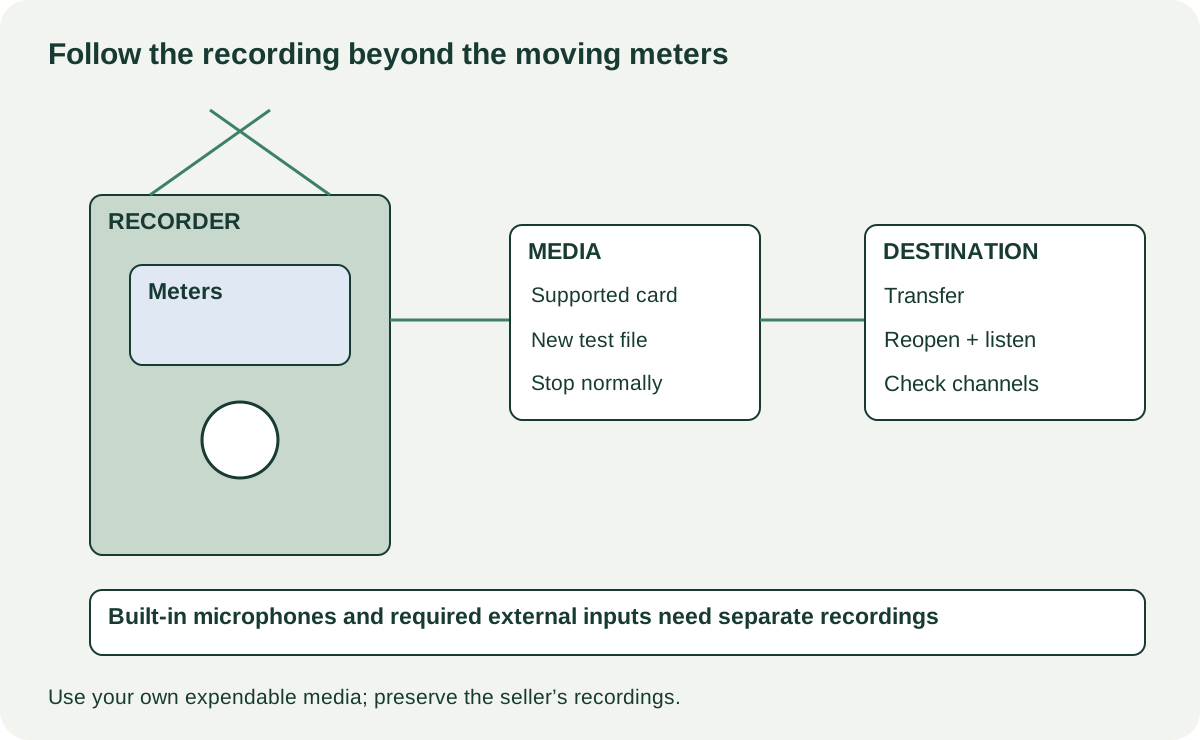
Identify the recorder’s actual input and track capabilities, supported card and power requirements. Make a fresh recording with the microphones and external inputs you need, stop it normally, play it back and transfer the file. Working meters alone do not prove recording or storage. Price missing capsules, adapters, covers and compatible media separately.
Choose the capture job before the recorder generation
A recorder for interviews may need reliable built-in microphones and simple file transfer. A music session may need several external inputs, while camera work can add mounting, monitoring or synchronisation requirements. List what must be recorded simultaneously and how the files will reach your editing device.
Get the full model and revision, included microphone capsule where detachable, battery arrangements, supported card type and exact external power supply. Do not infer the number of independent recording tracks from the number of visible sockets or a model-family number. Check how the device handles its built-in microphones alongside external inputs.
The Zoom H4essential operation manual separates recording, interface and file-transfer workflows. Its support page provides model-specific media and software compatibility resources. Use the matching documents for your actual candidate and firmware; a card working in a different recorder does not establish support here.
Bring a safe, repeatable sample
Arrange a quiet enough space and bring headphones, your own compatible empty media if agreed, and a known suitable microphone or line source for any external inputs you need. Use original speech or other material you are entitled to record. Avoid recording bystanders’ private conversations.
Do not format the seller’s card. If a formatting step is necessary, use your own media containing nothing you need and confirm the selected card. Agree any setting changes or new project location with the owner so their recordings remain untouched.
| Test record | What to write |
|---|---|
| Device | Model, firmware and fitted capsule |
| Media | Exact supported card and available test space |
| Input | Built-in left/right and each required external input |
| Power | Battery or supported USB/external source |
| Capture | File format, relevant settings, duration and observed errors |
| Result | Playback, transferred file and required channels present |
 Enlarge diagram
Inspect controls, connectors and power
Check microphone guards, input sockets, card door, battery cover and mounting threads for damage. Inspect accessible battery contacts for corrosion without scraping them. A missing door or broken mounting thread can matter greatly in portable use even if a desktop recording works.
Try every required button, dial and touchscreen area through normal operation. Check that a rotary control does not skip unpredictably. If a detachable capsule is included, confirm the exact compatibility and secure fit according to the manual; do not swap it while powered unless the maker specifically permits it.
Test the intended battery and supported external-power route. Observe charge or power indication where applicable, but do not convert a short run into a full runtime promise. Damaged or swollen batteries should stop the demonstration and be handled through appropriate service or disposal. Do not open battery packs or improvise power connectors.
Record first, then follow the file
Record a short spoken identifier, a normal speech passage and a quiet pause. For stereo built-in microphones, place the source to each side in turn so the resulting channels can be distinguished. Test each required external input using its documented input type and power setting. Apply phantom power only when both the microphone and connection support it.
Start and stop normally, then play back through known-good headphones at a comfortable level. Look for missing channels, clipping, unexplained noise or interrupted files. A meter moving before recording begins proves only that some input is being detected.
Transfer the new file through the route you will use: supported USB mode, card reader or another documented method. Open it in your own compatible software and check its duration and channels. A USB cable may provide power without data, so use a known data-capable cable before diagnosing the port. A file-transfer success does not establish audio-interface operation; test that separately if you need it.
If the product advertises a recording format or feature that changes gain handling, read the actual documentation rather than treating the label as immunity from every recording mistake. Microphone placement, unsupported inputs, physical noise and missing channels still affect the result. Your acceptance criterion is a usable recorded file from the intended setup.
Price the complete field kit
A hypothetical recorder is $110, with $30 for supported media, $25 for a missing cover or mount and $15 collection: $180. A $170 complete candidate may be cheaper if it passes the same capture and transfer test. These are examples; get exact part quotes, especially for proprietary capsules and connectors.
An absent ordinary cable is a bounded cost once specified. Intermittent recording, a broken card mechanism or unavailable required software needs resolution or a service assessment. Do not value the seller’s private recordings or commercial sample library as included transferable content.
Before handover, have the seller remove their media and account or wireless settings as applicable. Confirm the capsule, power accessories and mounting parts in the demonstration are included. Keep your test record with the comparison. A recorder is a successful purchase when you can create, recover and use the file you need, not only when its display lights up.