Used over-ear headphones: fit, channels and connection modes
Quick answer
Identify the exact headphone version, try the fit and inspect hinges, pads and connectors. Listen at a comfortable volume to both channels, test your required microphone and connection modes separately, and observe charging without turning a short test into a battery-life claim. Price correct replacement pads, cables and service before deciding.
Choose the connection job first
Headphones for wired editing, wireless calls and commuting can have different requirements even when they share a similar shape. Write down the host device, required connection, whether you need a microphone, and whether active noise cancellation or another mode matters. Add comfort requirements such as glasses, clamp pressure and wearing time.
Get the full model and generation from the actual unit. A seller’s generic family name may hide a different cable socket, app or feature set. Ask which cables, adapters, case and accessories are included, whether pads or batteries have been replaced, and whether either hinge has been repaired.
Do not infer call functionality from wired music playback. Sony’s WH-1000XM5 cable instructions, for example, describe different behaviour in cable and powered modes and direct phone conversations through the phone’s microphone in the documented cable arrangement. Check the exact manual for the pair you are buying rather than extending a wireless feature to every connection.
Inspect the structure before putting them on
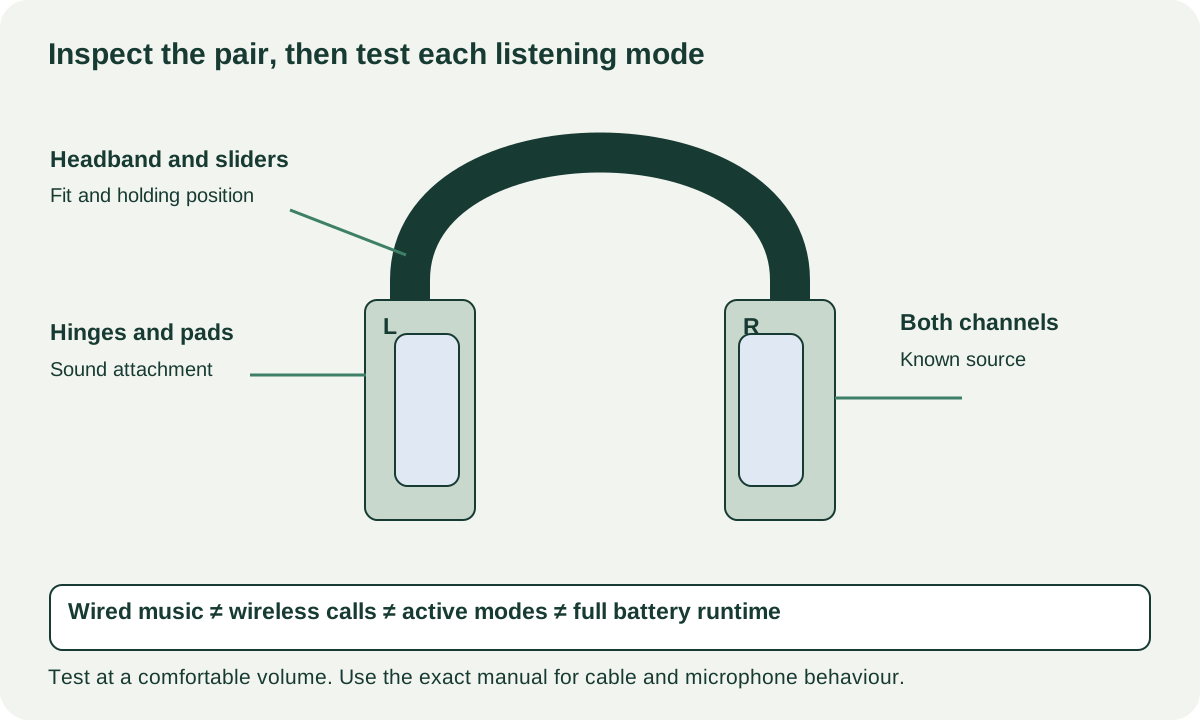
Look at headband joints, hinges, sliders, earcup attachments and cable sockets. Open or rotate only through the normal range. Tape around a hinge or a repaired slider deserves an explanation and a realistic parts quote; a comfortable fit during one minute does not establish a durable repair.
Check pads for split covers, collapsed filling, persistent odour and attachment damage. Replacement pads need to fit the exact model, and their condition can affect fit and how the headphones sound. A cheap generic set is not necessarily equivalent to the original. Follow the manufacturer’s cleaning instructions and agree hygienic conditions before trying them on.
Wear them with the glasses or other headwear you normally use. Adjust both sides and note immediate pressure or a slider that will not hold. A short visit can reveal a poor fit but cannot promise comfort throughout an entire workday. If you already know a model fits, matching its generation and pad condition reduces uncertainty.
 Enlarge diagram
Listen to channels and modes separately
Use your familiar source and known-good cable where applicable. Start at low volume and raise it only to a comfortable level. Play ordinary speech and music you know, then a simple left/right channel identification track. You do not need loud sweeps to establish whether one side is missing or an obvious buzz occurs.
Check each channel with the same source settings. If the balance seems wrong, inspect the device’s balance or accessibility settings and try a known-good connection before blaming a driver. A repeatable problem that remains unresolved is a buying concern even if its internal cause is unknown.
For wireless headphones, pair them using the supported procedure and try reconnecting after normal sleep. Test your actual calling or recording application if microphone performance matters. Confirm that the microphone you are hearing is the headphone microphone rather than the laptop’s built-in one. Record a short ordinary speech sample and listen back at a safe volume.
Turn required modes on and off in a steady environment and note whether the expected control works. A noisy shop is not a controlled measurement of noise-cancellation performance. A seller’s gesture demonstration also does not establish that every button or touch area works; try the controls you will use.
| Requirement | Demonstrate | Do not infer |
|---|---|---|
| Wired listening | Both channels with correct cable | Wireless or microphone operation |
| Calls | Correct selected microphone and playback | Studio-quality recording |
| Wireless listening | Pair, play and reconnect | All-day runtime |
| Active modes | Normal on/off controls and audible behaviour | A laboratory performance rating |
| Multipoint or host switching | Actual supported hosts and procedure | Compatibility from the model name alone |
Keep charging and runtime as different observations
Inspect the charging socket and use a supported supply and cable. Check that charging is recognised and the headphones operate unplugged. Record any sudden shutdown or implausible battery drop. Do not convert a few minutes of playback into the manufacturer’s original runtime claim for a used battery.
If the case or battery appears swollen, distorted or overheats abnormally, stop ordinary use and seek appropriate service. Do not open the battery enclosure at pickup. Ask about replacement availability and whether fitting needs an authorised or competent service provider before assigning a repair cost.
A supported reset can be part of owner handover, but it does not cure unexplained hardware faults. Sony’s reset guide is model-specific; use the matching instructions after the seller agrees. Remove the seller’s pairing or account relationship where the product requires it, and verify your own supported setup.
Price the pair you will actually use
In a hypothetical comparison, headphones A cost $85, correct pads cost $40 and collection $15: $140. Pair B costs $130 nearby with sound pads and the required cable. These examples are not market prices. If A also has an undiagnosed one-channel dropout, the pad quote does not account for that fault.
Buy when fit, required modes and ordinary listening work at a complete cost you accept. Negotiate a known replaceable pad or cable using the exact quote. Pause for structural damage, unresolved channel faults or unavailable service when dependable use is the goal. Keep tested modes and battery uncertainty in the comparison notes so a lower listing price does not erase the evidence differences.