Used soundbars: match the TV and the complete speaker set
Quick answer
Match the exact soundbar to your television’s supported audio connection and inventory every included speaker, supply and remote. Test dialogue, volume control and each paired component through the intended TV/source route. Bluetooth music alone does not prove HDMI audio, surround features or a clean buyer setup.
Treat the bundle as several model-specific parts
Ask for the model labels on the bar, subwoofer and rear speakers separately. Record remotes, power supplies, brackets and connecting cables. Similar-looking wireless subwoofers are not automatically interchangeable, and a seller’s photo may show optional speakers that are not included.
Write down the exact television and source device you will use. Check available ports, supported audio output and control behaviour in both manuals. Decide whether you need simple TV dialogue, a separate HDMI input, music streaming or a particular multichannel format. Do not assign value to an advanced format you cannot feed through your existing television and sources.
The Denon DHT-S517 input instructions distinguish TV audio over HDMI eARC/ARC from other inputs and describe linked HDMI control. That is a model example, not a universal soundbar port map. Use the actual bar’s manual and confirm the chosen television port supports the intended relationship.
Draw the route you will use every evening
| Link | Required evidence |
|---|---|
| Source to TV or bar | Supported connection and chosen output mode |
| TV to bar | Correct ARC/eARC or optical path for the intended features |
| Bar to subwoofer | Exact compatible model, normal pairing and audible contribution |
| Bar to rear speakers | Supported combination and each required channel demonstrated |
| Remote and app | Volume, input and setup access you can use after handover |
A single cable may carry TV audio in one arrangement while another port accepts a source in a different direction. Do not plug by shape alone. If the bar will sit in front of the TV, measure whether it blocks the screen or remote receiver. Check width, feet, wall-mount hardware and ventilation clearances before buying a physically awkward system.
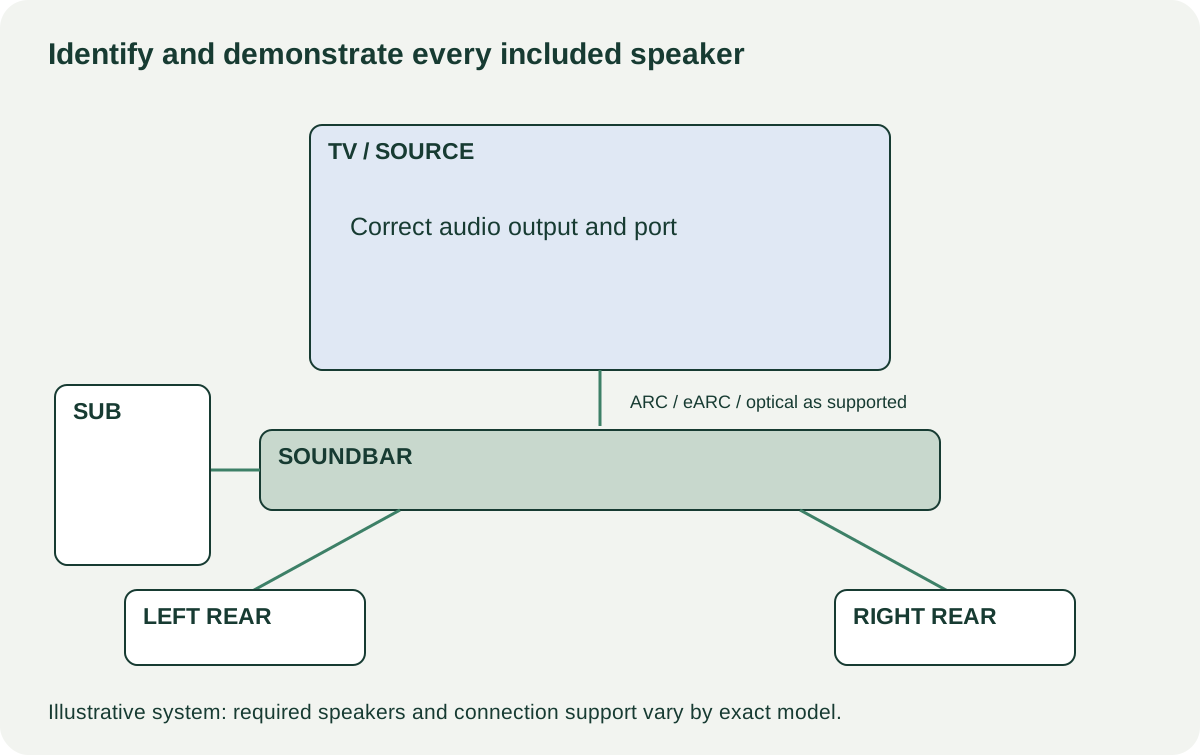 Enlarge diagram
Demonstrate the whole system
Arrange a TV demonstration with ordinary dialogue and familiar audio. Start at low volume and increase to a comfortable listening level. Check the main bar for rattles, missing sound and controls that fail to respond. Try the remote’s needed functions, then verify television volume control through the supported arrangement if that is important to you.
Confirm that the subwoofer and each included rear speaker are working. Use the system’s documented channel test where available or suitable known content. A light on a speaker is not evidence of audio from that speaker. Do not assume a quiet rear channel in a dialogue scene is broken; use a test intended to send it a signal.
Denon’s model-specific troubleshooting includes subwoofer connection and pairing checks. Have the seller follow the matching procedure for the actual system. If a component still will not connect, the sale remains an incomplete or faulty bundle until the cause is established.
Test each input you plan to use. Bluetooth playback can verify one route while leaving TV audio untested. For a desired audio format, confirm the source output, television pass-through behaviour and bar indication through the exact chain. An impressive logo on the carton does not establish that all three devices are configured compatibly.
Check accounts, accessories and ordinary condition
Inspect speaker fabric, cases, sockets and cables. Ask about drops, liquid exposure and repairs. A dent or cosmetic mark is different from a loose power connector or recurring shutdown. Keep enclosures closed and do not probe internal amplifiers.
For app-connected models, check current support, required subscriptions for your chosen services and the maker’s owner-transfer process. Have the seller remove personal accounts and complete an authorised reset after the hardware demonstration. Verify your own supported setup rather than retaining their credentials. An app screenshot on their phone does not establish buyer access.
A missing remote can prevent practical setup even when a TV controls basic volume. Confirm a compatible replacement with the functions you need. Do the same for proprietary power supplies and speaker pairing; a cheap generic accessory quote may not solve the actual missing part.
Compare complete listening systems
In a hypothetical example, a $120 bar needs a $35 remote and $20 collection, totalling $175. A $160 complete bar nearby may be a better purchase. If the first offer also lacks its intended subwoofer, do not invent a small allowance for an unverified replacement; establish compatibility and availability first.
Buy when the complete route and included speakers perform the job you want. Negotiate known missing accessories only with firm replacements. Pause for unexplained disconnects, an incompatible subwoofer or an account release the seller cannot complete. Keep the route and test results in the listing comparison, and carry the exact paired components home together.