Check used battery health without guessing remaining life
Quick answer
Check the exact model’s battery information, visible condition and ordinary operation, then verify a manufacturer-approved replacement or service route. Reported capacity, cycle count and a short runtime demonstration answer different questions. None guarantees remaining life. Do not charge or test a visibly damaged or swollen battery.
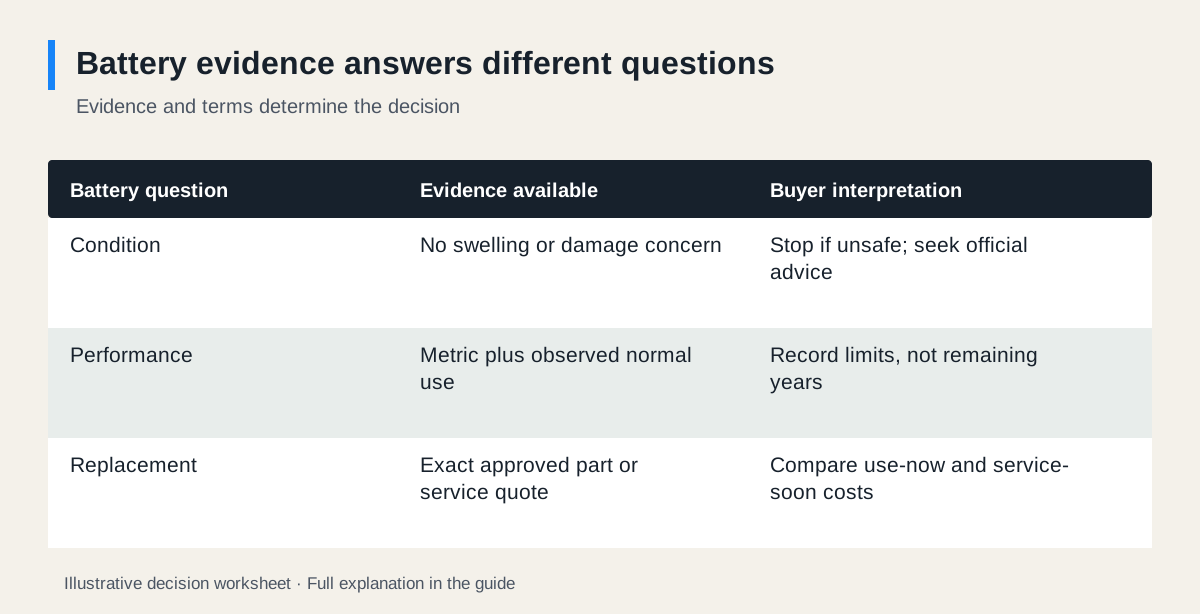 Enlarge diagram
Begin with condition, not a percentage
Look for visible swelling, enclosure separation, damage, leakage or unusual heat reported by the owner. Do not press a swollen case closed, puncture a battery or continue charging to see whether it recovers. Microsoft’s battery guidance specifically says to stop using a device when battery expansion extends beyond its enclosure and to avoid pressure or puncture. Follow the manufacturer’s service and local disposal instructions.
An unsafe-condition concern is not a bargaining opportunity. A cheap replacement estimate does not make it appropriate to transport or test a damaged battery casually. Obtain the correct handling advice before any further action.
If visible condition is acceptable, identify the product, battery where accessible through normal documentation, charger and any replacement history. An indicator showing full charge says how charged the battery currently appears; it does not say how much energy it can store compared with new.
Know what each observation can establish
| Evidence | Useful for | Does not establish |
|---|---|---|
| Manufacturer health screen | Reported capacity, service messages and supported metrics | Guaranteed runtime or remaining years |
| Cycle count where supported | One part of usage history | A universal pass/fail limit |
| Normal-use demonstration | Behaviour during that task, mode and duration | Performance in every workload or temperature |
| Replacement invoice | What a document says was fitted and when | Current condition without a matching unit and check |
| Official replacement route | Whether a supported service or part can be obtained | A promise that every fault is battery-related |
Do not compare two products by one health percentage as if their batteries, software estimates and workloads were identical. Use each manufacturer’s interpretation and your required task.
Example one: a phone with a health screen
Apple documents different battery-information screens for iPhone generations. Supported newer models can display additional information such as cycle count and manufacturing or first-use dates; older supported models have different screens. Ask the seller to show the applicable information on the actual device without exposing personal messages or files.
In a fictional inspection, the phone shows a maximum-capacity estimate of 86%, no displayed service recommendation and a normal response during the agreed camera and calling checks. Record those observations as observations. Do not translate 86% into “two years left,” or extrapolate a few minutes of use into all-day battery life.
The buyer needs long days away from charging. They obtain an exact-model battery-service quote and compare two scenarios: use it as observed for now, or pay for supported service soon. If the purchase only makes sense assuming no service will be needed, the uncertainty may be too large for that buyer.
Example two: a cordless vacuum with no comparable health percentage
For a vacuum, you may have an operating indicator and a task demonstration rather than a phone-style capacity screen. Identify the exact model and normal mode, head, surface, starting charge and demonstration duration. A brief run at maximum power is a different observation from cleaning the buyer’s required area in the intended mode.
Dyson’s V8 support guidance lists several possible reasons for short runtime, including mode, maintenance and battery replacement. That makes “just needs a battery” a claim to investigate, not a diagnosis to accept. Use the official route matching the actual V8 variant; similarly named batteries or housings need not be interchangeable.
If the seller cannot show ordinary operation and no qualified assessment resolves the fault, treat the vacuum as an unknown-fault purchase. The for-parts guide is the appropriate budget model, rather than assuming a working product plus one consumable.
Build two honest cost scenarios
Consider hypothetical figures for a phone: $220 purchase, $15 collection and a verified service quote represented here by an illustrative $110. The as-observed acquisition is $235; acquisition plus that service is $345. If a suitable alternative is $330 complete, the cheaper listing depends on your willingness to accept battery uncertainty.
This is a sensitivity check, not an expected-value calculation. There is no basis here to assign a probability to service or a date when it will be needed. Also ask about service turnaround, taxes and whether other damage would change the quote.
For the vacuum, the same structure needs a confirmed diagnosis or an explicitly unresolved branch. A quoted battery cost should not conceal a motor, charger or control fault. If the manufacturer cannot provide a suitable replacement path, a low purchase price may not solve your need.
Use the seller meeting efficiently
Agree the normal demonstration in advance and ask the seller to prepare the device according to its instructions. Record the mode and approximate duration. Do not run repeated deep-discharge tests, use improvised chargers or demand intrusive access.
Check the provided charger’s exact compatibility and condition. Ask whether the product or battery has been recalled using the recall workflow. A replacement battery needs its own identity and provenance checks; a recent replacement is not automatically an improvement.
Use the used buying cost calculator with the purchase, collection and confirmed service cost. Keep “service may be required” as a scenario, not a repair already proven necessary. Do not add an invented future resale value to offset an unsupported battery-life assumption.
Decide against your actual use
Buy only if the observed condition, normal operation and supported service path are acceptable at the complete cost. Negotiate around a verified consumable expense where the rest of the item is suitable. Postpone where the diagnosis or replacement match is unresolved, and pass where safety or essential runtime needs cannot be met.
Save the model, relevant health observations, service quote date and limitations in your purchase record. They explain the decision you made without pretending a short inspection certified the battery’s future.
Sources
- 01Microsoft Caring for your battery in Windows
- 02Apple Battery and performance of iPhone 11 and later
- 03Dyson V8 support