Reverse image search a Marketplace listing
Quick answer
Search a listing photo with Google Lens, then compare exact image matches and visually similar products separately. A reused image can expose a copied ad, but it can also be a manufacturer photograph or legitimate cross-post. Use the results to ask for current item photos, confirm the model and decide what needs checking before payment.
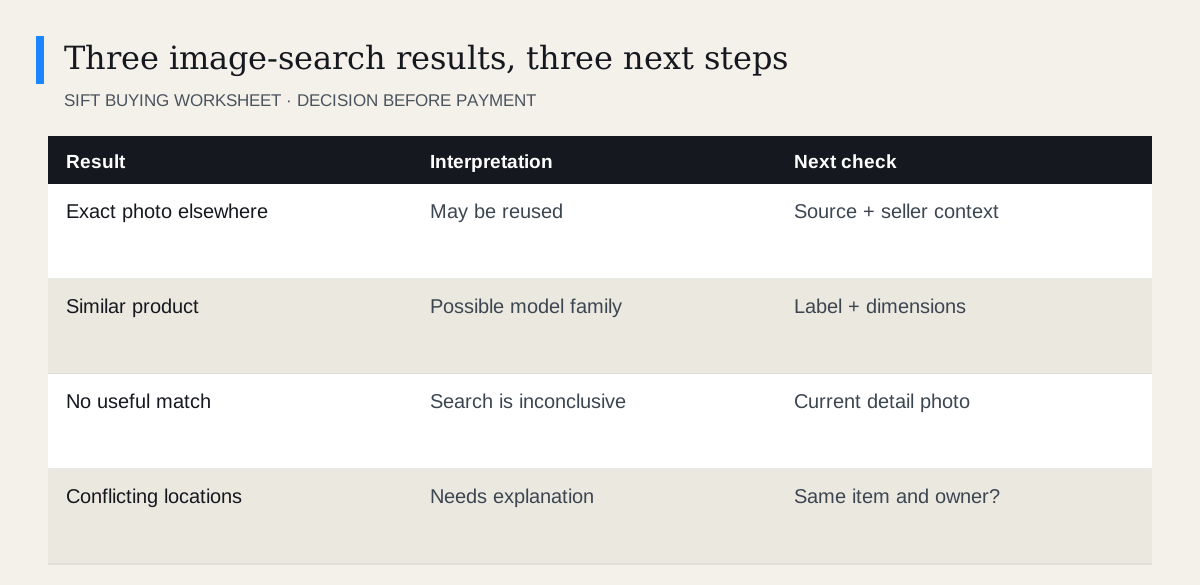 Enlarge diagram
What is reverse image search useful for?
It can help with two different tasks: checking where a photograph appears and finding products that look similar. Keep those tasks separate. An exact image elsewhere concerns the photograph’s origin. A visually similar chair concerns possible product identity.
Neither result verifies the condition of the item being sold. A genuine manufacturer photo can describe the correct model while concealing damage to the seller’s actual example. An original-looking photograph can still show a product that does not work.
How do you search the photograph?
Google’s image search instructions describe using Lens with an image, upload or image address, with options differing by device. Use the available image-search control in your browser or Google app.
- Choose the most informative image. Prefer a clear whole-item view over a tiny collage.
- Search it with Lens. If using a saved image, keep only the relevant product area.
- Inspect exact matches first. Open the source pages and compare the full image, background and distinguishing damage.
- Then inspect similar products. Add the apparent brand, object type or model family to refine the search.
- Write down the unresolved question. Use that question in your seller message rather than presenting an accusation.
Do not upload photographs containing unnecessary private documents, faces or addresses. Crop those out when the product itself is sufficient for the search.
How do you evaluate an exact match?
Look at what kind of page hosts it. A retailer or manufacturer image is often used to show a product clearly. A second classified ad may be the same seller cross-posting. An old review photograph or several unrelated sellers in distant places is a different situation.
Check whether the distinctive details match: a particular scratch, wall mark, reflection or unusual accessory. Similar furniture in two white rooms is not automatically the same photograph. A crop can hide the very detail you need to compare.
Do not assume the first search result is the earliest source. Search ranking and publication dates are imperfect evidence of who created an image.
What should you ask the seller next?
Ask for something practical and proportionate: “Could you send a current photo of the underside label and the small mark on the left edge?” This helps with both identification and condition.
A request for an unusual pose with personal identification is usually unnecessary. You want evidence of the item, not a stranger’s sensitive documents. The photo request guide shows how to ask for views that actually affect the buying decision.
| Finding | Useful message |
|---|---|
| Retail product image | Could you show the actual item and any wear? |
| Similar model | Could you photograph the model label? |
| Same ad on another site | Is that also your listing for this item? |
| Conflicting item condition | Which photo reflects its current condition? |
How can image search help identify a model?
Treat visual results as a candidate list. Compare dimensions, control layout, connection ports, leg shape and hardware. Then use the manufacturer’s documentation to confirm the label and version.
This matters when a family of products shares one appearance. A later generation may support different accessories or use a different charger. If your purchase depends on an exact match, do not let a visually confident search result replace the model identification workflow.
When should you stop investigating?
Stop when the seller provides enough consistent item evidence for a normal inspection, or when the uncertainty exceeds what you are comfortable paying for. You do not have to prove fraud to decline.
If the seller refuses basic current photographs while demanding advance payment, moving on is reasonable. Conversely, a reused product image with clear actual-item photos and an ordinary inspection arrangement may be entirely unremarkable. Judge the full transaction, not one search result in isolation.
Questions people ask
Does finding the same photo prove a scam?
No. Sellers can cross-post their own images or use manufacturer photos. Unrelated sellers using the same supposedly personal image deserve closer checking.
Does no image match prove the photo is original?
No. Search engines do not index every image, and cropping or editing can affect results.
Can Lens identify the exact model?
Sometimes it suggests useful candidates, but similar generations can look alike. Confirm with the product label or manufacturer documentation.
Sources
- 01Google Search with an image on Google
- 02Meta Tips for Shopping Safely