Facebook Marketplace messages not working: fixes
Quick answer
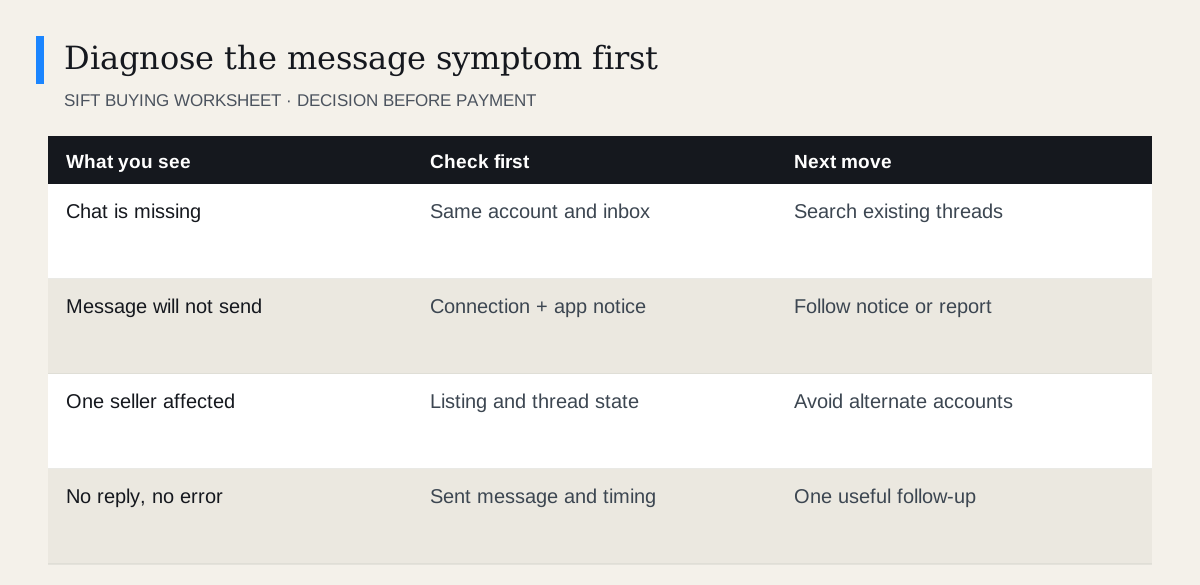
First identify whether the chat is missing, a message fails to send, or the seller simply has not replied. Check the same account in Facebook and Messenger, test your connection and update the app. Meta also documents messaging limits and Marketplace restrictions. Follow any account notice; a browser extension cannot remove a Meta messaging restriction.
 Enlarge diagram
Is the conversation missing or is sending failing?
Write down exactly what you see before changing anything. “Marketplace messages are broken” can describe four problems: you cannot find a conversation, the send action fails, one seller is unavailable, or a seller is not answering.
Open the listing and existing conversation if both remain available. Look for the chat in Messenger using the seller or item name. Confirm that Facebook and Messenger are signed into the intended account. A conversation in another account will not appear just because the same phone is being used.
Avoid deleting the conversation as a troubleshooting step. It may contain the only record of a price, pickup address or seller answer. If a pickup is imminent and you cannot reconfirm it, delay the trip rather than assuming an old arrangement still holds.
What should you try for a sending error?
Meta’s Messenger troubleshooting guidance recommends checking the app, connection and device, and recognises account-related causes. Work from reversible checks toward a support report.
- Read the error or notice. Record its wording and time. A restriction notice deserves a different response from a loading spinner.
- Check the connection. See whether other ordinary pages load. Try a reliable connection before attempting another send.
- Update and reopen the app. Use the official app store, then reopen Facebook or Messenger.
- Compare website and app. Use the same account. If one works, you have a practical way to continue.
- Report a reproducible problem. Include the surface, device, error and approximate time through the platform’s help route.
In a browser, a temporary clean session or disabling optional extensions for a test can help isolate a display problem. Sign in through Facebook’s genuine website. Restore your normal settings afterwards. This test does not remove an account restriction.
What if Meta says messaging is restricted?
Meta’s Marketplace messaging article identifies regional differences, excessive messaging and lost Marketplace access as possible causes. Follow the notice shown on your account and use an available review route when appropriate.
Do not send bursts of messages to test whether the limit is gone. Do not pay anyone claiming to restore access, or hand over passwords or login codes. A seller cannot repair your account by sending a payment or verification link.
There is no universal waiting period this guide can promise. Your account notice and Meta’s response are better evidence than a fixed number copied from another person’s experience.
What if only one seller is affected?
Try opening another existing conversation without sending an unnecessary test message. If other chats load normally, the problem may be specific to that person, thread or listing. Blocking, deactivation and item removal can produce different symptoms, and the interface may not tell you which applies.
Check the unavailable listing guide if the item disappeared too. Preserve the existing thread and avoid contacting the person through another account to bypass a possible block.
If you already paid and the seller disappears, treat that as a transaction problem as well as a technical one. Preserve records and use the relevant payment provider and reporting steps.
How should you follow up when there is no error?
One clear follow-up is more useful than repeated “hello” messages. State the item and the decision you need: “I am still interested in the desk. Could you confirm the depth and whether tomorrow’s pickup is possible?”
Choose your own sensible deadline based on the item and your schedule. That is a planning decision, not a rule about how quickly strangers must answer. If there is no reply, move on without sending money to secure an uncertain arrangement.
Keep your saved shortlist organised while the problem is unresolved. You can compare models, check measurements and prepare questions without creating more message traffic. If an alternative seller replies, finish one clear arrangement before committing to a second pickup.
Questions people ask
Does no reply mean my message failed?
No. Look for an actual sending error or missing conversation. A seller may not have read or answered a successfully sent message.
Can Sift fix messaging restrictions?
No. Sift helps organise desktop browsing. Meta controls account access, message delivery and restrictions.
Should I repeatedly resend the same message?
No. Check whether the first message sent and follow any platform notice. Repeated attempts add confusion and are not a reliable fix.