Why a Facebook Marketplace listing is unavailable
Quick answer
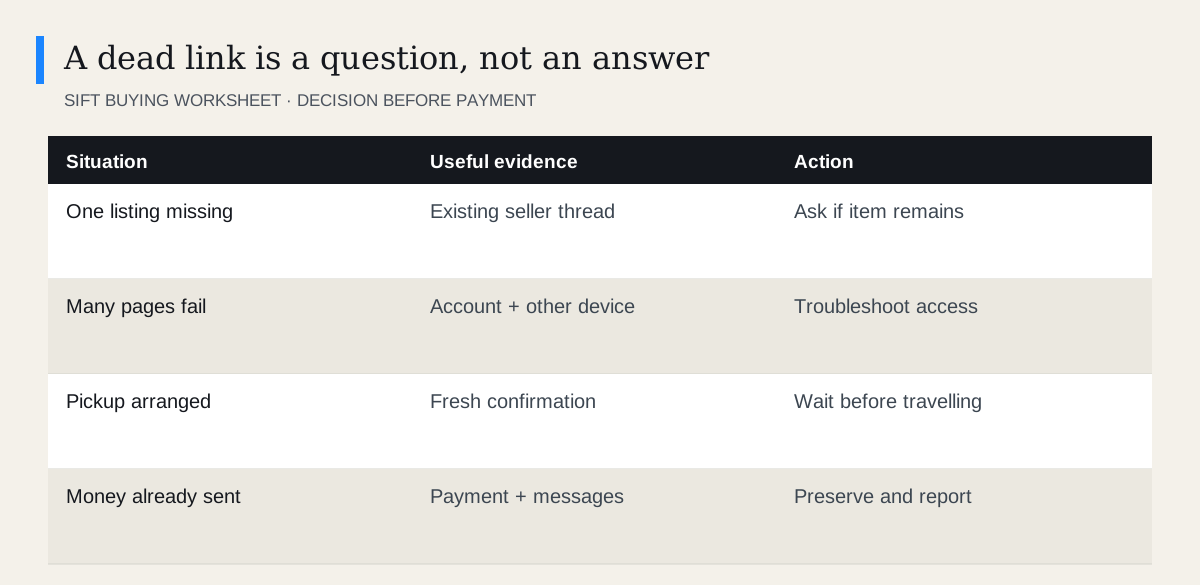
An unavailable Marketplace listing does not tell you exactly what happened. The item may have been sold, deleted, removed or become inaccessible to your account. Check the existing conversation, your account and another supported Facebook surface. Ask the seller to confirm the item before travelling; a saved link cannot restore a listing that is gone.
 Enlarge diagram
What does the message actually establish?
Only that the listing cannot be shown to you at that moment. It does not reliably distinguish a sale from a deletion, moderation action or account-access problem. Avoid treating a generic error as a diagnosis.
Start with the scope. If one item fails while other Marketplace listings open, focus on that item and its seller conversation. If Marketplace itself will not load, use the access troubleshooting guide. Rebuilding a shortlist will not fix a broader login problem.
What should you check first?
- Open the original conversation. Check whether the seller has sent an update or marked the arrangement differently.
- Confirm your account. A link opened in a browser may use a different signed-in account from the app.
- Try the original link again. Copying a shortened preview or partial address can lead somewhere different.
- Compare app and website. This helps separate a surface problem from a listing problem.
- Ask one direct question. “The listing link no longer opens. Is the same table still available for our agreed pickup?”
Do not create another account to bypass a possible block. Do not search for the seller’s personal contact details to continue a conversation they may have ended.
Should you search for a replacement listing?
Yes, if the item still matters to you. Search the model, distinctive title wording or relevant dimensions. Use a sensible location range. A seller can change the title, photographs or asking price when creating another listing.
A matching photograph is a lead, not proof. Confirm that the new listing is the same physical item and that the person in the existing conversation controls it. Use reverse image searching if identical photos appear across unrelated sellers or distant locations.
If the seller says they relisted, ask them to send the new listing within the existing thread. Reconfirm any earlier agreement in that thread. Do not assume a previous offer survives a new ad unchanged.
What if you were about to collect it?
Stop before travelling and get a fresh confirmation. The inconvenience of a delayed departure is usually smaller than the cost of a wasted trip, especially when a rental vehicle or helper is involved.
| Detail | What you need |
|---|---|
| Item | Same model, size and included parts |
| Availability | Seller confirms it is still for you to inspect |
| Price | Clear agreed amount, subject to stated checks |
| Time | Current collection window |
| Access | Meeting place and any loading conditions |
A message sent yesterday is not confirmation today if the listing has since disappeared. If the seller cannot be reached, release any optional transport booking before its cancellation deadline.
For example, suppose a seller confirms a lamp for Saturday and the listing disappears on Friday. Send one message in the existing conversation: “I can no longer open the listing. Are we still meeting for the same lamp at the agreed price?” Wait for confirmation before setting out. If a different person replies with a new payment link, resolve that change through the established conversation. The missing ad alone tells you neither that the arrangement is cancelled nor that payment is now necessary.
What if you have already paid?
Save the conversation, listing reference if you have it, payment details and the time of the disappearance. Ask the seller for an explanation through the existing channel. If the item is not delivered or the explanation is inconsistent, follow your payment provider’s dispute or fraud route promptly.
The correct options depend on how you paid and the transaction type. Use the buyer protection guide and scam reporting guide. An unavailable listing alone does not establish fraud, but uncertainty should not delay preserving evidence.
For future purchases, save the terms that matter in the conversation before payment. A screenshot can document what you saw, but it cannot keep the item available or guarantee a refund. Keep your shortlist current so the loss of one promising ad does not force you into a rushed alternative.
Questions people ask
Does unavailable mean sold?
It can, but the message alone does not prove the item sold. The seller may have deleted it or access may have changed.
Can I restore someone else’s deleted listing?
No. You can ask about the item through an existing conversation or search for a new listing, but you cannot restore the seller’s deleted ad.
Is a similar new listing automatically the same deal?
No. Confirm the seller, item, included accessories and agreed price again.