Replace an essential item secondhand without losing the fallback
Quick answer
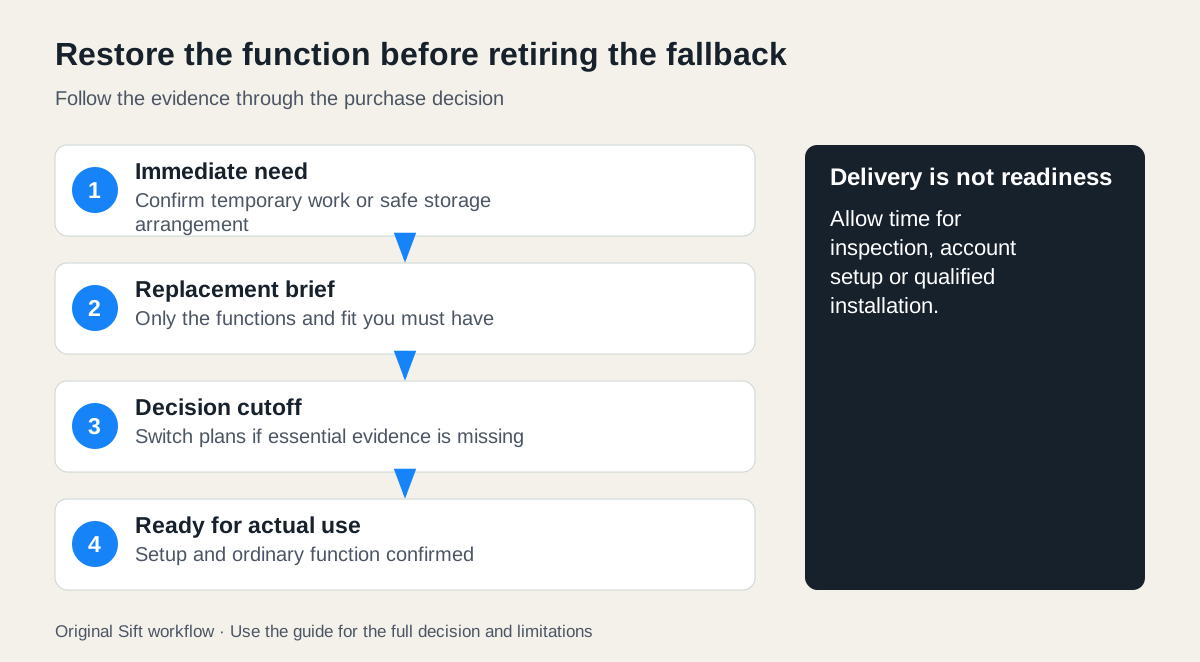
Arrange a temporary way to meet the essential need, then define the latest date a replacement must be usable. Check condition, compatibility, transport, setup and any qualified installation against that deadline. Keep a fallback until the replacement is ready; urgency is a reason to simplify the plan, not skip essential checks.
 Enlarge diagram
Solve the next day before the next several years
When a work computer fails or a refrigerator stops cooling, the urgent need can overwhelm the purchase decision. Separate them. The immediate job is to preserve access to work or safe food storage. The lasting job is to obtain a suitable replacement at a complete cost you can afford.
A temporary loan, another existing device, an appropriate service arrangement or a short-term alternative may give you time to inspect. The rent, borrow or buy guide helps compare obligations. Do not assume a temporary option exists until its availability is confirmed.
Computer example: ready for Monday means more than delivered
In a fictional case, a buyer needs a work computer by Monday morning. Their essential brief is a supported operating system, the required application, a working camera and network connection, and access to their own files. A colleague can lend a suitable computer through Wednesday with agreed permissions.
| Time | Required result | If incomplete |
|---|---|---|
| Friday | Confirm loan and access to necessary work through authorised accounts | Arrange another approved fallback |
| Saturday | Inspect shortlisted replacement and confirm supported compatibility | Keep searching; do not buy a locked or unsuitable device |
| Sunday | Complete clean buyer setup, updates and required application check | Use the loan on Monday |
| Before Wednesday return | Verify files and normal workload on replacement | Extend only by agreement or choose another fallback |
A seller’s demonstration under their account is not the buyer’s completed setup. Use the account-lock guide and support-life guide. Do not bypass employer controls or transfer work data to an unapproved device. Follow your organisation’s requirements where applicable.
Keep the old device and its data intact until you have confirmed an appropriate backup and migration path, unless its physical condition requires a different safe handling decision. Do not erase the only copy of a file simply because a new machine boots.
Refrigerator example: protect food separately from the purchase
Food safety cannot wait for a seller’s response. Use current food-safety guidance for the actual temperature and time history. USDA FSIS recommends monitoring refrigerator temperature and maintaining 40°F (4.4°C) or below. Its emergency guidance explains when food must be discarded; appearance or taste is not a reliable safety test.
Arrange a suitable temporary storage or meal plan without assuming that putting food into a newly delivered refrigerator immediately establishes safe temperature. The replacement needs its model-specific transport, installation and startup instructions followed, and its actual operation checked.
The buyer’s brief should include exact available space, door access, required capacity, supply/connection needs and qualified work where applicable. Use installation planning before arranging removal of the old unit. A seller able to deliver tonight may still be unable to provide a suitable working replacement tonight.
Compare completed timelines and costs
In a hypothetical appliance comparison, a private used unit costs $250, delivery $80, confirmed installation/setup $90 and old-item removal $40: $460. It cannot be ready until Tuesday. A business option is $520 with the same documented scope and a confirmed Monday completion.
The difference is $60 plus one day of readiness, subject to the actual condition and terms. If the temporary arrangement costs another $70 for that day, the apparent saving disappears. If a safe temporary arrangement is already available at no extra cost, the private option may remain reasonable. These are planning figures, not actual quotes.
Include failure exposure: what happens if the candidate fails inspection, the delivery is cancelled or the installer finds an incompatibility? A plan with no affordable fallback can be more fragile than its headline total suggests.
Set a cutoff before urgency makes the choice
Choose the latest time you will rely on the used candidate. If a required condition is unresolved at that point, activate the fallback or another verified option. Do not make the cutoff “when I get tired of searching.”
Ask focused seller questions early: exact model, relevant demonstration, included parts, known faults, access and realistic collection. Keep the requirements small enough to assess. Optional upgrades can wait until the essential function is restored.
Retire the old item only after the new plan works
Confirm ordinary operation under your actual use, save the purchase and service records, and follow appropriate disposal or recycling requirements for the old item. If the old appliance is unsafe or the device has a damaged battery, obtain the relevant handling advice rather than keeping it in use as a fallback.
Use the first-day checklist to finish the handover and preparation. The replacement is complete when the essential function is reliably available under the verified setup, not when the seller marks the listing sold.
Sources
- 01USDA FSIS Refrigeration and food safety
- 02USDA FSIS Food safety during emergencies