Set up a complete secondhand home office
Quick answer
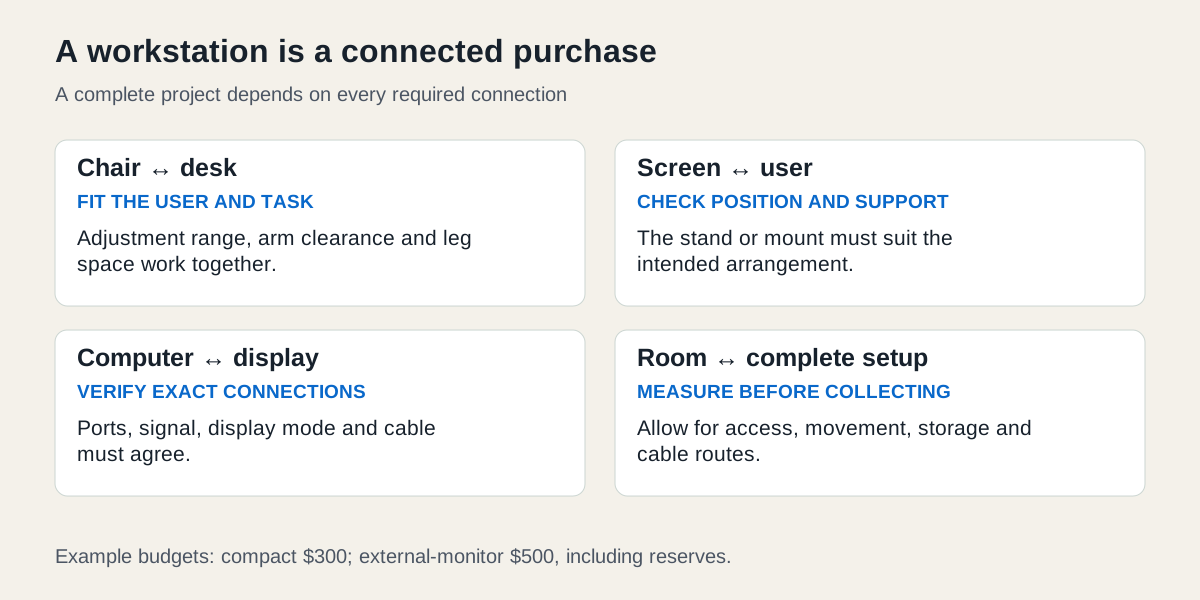
Start with the user, work, room and computer connections. Compare complete setups, including stands, cables and collection, and try the chair and desk arrangement before treating the office as finished.
 Enlarge diagram
What does the workstation need to do?
Choose the work before the furniture. Write down the computer you will use, typical tasks, available floor space, storage needs and who shares the desk. Measure the room and the route into it. Then try to assemble a compatible chair, work surface, screen and input-device arrangement within the complete budget.
CCOHS’s furniture guidance treats ergonomics as matching equipment and environment to the person and tasks. A premium chair or an adjustable desk does not establish that the resulting workstation fits you. Allow time to try and adjust the arrangement; seek appropriate ergonomic advice where you have unresolved needs.
Two complete setup briefs
These are fictional planning examples. Dimensions describe the buyers’ available space, not recommended body measurements.
| Requirement | Compact laptop workspace | Longer-session external-monitor workspace |
|---|---|---|
| Work | Email, documents and occasional calls | Documents, spreadsheets and frequent calls |
| Space | A 40 × 24-inch desk footprint fits the measured room | A 48 × 28-inch footprint fits the room and access route |
| Existing equipment | Laptop, charger and mouse | Laptop, charger, keyboard and mouse |
| Required purchases | Suitable chair, desk, laptop support and external keyboard | Suitable chair, desk, adjustable monitor and correct cable |
| Accepted compromise | One display; no dedicated printer storage | One external monitor; no dock unless a required connection needs it |
| Rejection reason | Chair or desk cannot be adjusted into a workable arrangement | Display connection or stand cannot meet the intended setup |
For the compact example, raising the laptop screen changes where its keyboard sits. The separate keyboard and mouse are part of the plan, not decorative extras. For the external-monitor example, a dock is optional until the computer’s actual ports, display requirements and power arrangements show a need for one. A USB-C connector alone does not prove video output, charging capability or a dock’s compatibility.
Check the whole fit and connection matrix
| Part | Check alongside it | Evidence before payment |
|---|---|---|
| Chair | Your body, desk height and usable leg space | Try the working adjustments; assess support and movement in the intended task |
| Desk | Chair arms, legs, screen depth and room access | Actual clearance under the top, including drawers and crossbars |
| Monitor | Your computer and stand | Exact input/output compatibility, supported display mode and working stand adjustments |
| Monitor arm, if planned | Display and desk | Manufacturer mounting pattern, weight limits and permitted mounting surface |
| Dock, if needed | Exact laptop, operating system and charger | Manufacturer compatibility and required power supply, not just matching plug shape |
| Cables | Both ends and the intended function | Correct signal and charging capability, length and condition |
CCOHS’s chair guidance explains why the chair must suit both the person and workstation. A photograph cannot establish that fit. For the physical item checks, use the office-chair guide, standing-desk guide and monitor guide.
What is the complete office budget?
The amounts below are illustrative, with existing computer equipment counted as already owned. They include no assumed resale proceeds.
| Cost | Compact plan | External-monitor plan |
|---|---|---|
| Used chair | 100 | 140 |
| Used desk | 60 | 90 |
| Used monitor | 0 | 100 |
| Laptop support and keyboard | 45 | 0 |
| Required cable | 0 | 20 |
| Collection | 25 | 40 |
| Cleaning or identified minor replacement items | 20 | 20 |
| Unspent reserve | 50 | 90 |
| Total allocation | 300 | 500 |
A $65 monitor without its usable stand may cost more than the $100 complete candidate. If a correct stand costs $35 and a separate collection costs $15, the monitor basket reaches $115 before any cable. A cheap mounting arm is not an automatic substitute: the desk and display must both support it.
In the compact plan, a $40 desk that needs $50 delivery costs more to obtain than the $60 desk with $25 collection. Compare acquisition costs in listing comparison, then keep the reserve separate. Reserve money is not evidence that an unidentified fault is repairable.
How do you choose the order of purchases?
First establish the room envelope, computer connections and necessary adjustments. Next trial the chair and desk combination, or obtain enough measurements to avoid committing to an obvious mismatch. Buy the monitor with its stand and required cable identified. Add a dock only after checking the exact compatibility and seeing a task it solves.
Ask sellers for useful evidence: “What is the clear space beneath the desk, excluding the drawer? Which chair adjustments work? Does the monitor include its original stand and power supply? Can I test the input I intend to use?” If the seller substitutes another model, repeat the relevant checks.
Do not buy several bulky pieces before confirming access. Use the furniture fit checker to organise simple measurements, while separately assessing turns, stairs and handling. It does not certify that furniture can be moved through a building.
Recheck the workstation after assembly
Set up the equipment using its manuals, adjust the arrangement for the actual user and try the normal tasks. Keep commonly used controls and accessories reachable, manage cables and preserve required ventilation. If an item forces an unsuitable compromise, reconsider that item instead of adding accessories indefinitely.
A shared workspace needs workable settings for each user. Record useful adjustments so the setup can be restored after someone else uses it. Keep model numbers and maintenance instructions: worn casters, a slipping chair adjustment or an unstable monitor stand can change the suitability of a setup that originally worked.